240 Audio and Visual
Audio Operations
Using the USB Music File Player
Using the USB Music File Player
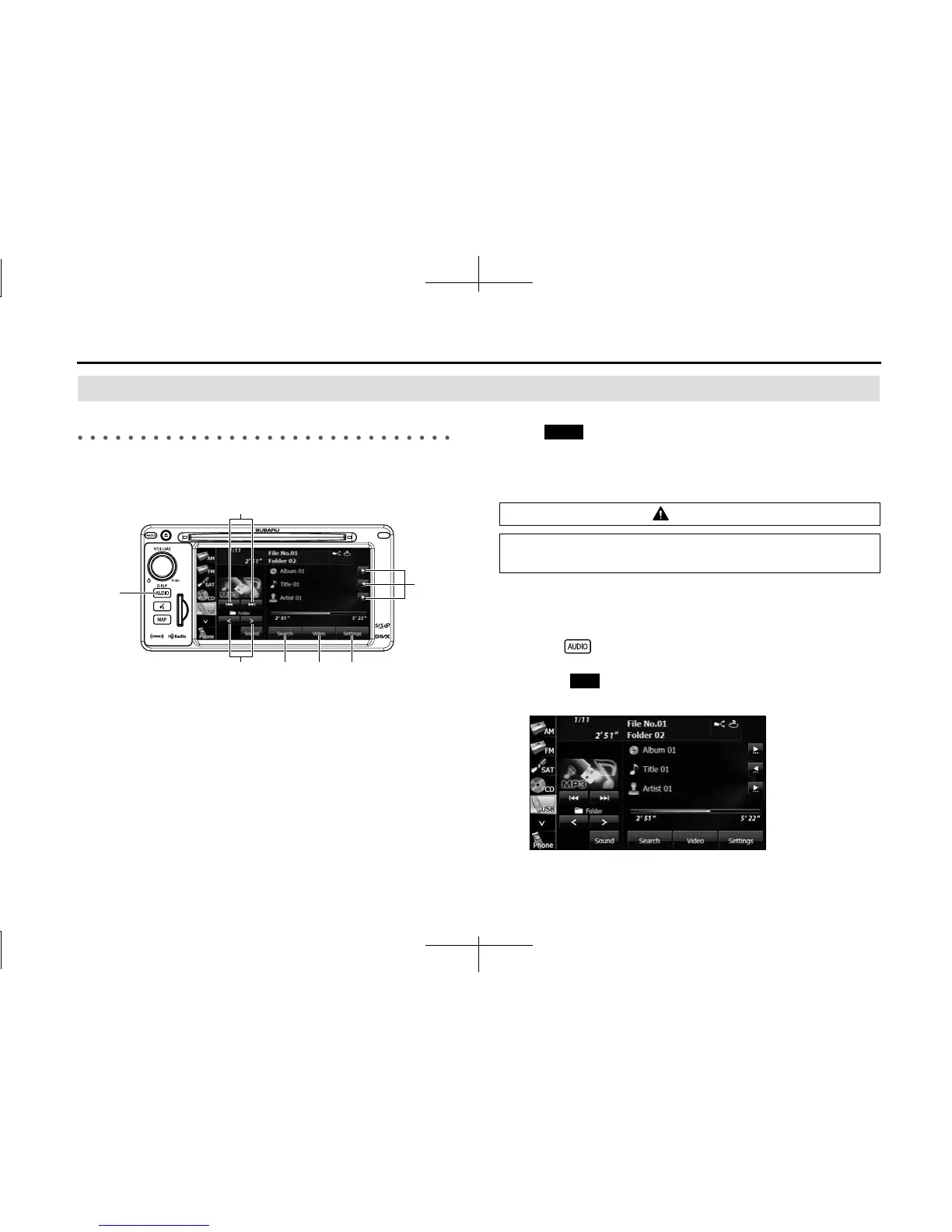
This unit can play music files stored in a USB memory. Only MP3/WMA
playback is supported.
(1) Title information scroll buttons
*
(2) Settings button
(3) Video button
(4) Search button
(5) Folder selection buttons
(6) AUDIO button
(7) File up/down and fast forward (fast reverse) buttons
* It will be displayed if the length of the information is too long and it
cannot be displayed.
NOTE
• Touch (Video) to operate the USB video file player. (See Page 247.)
• Some of the functions may not be available when vehicle is in motion.
■ Listening to a USB music file
1 Connect a USB memory that contains music files to the
USB connector.
2 Press .
3 Touch (USB).
• The playback starts.
(1)
(3) (2)(4)(5)
(6)
(7)
CAUTION
Connect the USB cable correctly so that it does not interfere
with safe operation of the vehicle.
Video
USB














 To Next Page