8
step 3 Click SSaavvee.
-- -- EEnndd
5.2.2 Edit Device
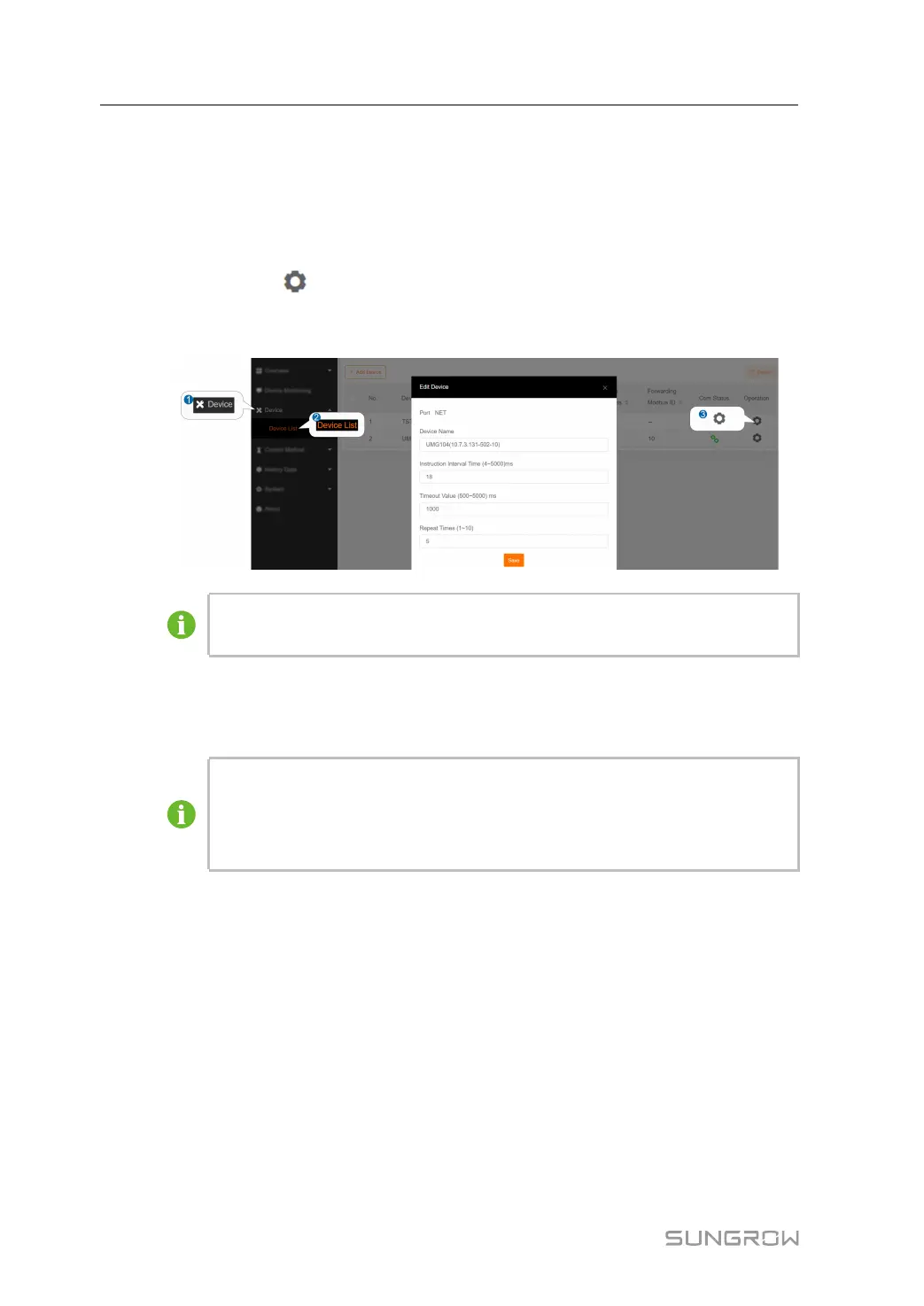
step 1 Click DDeevviiccee→→DDeevviiccee lliisstt to enter the corresponding interface.
step 2 Click the button
in the operation bar, to modify the name, instruction internal time,
timeout value, repeat times of the devices connected to the system and other
parameters.
The figure is for reference only. The actual interface may be different and shall
prevail.
step 3 Click SSaavvee.
-- -- EEnndd
The DDeevviiccee NNaammee is named in the form device model (IP address-port
number-device address). Take EM610(10.7.3.136-502-1) as an example.
EM610 is device type, 10.7.3.136 is the IP address, 502 is the port number, 1
is the device address.
5.2.3 Delete Device
After a device is deleted on site, the user can delete the device from the device list, to
keep device consistency.
step 1 Click DDeevviiccee→→DDeevviiccee lliisstt to enter the corresponding interface.
step 2 Select the device to be deleted, click the button DDeelleettee.
5 Device Monitoring and Maintenance User Manual



 To Next Page