46
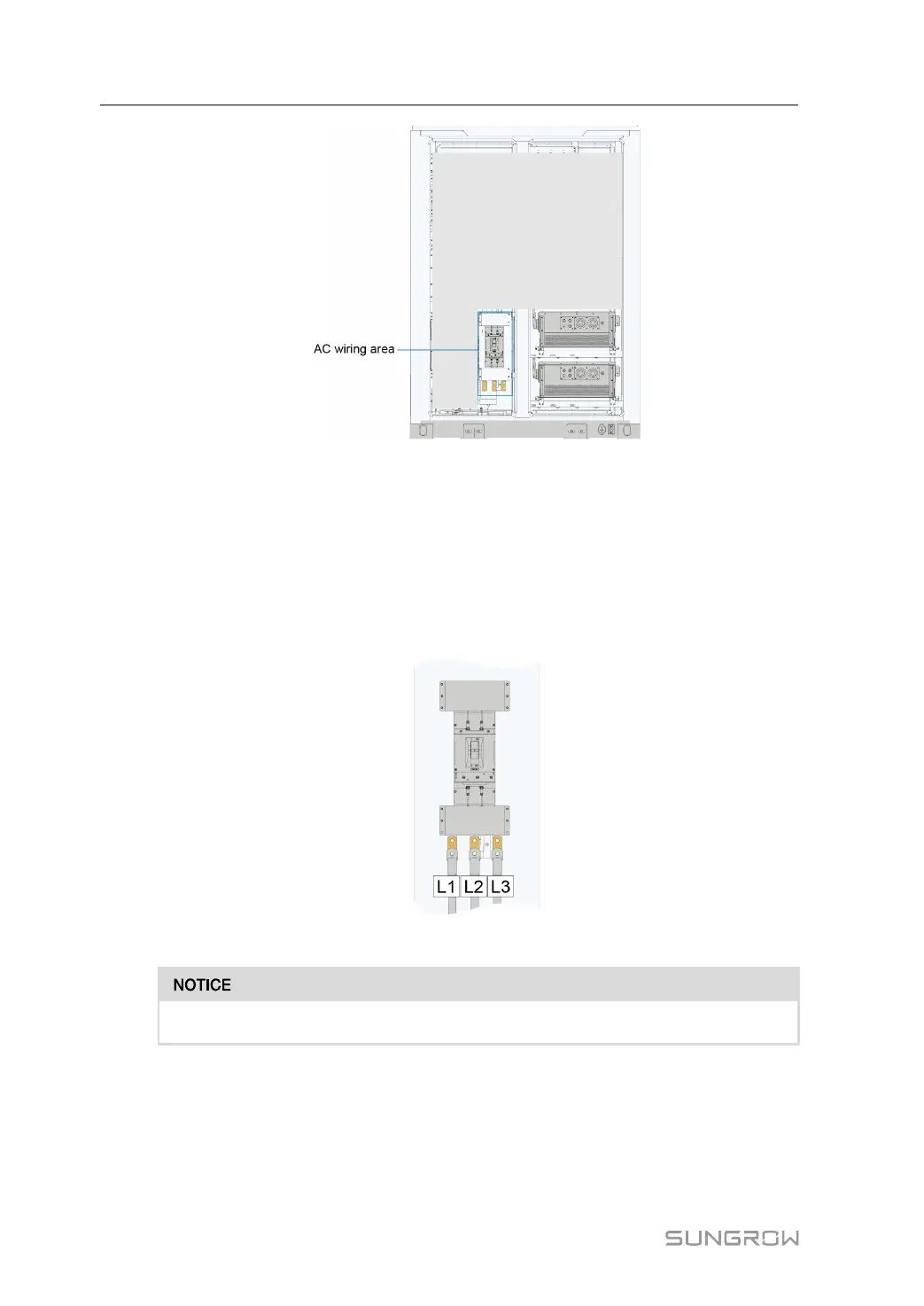
*The figure is for reference only and the actual product shall prevail.
step 4 Strip the protective layer of the cable to expose the copper core of the wire with strippers.
step 5 Crimp with OT terminal, refer to"5.3.3 Preparing Cables"。
step 6 Secure the OT terminal to the wiring hole by M12 bolt with a tightening torque of 60~70N·m.
Refer to the "5.3.4 Copper Wire Connection" and "5.3.5 Aluminum Wire Connection"
connection sequence for installation.
step 7 Pull the cable back slightly after wiring to ensure that the cable is long enough.
*The figure is for reference only and the actual product shall prevail.
• Strictly follow the phase sequence to connect cables.
- - End
5.7 PCS Auxiliary Power Supply Connection
Power supply mode setting
5 Electrical Connection System Manual







 To Next Page