60
8
Accessing LC200 WEB via WiFi(Optional)
The PCS is equipped with a wireless router inside, and the LC200 interface can be
accessed through mobile phone or pad via WiFi connection.
Connection Steps
step 1 Connect WiFi antennas (*2) to the corresponding antenna interfaces of the router in turn.
step 2 Wait about 2 minutes. If the RUN indicator blinks, and the WiFi indicator is steady on, the
router has been initialized.
step 3 Search for wireless WiFi hotspot on the mobile phone or the pad. Select the corresponding
hotspot, enter the password, and tap Connect.
• Default hotspot: MIR605-W-XXXX. The last 4 bits are the same as those of
MAC on the router label.
• Default password: www.maiwe.com.
step 4 Open a browser on the mobile phone, and enter the LAN port IP of the router
(192.168.16.253 or http://welinos.cn) in the address bar. Enter the user name (admin) and
password (admin) on the interface, and tap Login to log in to the WEB management
interface of the router.
The above web address is the factory default address. If it is changed, log in to
the router WEB interface with the new address.
step 5 Modify the hotspot name.
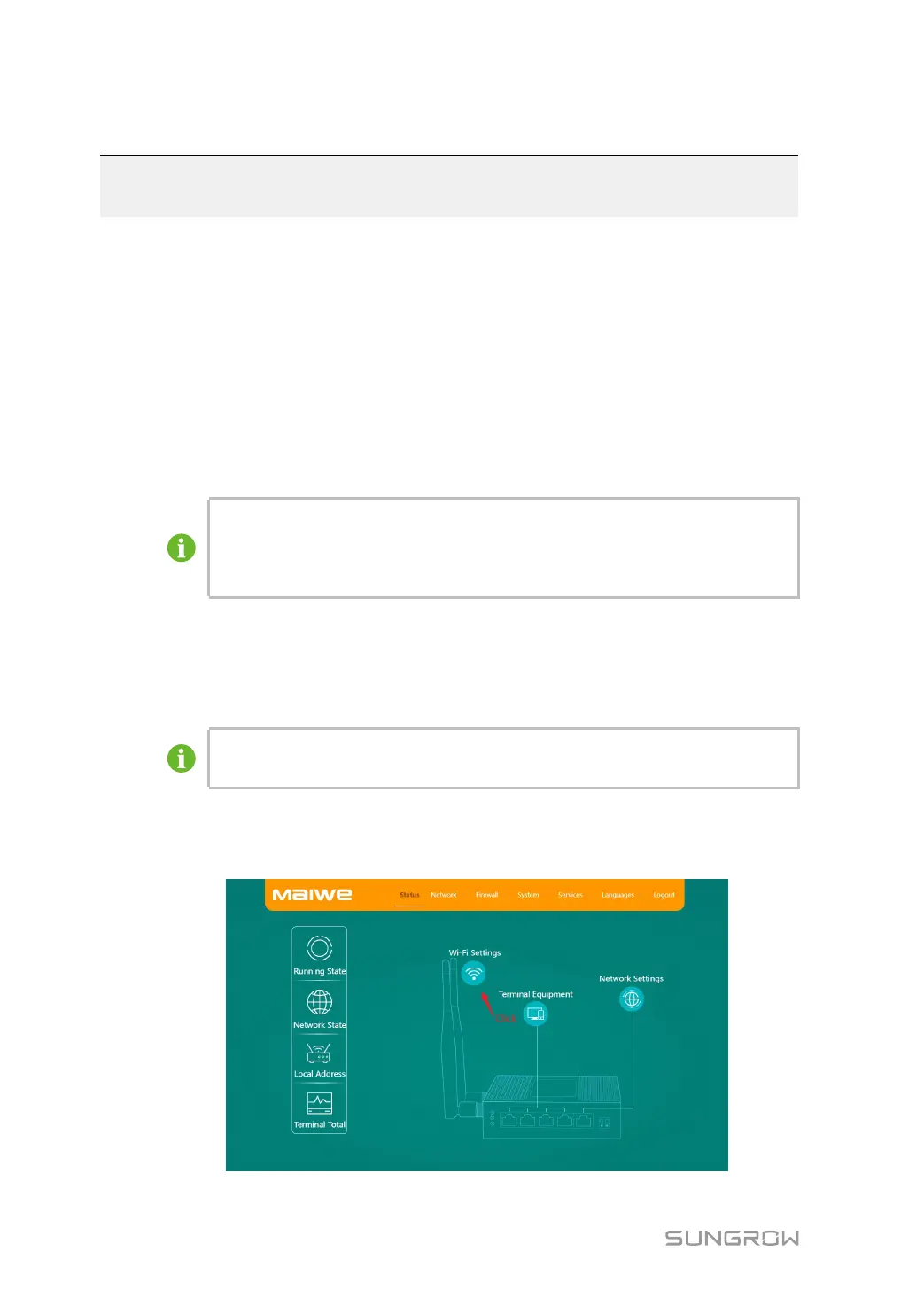
1 Tap Status→Wi-Fi Settings.







 To Next Page