2-10
X10DRT-B+ Motherboard User’s Manual
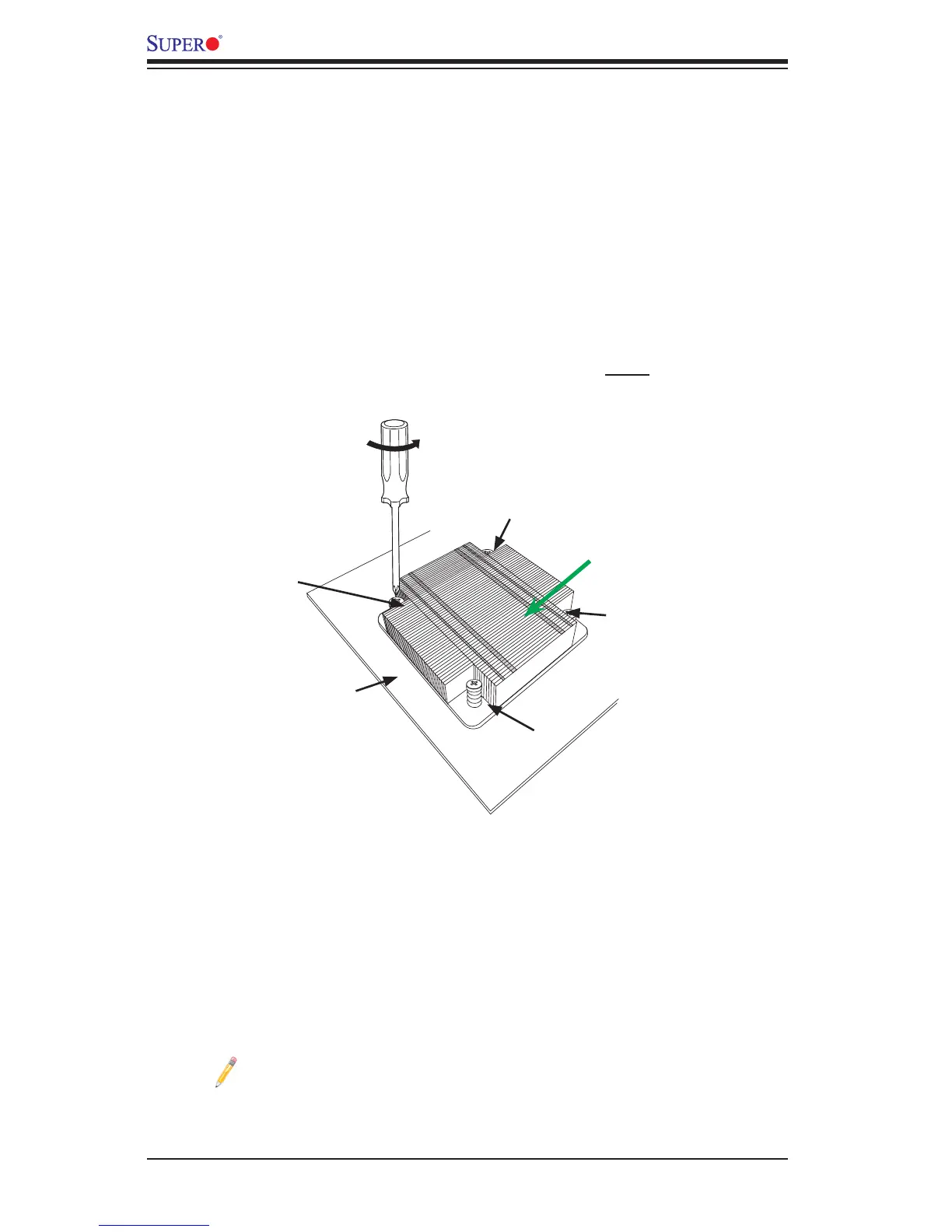
Removing the Passive Heatsink
Warning: We do not recommend that the CPU or the heatsink be removed. However,
if you do need to remove the heatsink, please follow the instructions below to uninstall
the heatsink to avoid damaging the CPU or other components.
1. Unplug the power cord from the power supply.
2. Use a screw driver to loosen the screw from the motherboard by turning it
counter-clock-wise. Repeat the same step to remove all screws from the
motherboard in the sequence as shown below.
3. Hold the heatsink as shown in the picture below, and gently wriggle the heat-
sink to loosen it. (Do not use excessive force when wriggling the heatsink.)
4. Once the heatsink is loosened, remove it from the motherboard.
Note: For optimized airow, please follow your chassis airow direction
to properly install the CPU heatsink. Graphic drawings included in this
manual are for reference only. They might look different from the compo-
nents installed in your system.
Loosen screws
in sequence as
shown.
Screw#2
Motherboard
Screw#1
Screw#3
Screw#4
Airow Direction




 To Next Page