4-38
X10DRT-B+ Motherboard User’s Manual
4-7 Boot Settings
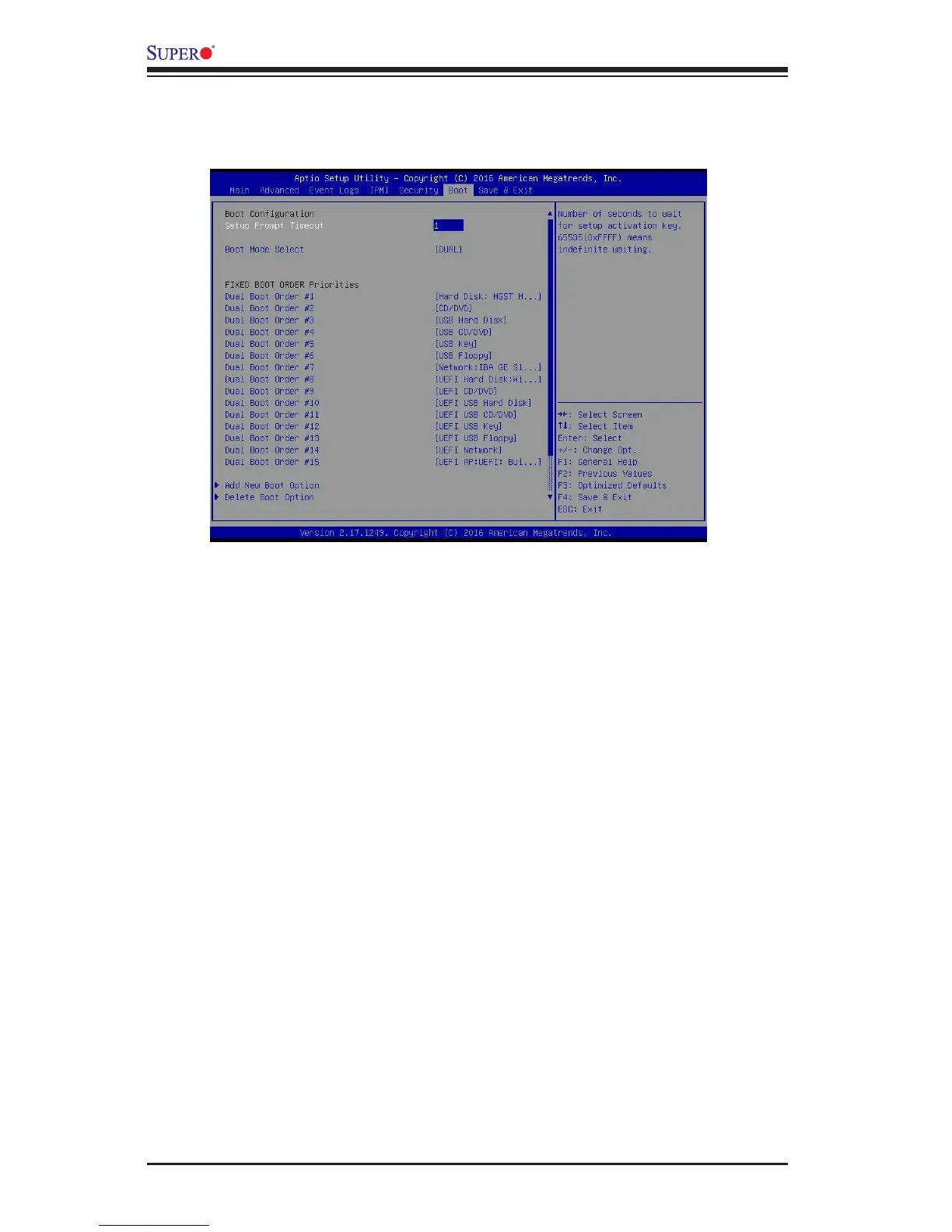
Use this feature to congure Boot Settings:
Boot Conguration
Setup Prompt Timeout
This feature allows the user to determine how long the system should wait for the
setup activation key before it boots up. The default setting is 1 (second).
Boot Mode Select
Use this item to select the type of device to be used for system boot. The options
are Legacy, UEFI, and Dual.
Fixed Boot Order Priorities
This option prioritizes the order of bootable devices from which the system will boot.
Press <Enter> on each entry from top to bottom to select devices.
When the item above -"Boot Mode Select" is set to Dual (default), the following
items will be displayed for conguration:
• Dual Boot Option #1 - Dual Boot Option #15
When the item above -"Boot Mode Select" is set to Legacy, the following items will
be display for conguration:
• Legacy Boot Option #1 - Legacy Boot Option #7
When the item above -"Boot Mode Select" is set to UEFI, the following items will
be display for conguration:




 To Next Page