I-SATA0~5
UID SW
S-SATA0~2
CPU1 PCI-E 3.0 X4
CPU1 SLOT1 PCI-E 3.0 X16
IPMI_LAN
BMC
P1-DIMMA1
P1-DIMMB2
P1-DIMMB1
P1-DIMMA2
VGA
BIOS
FLASH
P2-DIMMH1
P2-DIMMG2
USB0/1
(3.0)
P2-DIMMH2
P2-DIMMF1
P2-DIMMF2
P2-DIMME2
P2-DIMME1
SIOM: CPU1 PCI-E 3.0 X16
P1-DIMMD1
P1-DIMMD2
P1-DIMMC1
P1-DIMMC2
CPU2 SLOT2
PCI-E 3.0 X16
C612
P2-DIMMG1
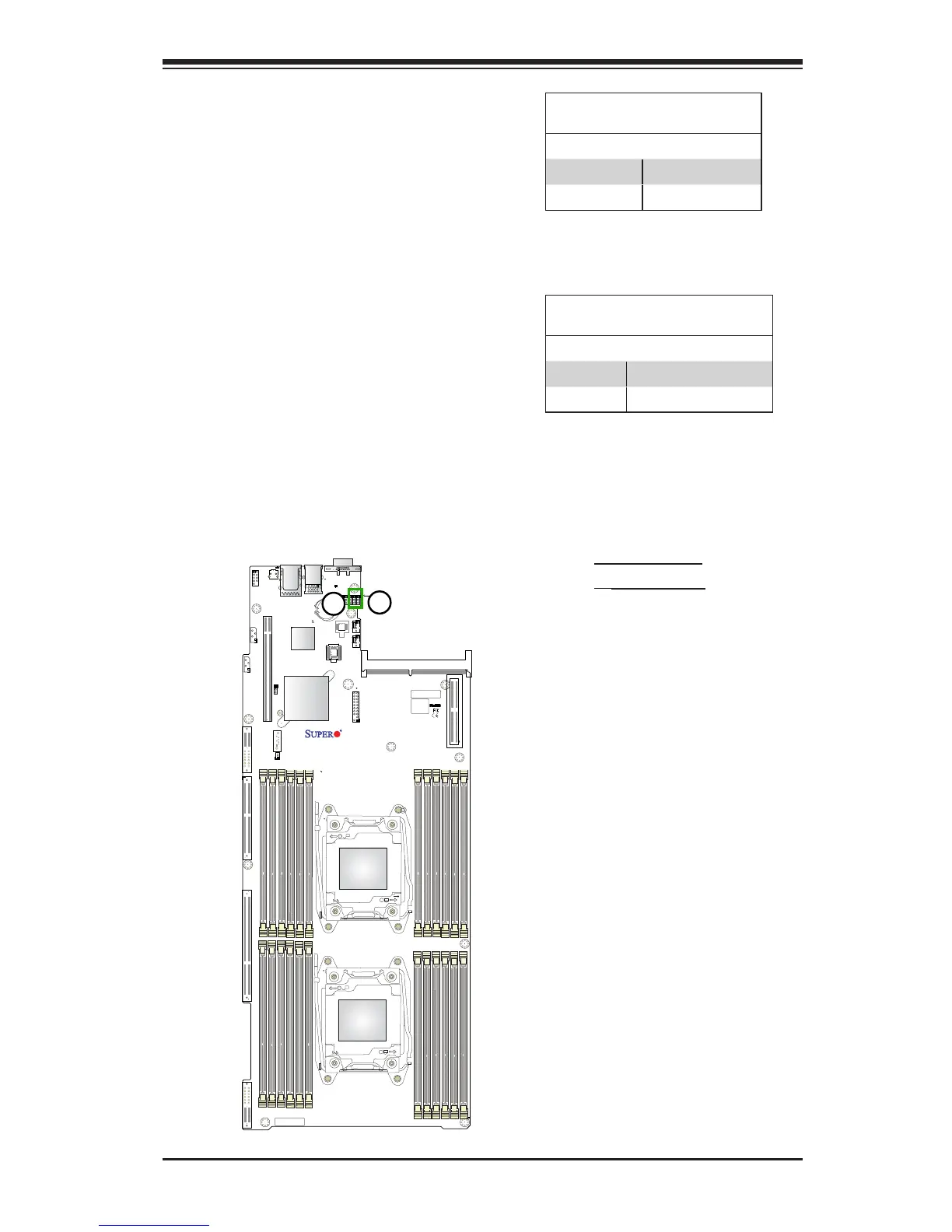
1. VGA Enable
2. BMC Enable
VGA Enable
Jumper JPG1 allows the user to enable
or disable the onboard VGA connector.
The default setting is 1-2 to enable the
connection. See the table on the right for
jumper settings.
VGA Enable
Jumper Settings
Jumper Setting Denition
1-2 Enabled (Default)
2-3 Disabled
BMC Enable
Jumper JPB1 allows you to enable the
onboard BMC (Baseboard Management)
Controller) to provide IPMI 2.0/KVM
support on the motherboard. Be sure to
remove the power cord before closing
pins 2-3 to disable the BMC. See the
table on the right for jumper settings.
BMC Enable
Jumper Settings
Jumper Setting Denition
Pins 1-2 BMC Enable (Default)
Pins 2-3 BMC Disable




 To Next Page