2-30
X10DRT-B+ Motherboard User’s Manual
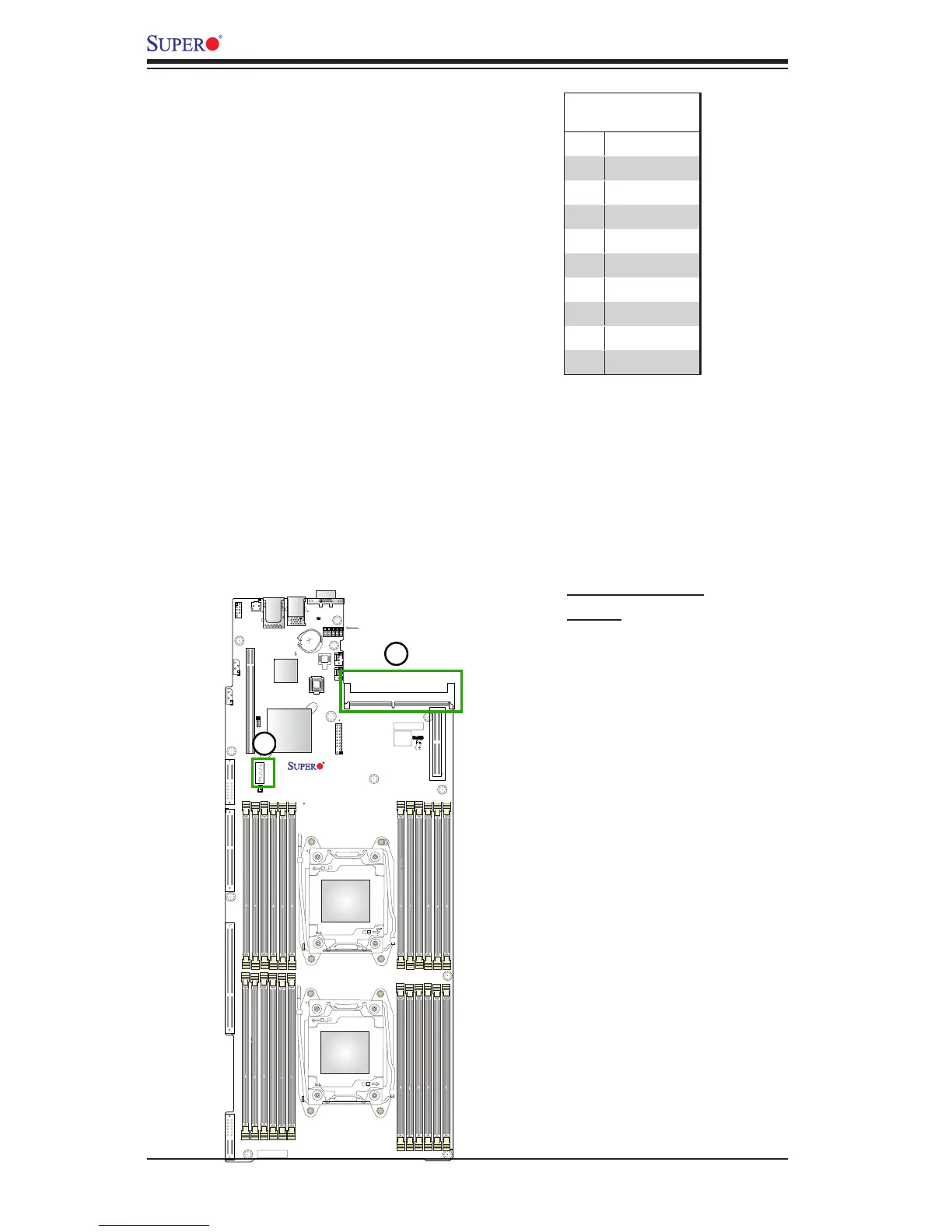
Powered SATA DOM (SuperDOM)
A SATA DOM (Device-on-Disk) is lo-
cated at S-SATA3 on the motherboard.
S-SATA3 is used with a Supermicro
SuperDOM, which is a yellow SATA
DOM connector with a power pin built in,
and no external power supply is needed.
Supermicro SuperDOM is backward-
compatible with a regular SATA HDD
or SATA DOM that requires an external
power supply. All SATA ports provide
serial-link signal connections, which are
faster than the connections of Parallel
ATA.
SATA DOM Power
Pin Denitions
Pin# Signal
1 Ground
2 SATA_TXP
3 SATA_TXN
4 Ground
5 SATA_RXN
6 SATA_RXP
7 Ground
8 +5V
9 Ground
1. SATA DOM Power
2. SIOM
4
3
2
1
IPMI CODE
BIOS
LICENSE
BAR CODE
X10DRT-B+
Rev. 1.01
OPEN 1st
1
1
CPU1
1
1
CPU2
J*
S-SATA3
JBAT1
LE6
JPME2
JVRM1
JVRM2
JPG1
JPB1
JWD1
UID_LED1
BMC_HB_LED1
JTPM1
JSD1
FAN4
FAN3
JBT1
SXB2
SXB1
JF2
JF1
Battery
TPM/Port80
CPU1 PCI-E 3.0 X4
P2-DIMMH3
P2-DIMMG3
P2-DIMMF3
P2-DIMME3
P1-DIMMD3
P1-DIMMC3
P1-DIMMB3
P1-DIMMA3
CPU2 PCI-E 3.0 X24
I-SATA0~5
UID SW
S-SATA0~2
CPU1 PCI-E 3.0 X4
CPU1 SLOT1 PCI-E 3.0 X16
IPMI_LAN
BMC
P1-DIMMA1
P1-DIMMB2
P1-DIMMB1
P1-DIMMA2
SIOM Networking Slot
There is one SIOM networking slot
(PCI-E 3.0 x16) on the motherboard.
See the layout below for the location.




 To Next Page