PCI-E 3.0 X16
C612
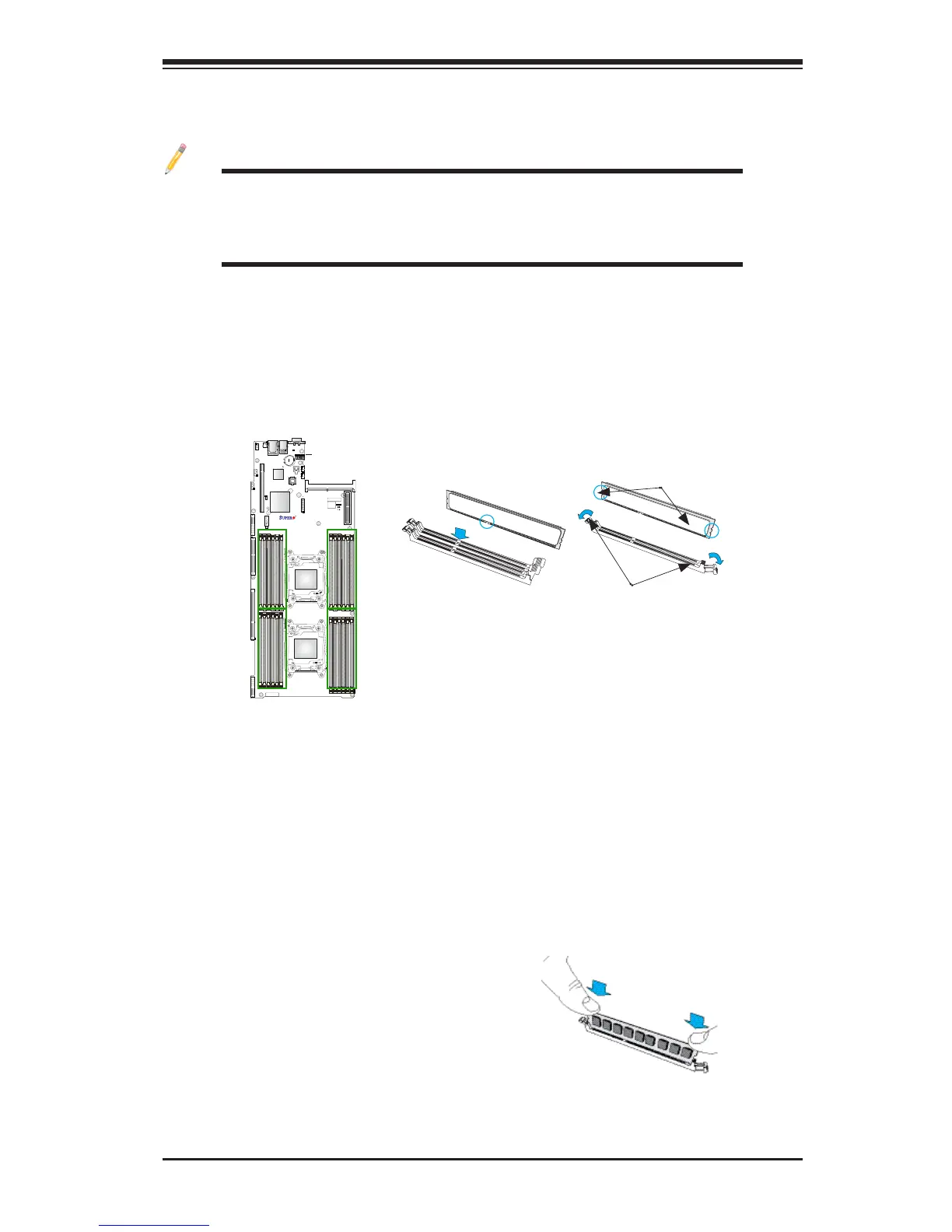
P2-DIMMG1
Release Tabs
Notches
2-4 Installing and Removing the Memory Modules
Note: Check Supermicro's website for recommended memory modules.
CAUTION
Exercise extreme care when installing or removing DIMM
modules to prevent any possible damage.
Installing & Removing DIMMs
1. Insert the desired number of DIMMs into the memory slots, starting with
P1-DIMMA1. (For best performance, please use the memory modules of the
same type and speed on the same motherboard.)
2. Push the release tabs outwards on both ends of the DIMM slot to unlock it.
Removing Memory Modules
Press the release tabs on both ends of the memory module to unlock it. Once it is
loosened, remove the DIMM module from the memory slot.
3. Align the key of the DIMM module with the receptive point on the memory
slot.
4. Align the notches on both ends of the module against the receptive points on
the ends of the slot.
5. Use two thumbs together to press the notches on both ends of the module
straight down into the slot until the module snaps into place.
6. Press the release tabs to the locking positions to secure the DIMM module
into the slot.
Press both notches straight
down into the memory slot at
the same time.




 To Next Page