BIOS
FLASH
P2-DIMMH1
P2-DIMMG2
USB0/1
(3.0)
P2-DIMMH2
P2-DIMMF1
P2-DIMMF2
P2-DIMME2
P2-DIMME1
SIOM: CPU1 PCI-E 3.0 X16
P1-DIMMD1
P1-DIMMD2
P1-DIMMC1
P1-DIMMC2
CPU2 SLOT2
PCI-E 3.0 X16
C612
P2-DIMMG1
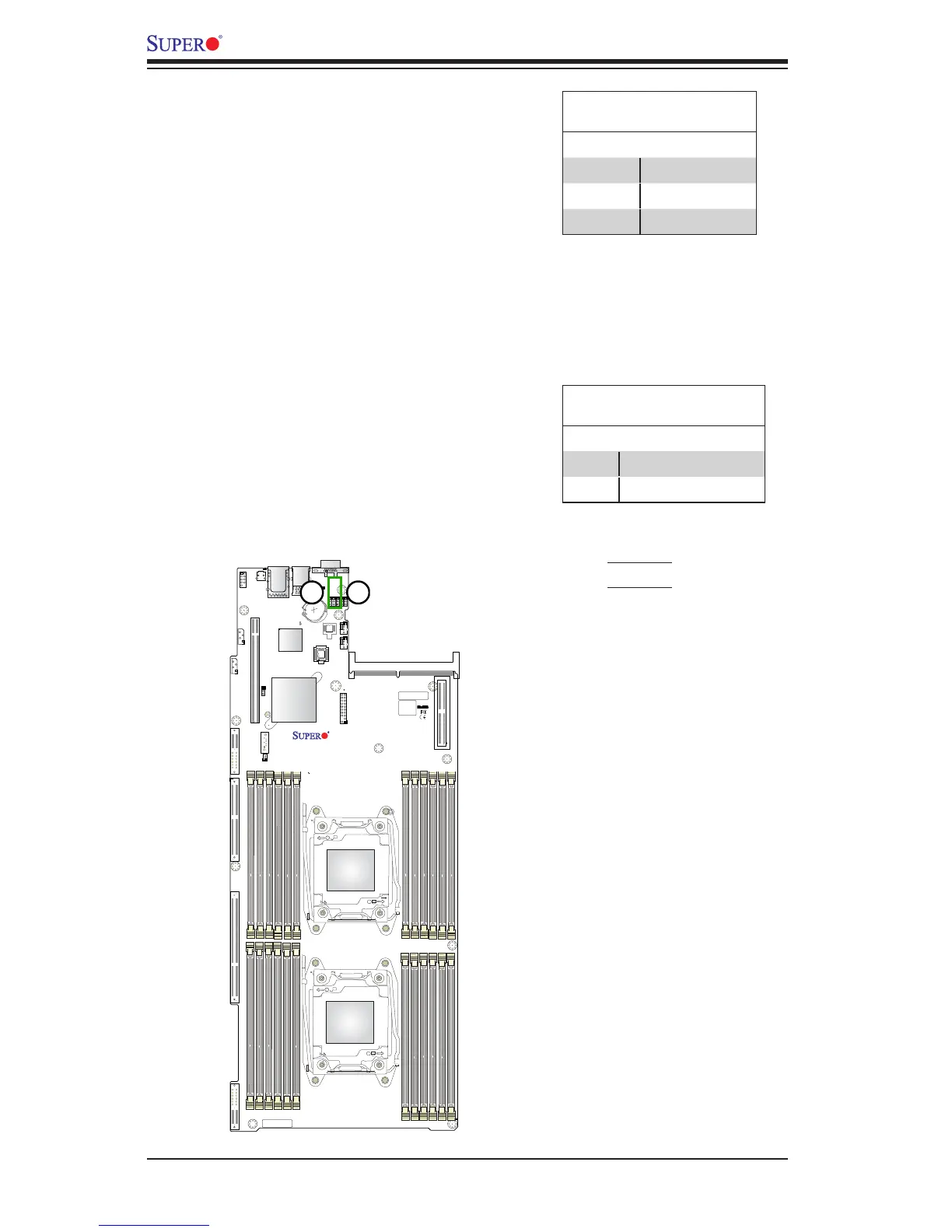
Watch Dog Enable/Disable
Watch Dog (JWD1) is a system moni-
tor that can reboot the system when a
software application hangs. Close pins
1-2 to reset the system if an applica-
tion hangs. Close pins 2-3 to generate
non-maskable interrupt signals for the
application that hangs. See the table on
the right for jumper settings. Watch Dog
must also be enabled in the BIOS.
Watch Dog
Jumper Settings
Jumper Setting Denition
Pins 1-2 Reset (default)
Pins 2-3 NMI
Open Disabled
I
2
C Bus for VRM
Jumpers JVRM1 and JVRM2 allow the
BMC or the PCH to access CPU and
memory VRM controllers. See the table
on the right for jumper settings.
VRM
Pin Dentions
Pin # Denition
1-2 BMC (Default)
2-3 PCH
1. JVRM1
2. JVRM2




 To Next Page