EasyManua.ls Logo

Supero C2G41 - Reset Button; PWR Button

Supero C2G41
93 pages
Print Icon
To Next Page IconTo Next Page
To Previous Page IconTo Previous Page
Loading...
Chapter 2: Installation
2-21
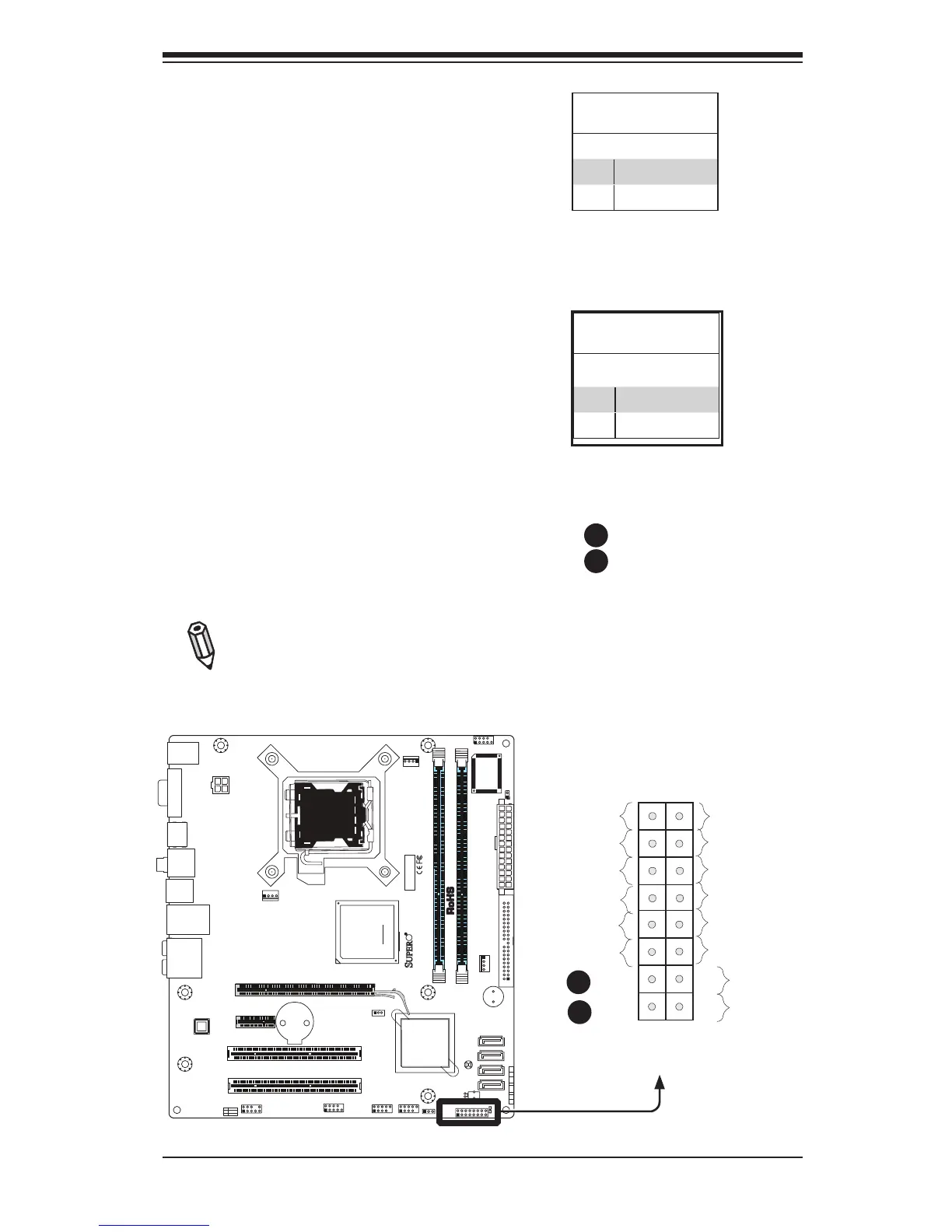
Power Button
The Power Button connection is located
on pins 1 and 2 of JF1. Momentarily con-
tacting both pins will power on/off the sys-
tem. This button can also be congured
to function as a suspend button (with a
setting in the BIOS - see Chapter 4). To
turn off the power when set to suspend
mode, press the button for at least 4
seconds. Refer to the table on the right
for pin denitions.
Note: Do not close or short Pins 1
& 2 since this will cause the system
to continuously reboot.
Power Button
PinDenitions(JF1)
Pin# Denition
1 Signal
2 Ground
Reset Button
The Reset Button connection is located
on pins 3 and 4 of JF1. Attach it to a
hardware reset switch on the computer
case. Refer to the table on the right for
pin denitions.
Reset Button
PinDenitions(JF1)
Pin# Denition
3 Reset
4 Ground
A. Reset
B. PWR Button

Power Button
OH/Fan Fail LED
1
NIC1 LED
Reset Button
2
HDD LED
Power LED
Reset
PWR
LED_Anode+
LED_Anode+
LED_Anode+
LED_Anode+
Ground
Ground
X
X
X
X
A
B
JF1 Header Pins
A
B
FAN2
FAN1
LE1
JBT1
JF1
121
JPT1
C2G41
Tested to C omply
With FCC Standards
FOR HOME OR OFFICE USE
AT X_POWER1
LGA775 CPU
AT X12V1
COM2
COM1
1
A
JL1 CHASSIS INTRUSION
TPM
IDE
HDMI
JF1
X
PWR
ON
RST OH/FFX
HDD
NIC1
LED
PWR
LED
CPU FA N
FAN3
I-SATA3
I-SATA2
I-SATA1
I-SATA0
BUZZER
JWOL
+
BATTERY
JPW2
JPW1
AUDIO FP
USB0/1
USB2/3
DIMM1B
DIMM1A
SLOT7 PCI-E X16
SLOT6 PCI-E X1
SLOT5 PCI 33MHZ
SLOT4 PCI 33MHZ
USB6/7 LAN
USB4/5
SPDIF OUT
KB/MOUSE
:CMOS CLEAR
ENABLE
JPT1
1-2
2-3
DISABLE
VGA
PSKBM
AUDIO

Table of Contents

Related product manuals