EasyManua.ls Logo

Supero C2G41 - ATX PS;2 Keyboard and PS;2 Mouse Ports; Serial Ports

Supero C2G41
93 pages
Print Icon
To Next Page IconTo Next Page
To Previous Page IconTo Previous Page
Loading...
Chapter 2: Installation
2-25
FAN2
FAN1
LE1
JBT1
JF1
121
JPT1
C2G41
Tested to Co mply
With FCC Standards
FOR HOME OR OFFICE USE
AT X_POWER1
LGA775 CPU
AT X12V1
COM2
COM1
1
A
JL1
CHASSIS INTRUSION
TPM
IDE
HDMI
JF1
X
PWR
ON
RST OH/FFX
HDD
NIC1
LED
PWR
LED
CPU FA N
FAN3
I-SATA3
I-SATA2
I-SATA1
I-SATA0
BUZZER
JWOL
+
BATTERY
JPW2
JPW1
AUDIO FP
USB0/1
USB2/3
DIMM1B
DIMM1A
SLOT7 PCI-E X16
SLOT6 PCI-E X1
SLOT5 PCI 33MHZ
SLOT4 PCI 33MHZ
USB6/7 LAN
USB4/5
SPDIF OUT
KB/MOUSE
:CMOS CLEAR
ENABLE
JPT1
1-2
2-3
DISABLE
VGA
PSKBM
AUDIO
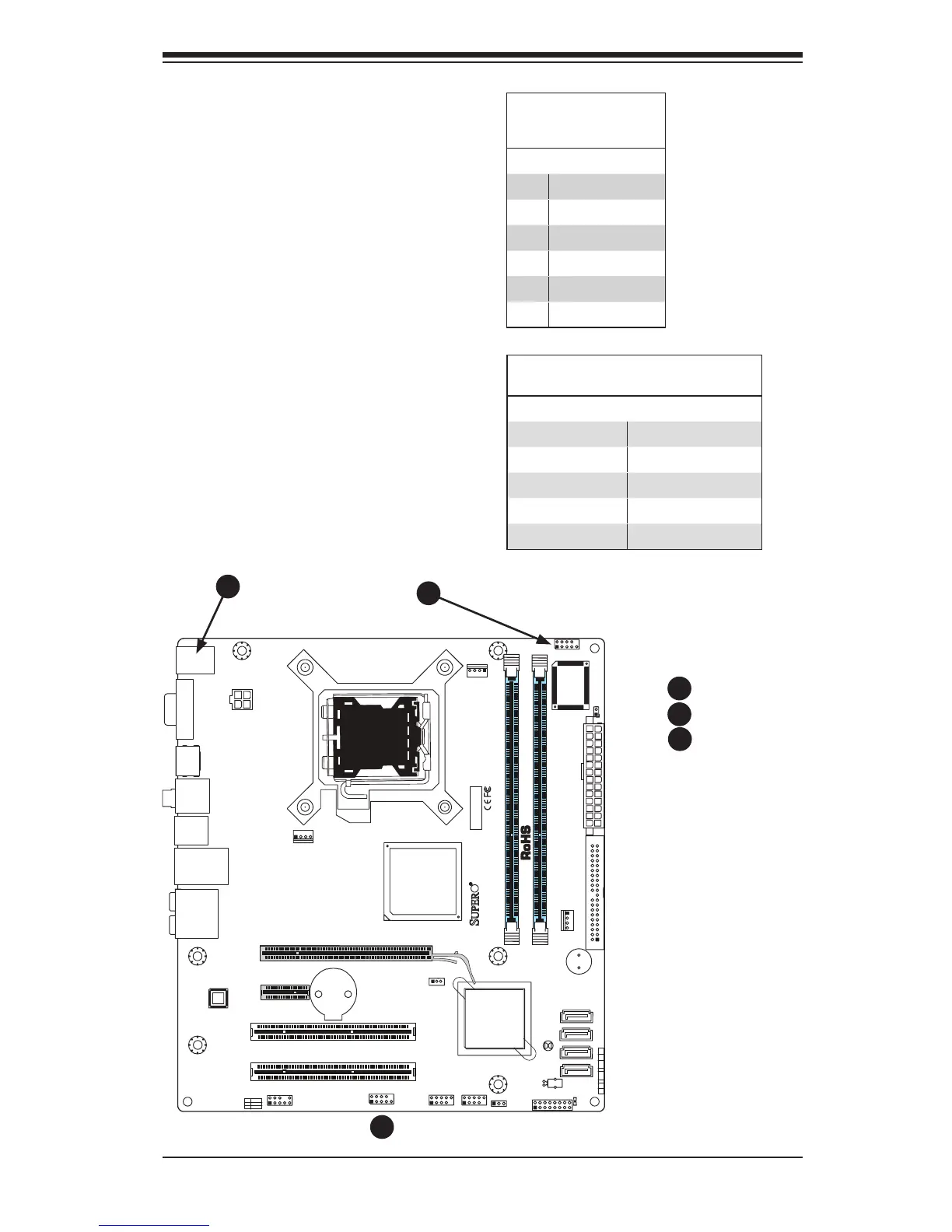
ATX PS/2 Keyboard and PS/2
Mouse Ports
The ATX PS/2 keyboard and the PS/2
mouse are located at J8. See the table
on the right for pin denitions. (The
mouse port is above the keyboard
port. See the table on the right for pin
denitions.)
PS/2 Keyboard and
Mouse Port Pin
Denitions
Pin# Denition
1 Data
2 NC
3 Ground
4 VCC
5 Clock
6 NC
Serial Ports
COM 1 and COM 2 are header con-
nectors on the motherboard. See the
table on the right for pin denitions.
SerialPortPinDenitions
Pin # Denition Pin # Denition
1 DCD 6 DSR
2 RXD 7 RTS
3 TXD 8 CTS
4 DTR 9 RI
5 Ground 10 NC
A. Keyboard/Mouse
B. COM1
C. COM2
B
A
C
B
A
C


Table of Contents

Related product manuals