2-8
C2G41 User's Manual
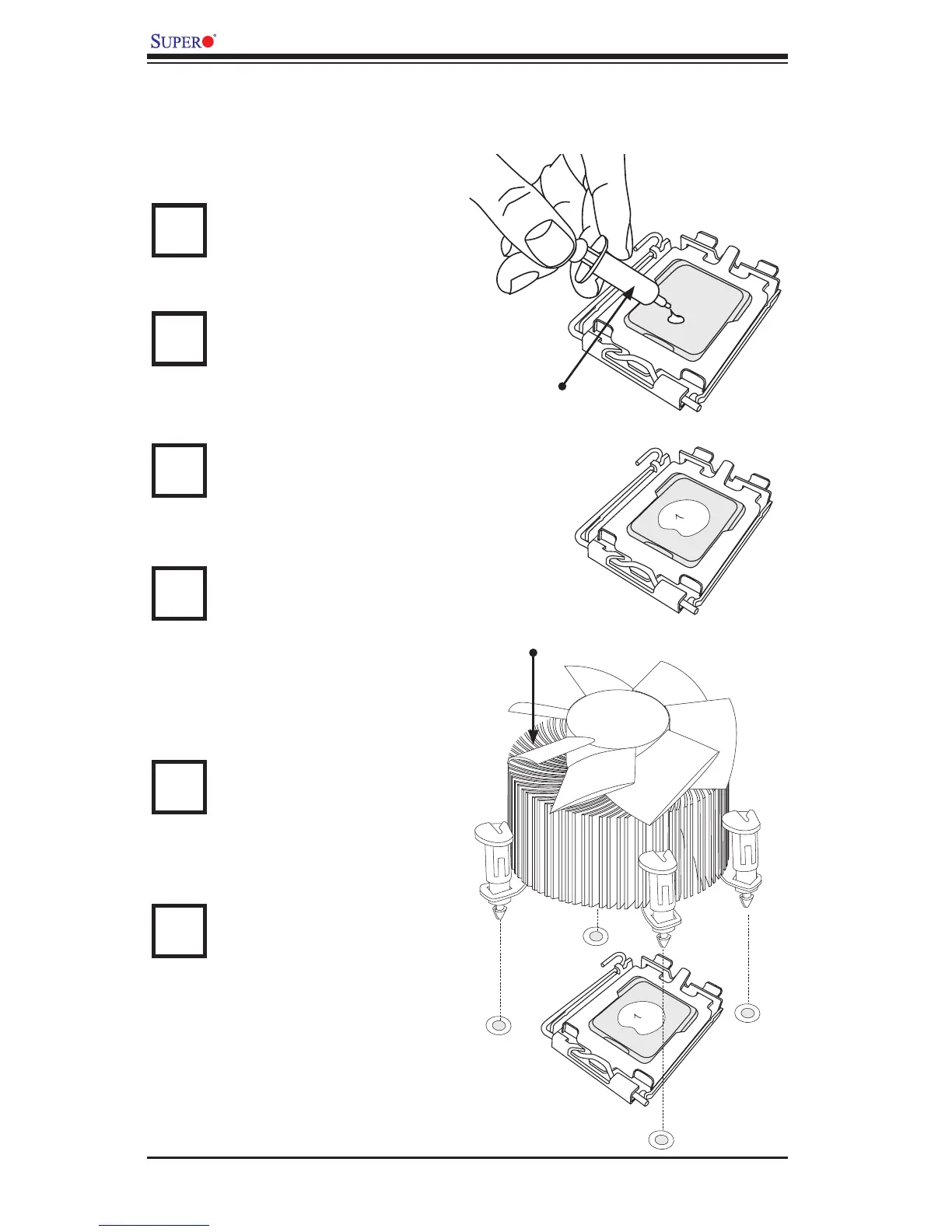
Thermal Grease
CPU
Heatsink Fins
Locate the CPU Fan power
connector on the motherboard.
(Refer to the layout on the right
for the CPU Fan location.)
Position the heatsink so that the
heatsink fan wires are closest
to the CPU fan power connector
and are not interfered with other
components.
Inspect the CPU Fan wires to
make sure that the wires are
routed through the bottom of the
heatsink.
Remove the thin layer of the pro-
tective lm from the copper core
of the heatsink.
(Warning: CPU may overheat if
the protective lm is not removed
from the heatsink.)
Apply the proper amount of
thermal grease on the CPU.
(Note: if your heatsink came with
a thermal pad, please ignore this
step.)
If necessary, rearrange the wires
to make sure that the wires are
not pinched between the heatsink
and the CPU. Also make sure to
keep clearance between the fan
wires and the ns of the heatsink.
Installing an Active Fan CPU Heatsink
1
2
3
4
5
6
Note: Heatsink and hardware are not supplied with the motherboard.



 To Next Page