EasyManua.ls Logo

Sylvania DVR91DG - Connections; Connection to a TV

Sylvania DVR91DG
82 pages
Print Icon
To Next Page IconTo Next Page
To Previous Page IconTo Previous Page
Loading...
13
EN
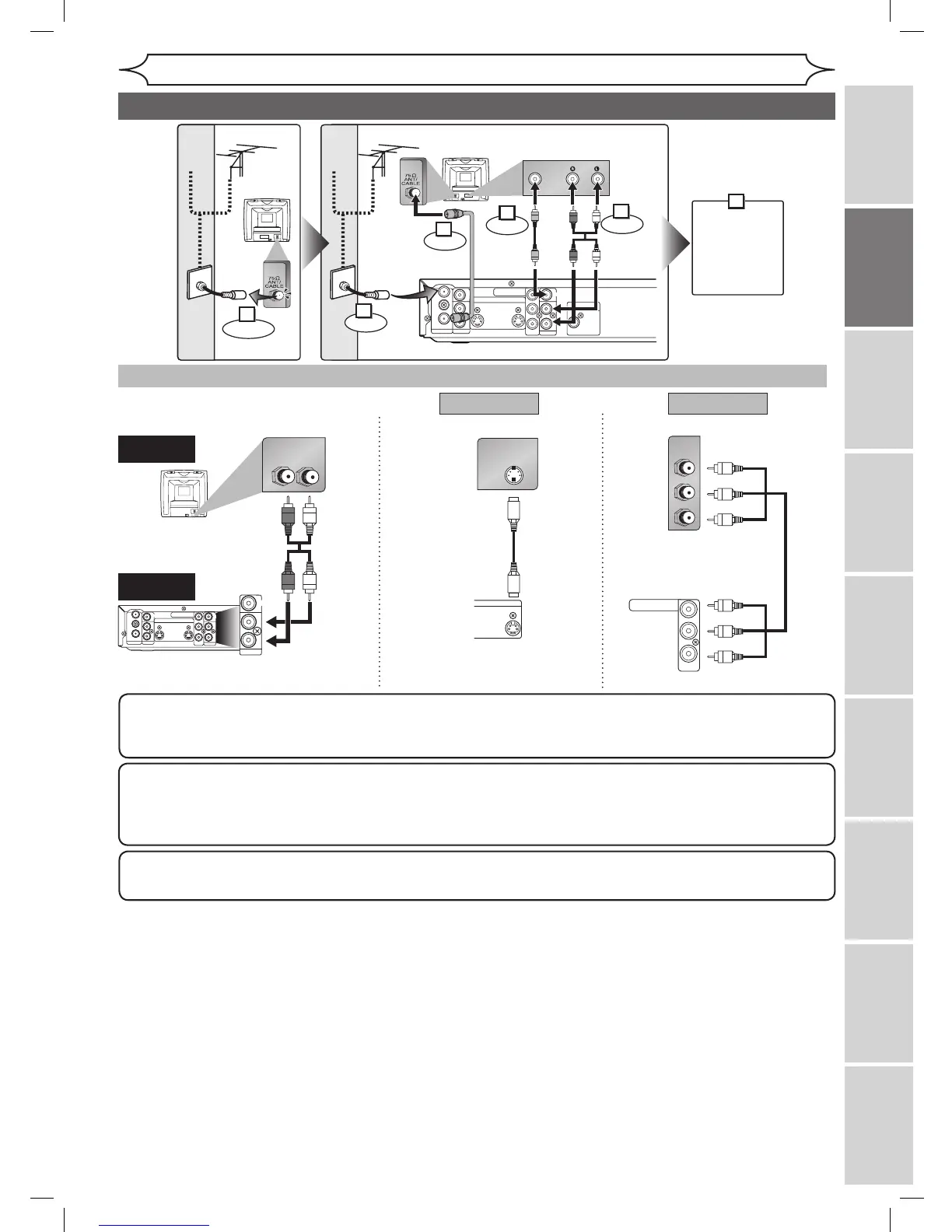
Connection to a TV
Connections
Recording Playing discs EditingBefore you start Connections Getting started
Changing the
Setup menu Others Español
Make one of the following connections, depending on the capabilities of your existing equipment.
ANTENNA
AUDIO IN
VIDEO IN
L
R
AUDIO OUT
VIDEO OUT
(L1)
IN
IN
OUT
OUT
S-VIDEO
COMPONENT
VIDEO OUTPUT
L
Y
P
B
/C
B
P
R
/C
R
R
COAXIAL
R L
AUDIO OUT
VIDEO OUT
L
R
S-VIDEO IN
IN
OUT
S-VIDEO
P
B/CB
Y
P
R/CR
COMPONENT
VIDEO IN
COMPONENT
VIDEO OUTPUT
Y
P
B
/C
B
P
R
/C
R
AUDIO OUT
TV
Basic Audio
Method 1 Method 2
Better picture Best picture
S-VIDEO OUT
COMPONENT VIDEO OUT
Audio cable
(supplied)
S-Video cable
(commercially available)
Component Video cable
(commercially available)
This unit
ANTENNA
AUDIO IN
VIDEO IN
L
R
AUDIO OUT
VIDEO OUT
(L1)
IN
IN
OUT
OUT
S-VIDEO
COMPONENT
VIDEO OUTPUT
L
Y
P
B
/C
B
P
R
/C
R
R
DIGITAL AUDIO OUTPUT
PCM / BITSTREAM
COAXIAL
AUDIO INVIDEO
RF cable
(supplied)
Video
cable
(supplied)
Audio
cable
(supplied)
(Back of TV)
or
Cable
TV signal
or
Cable
TV signal
Connect
Connect
Connect
Connect
Disconnect
Antenna
Antenna
(Back of this unit)
(Back of TV)
3
2
1
4
5
Plug in the AC
power cord
of this unit.
6
Note
Connect this unit directly to the TV. If the A/V cables are connected to a VCR, pictures may be distorted due
to the copy protection system.
When Progressive Scan mode is selected, no video signal will be output from the VIDEO OUT or
S-VIDEO OUT jack.
After you have completed connections
Switch the input selector on your TV to an appropriate external input channel (usually near channel 0). Press a button
on the TV’s original remote control (refer to “Input Mode Names for Common TV Brands” on page 15) that selects an
external input channel until the DVD recorder’s picture appears. Check your TV owner’s manual for details.
To set progressive scan mode, refer to pages 69-70
This unit compatible with the Progressive Scan System. The feature provides you with the higher definition images
than the traditional output system does. To utilize this feature, you must set Progressive Scan mode to “ON”.

DVR91DG_E7A01UD.indd 13 2006/02/15 17:26:02

Table of Contents

Other manuals for Sylvania DVR91DG

Related product manuals