EasyManua.ls Logo

Sylvania DVR91DG - Connection to a Cable Box or Satellite Box

Sylvania DVR91DG
82 pages
Print Icon
To Next Page IconTo Next Page
To Previous Page IconTo Previous Page
Loading...
14
EN
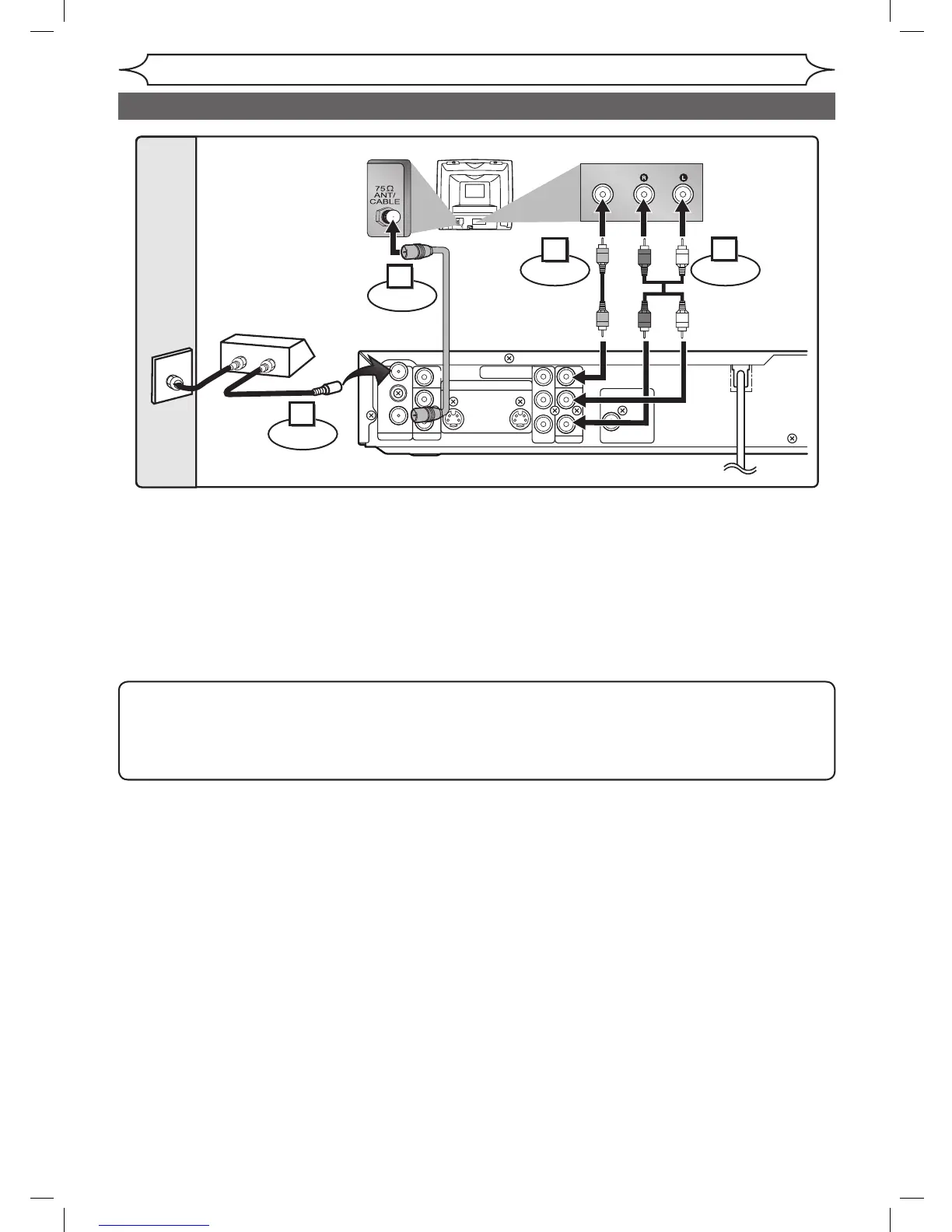
Connection to a cable box or satellite box
Connections
Note to the Cable TV System Installer :
This reminder is provided to call the Cable TV system installer’s attention to Article 820-40 of the
National Electrical Code, which provides guidelines for proper grounding - in particular, specifying
that the cable ground shall be connected to the grounding system of the building, as close to the
point of cable entry as possible.
With this setup:
You can record any unscrambled channel by selecting the channel on the cable box or satellite
box. Be sure that the cable box or satellite box is turned on.
You cannot record one channel while watching another channel.

ANTENNA
AUDIO IN
VIDEO IN
L
R
AUDIO OUT
VIDEO OUT
(L1)
IN
IN
OUT
OUT
S-VIDEO
COMPONENT
VIDEO OUTPUT
L
Y
P
B
/C
B
P
R
/C
R
R
DIGITAL AUDIO OUTPUT
PCM / BITSTREAM
COAXIAL
AUDIO INVIDEO
RF cable
(supplied)
Video
cable
(supplied)
Audio
cable
(supplied)
(Back of TV)
Cable
TV signal
Connect
Connect
Connect Connect
(Back of this unit)
2
1
3
4
IN
O
U
T
(Cable box or
Satellite box)
RF cable
DVR91DG_E7A01UD.indd 14 2006/02/15 17:26:03

Table of Contents

Other manuals for Sylvania DVR91DG

Related product manuals