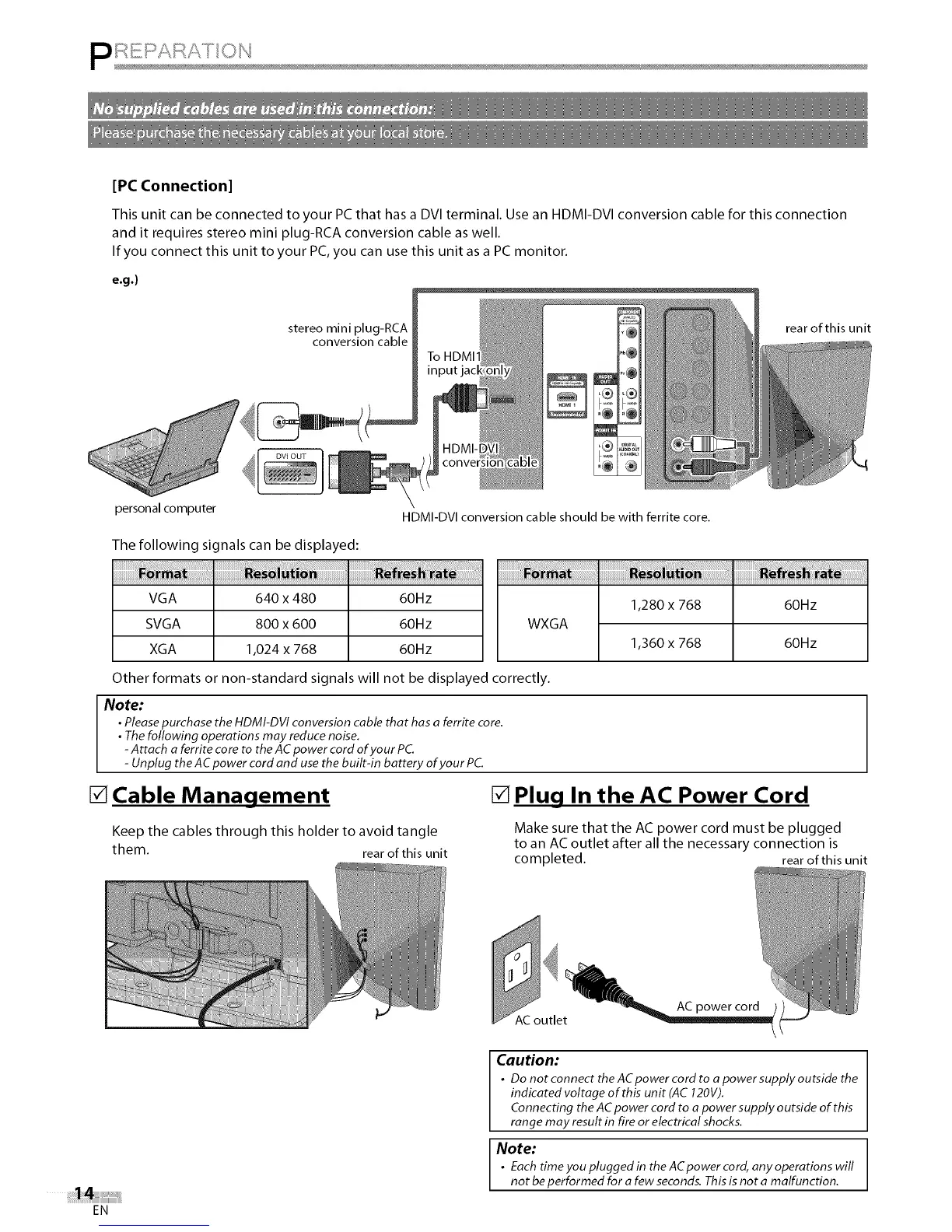
[PC Connection]
This unit can be connected to your PC that has a DVI terminal. Use an HDMI-DVI conversion cable for this connection
and it requires stereo mini plug-RCA conversion cable as well.
If you connect this unit to your PC,you can use this unit as a PC monitor.
e.g.)
stereo mini plug-RCA rear of this unit
conversion cable
personal computer
HDMI-DVI conversion cable should be with ferrite core.
The following signals can be displayed:
VGA 640 x 480 60Hz
SVGA 800 x 600 60Hz
XGA 1,024 x 768 60Hz
1,280 x 768
WXGA
1,360 x 768
iiiiiiiiiiiiiiiiiiiiiiiiiiiiiiiiiiiiiiii ! i i ilil
60Hz
60Hz
Other formats or non-standard signals will not be displayed correctly.
Note:
• Please purchase the HDMI-DVI conversion cable that has a ferrite core.
• The following operations may reduce noise.
-Attach a ferrite core to the AC power cord of your PC.
- Unplug the AC power cord and use the built-in battery of your PC.
[] Cable Management [] Plug In the AC Power Cord
Keep the cables through this holder to avoid tangle
them. rear of this unit
Make sure that the AC power cord must be plugged
to an AC outlet after all the necessary connection is
completed, rear of this unit
AC outlet
EN
Caution:
• Do not connect the AC power cord to a power supply outside the
indicated voltage of this unit (AC 120V).
Connecting the AC power cord to a power supply outside of this
range may result in fire or electrical shocks.
Note:
• Each time you plugged in the ACpower cord, any operations will
not be performed for a few seconds. This is not a malfunction.















 To Next Page