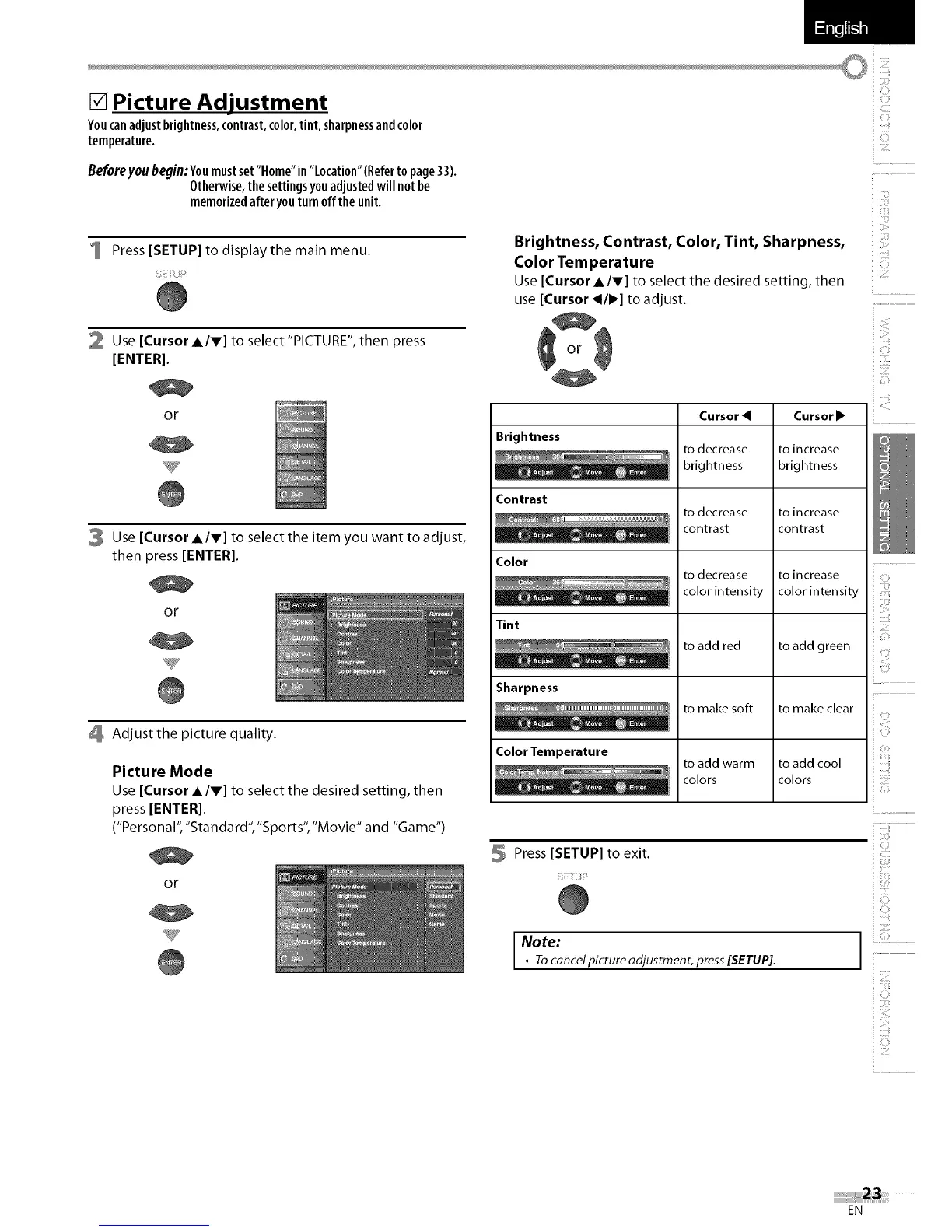
[] Picture Adjustment
Youcanadjustbrightness,contrast,color,tint, sharpnessandcolor
temperature.
Beforeyou begin:Youmustset"Home"in "Location"(Referto page33).
Otherwise,the settingsyouadjustedwill notbe
memorizedafteryouturn offthe unit.
Press [SETUP] to display the main menu.
SEiU_
2 Use [Cursor l/V] to select "PICTURE", then press
[ENTER].
or
3 Use [Cursor l/V] to select the item you want to adjust,
then press [ENTER[.
Or
V
4 Adjust the picture quality.
Picture Mode
Use [Cursor l/V] to select the desired setting, then
press [ENTER[.
("Personal", "Standard", "Sports", "Movie" and "Game")
or
Brightness, Contrast, Color, Tint, Sharpness,
Color Temperature
Use[Cursor AIr] to select the desired setting, then
use[Cursor _1•] to adjust.
Brightness
Contrast
Color
Tint
Sharpness
Color Temperature
Cu rsor
to decrease
brightness
to decrease
contrast
to decrease
color intensity
to add red
to make soft
to add warm
colors
Cursor •
to increase
brightness
to increase
contrast
to increase
color intensity
to add green
to make clear
to add cool
colors
5 Press [SETUP] to exit.
Note:
• Tocancel picture adjustment, press[SETUP].
ii ii:i!i¸
ii..................................................
ii II,_C,_!
_iiiii
Z7
C
il................................................
iii! !!i
ii!!!?
ij :::ii
ii!!i i iii
ii ZIZ
l iiiiiiiiii!................................
! ZTZ
i i_r¸¸¸
EN















 To Next Page