[] PC Settings
Thisfunctionletsyouadjustthe PCscreenpositionduringPCinputthrough
the HDMI1 inputjack,
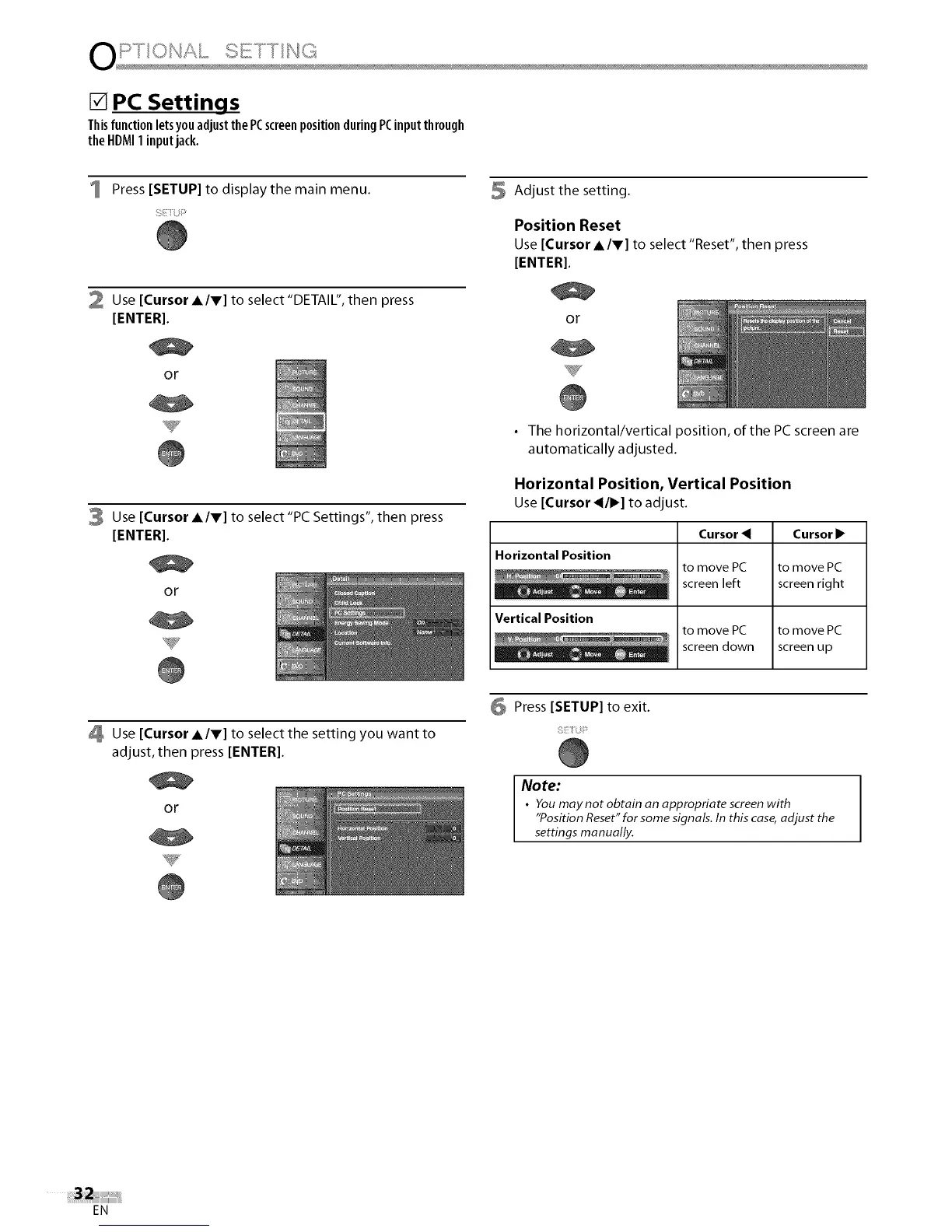
Press [SETUP] to display the main menu.
2 Use [Cursor A/V] to select "DETAIL", then press
[ENTER].
or
Y
3 Use [Cursor A/V] to select "PC Settings", then press
[ENTER].
or
5 Adjust the setting.
Position Reset
Use [Cursor A/V] to select "Reset", then press
[ENTER].
or
• The horizontal/vertical position, of the PC screen are
automatically adjusted.
Horizontal Position, Vertical Position
Use[Cursor _/•] to adjust.
Horizontal Position
Vertical Position
Cursor
to move PC
screen left
to move PC
screen down
Cursor •
to move PC
screen right
to move PC
screen up
Use [Cursor A/V] to select the setting you want to
adjust, then press [ENTER[.
or
6 Press [SETUP] to exit.
Note:
• You may not obtain an appropriate screenwith
"Position Reset"for some signals. In this case,adjust the
settings manually.
EN















 To Next Page