[] Supplied Accessories
owner's manual quick start guide
(1EMN24259) (1EM N24499)
remote control registration card Phillips pan screw for
(NF033UD) (1EMN24700) attaching the stand x 4
(FPH34200)
batteries
(AA x 2)
• If you need to replace these accessories, please refer to the part No. with the illustrations and call our toll free
customer support line found on the cover of this manual.
[] Attaching the Stand
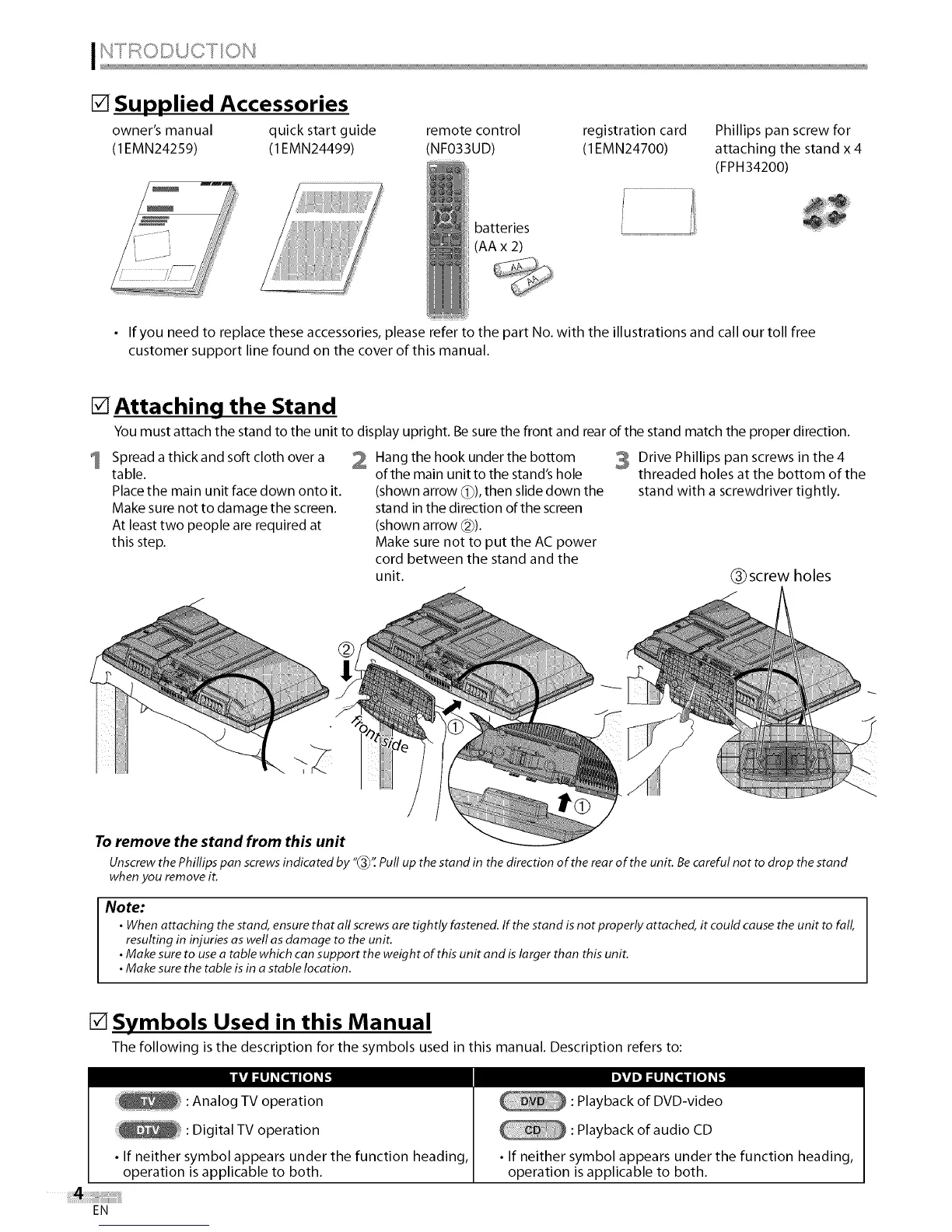
You must attach the stand to the unit to display upright. Be sure the front and rear of the stand match the proper direction.
1
Spread a thick and soft cloth over a
table.
Place the main unit face down onto it.
Make sure not to damage the screen.
At least two people are required at
this step.
2 Hang the hook under the bottom
of the main unit to the stand's hole
(shown arrow (_)), then slide down the
stand in the direction of the screen
(shown arrow _2)).
Make sure not to put the AC power
cord between the stand and the
unit.
3 Drive Phillips pan screws in the 4
threaded holes at the bottom of the
stand with a screwdriver tightly.
(_ screw holes
To remove the stand from this unit
Unscrew thePhillips pan screws indicated by "_3_'_Pull up the stand in the direction of the rear of the unit. Becareful not to drop the stand
when you remove it.
Note:
• When attaching the stand, ensure that all screws are tightly fastened. If the stand isnot properly attached, it could cause the unit to fal_
resulting in injuries as well asdamage to the unit.
•Make sure to usea table which can support the weight of this unit and islarger than this unit.
•Make sure the table is in astable location.
[] Symbols Used in this Manual
The following is the description for the symbols used in this manual. Description refers to:
IkUI:llJ_[q II[e]_
: Analog TV operation heading,
: Digital TV operation
• If neither symbol appears under the function
operation is applicable to both.
DlVJ D] ::1IIJ_ [q II [e] _ [_
: Playback of DVD-video
: Playback of audio CD
• If neither symbol appears under the function heading,
operation is applicable to both.
EN















 To Next Page