[] Sound Adjustment
Youcanadjustthe soundmode,equalizerandsomeothersoundfunctions.
Beforeyou begin:Youmustset"Home"in "Location"(Referto page33).
Otherwise,the settingsyouadjustedwill notbe
memorizedafteryouturn offthe unit.
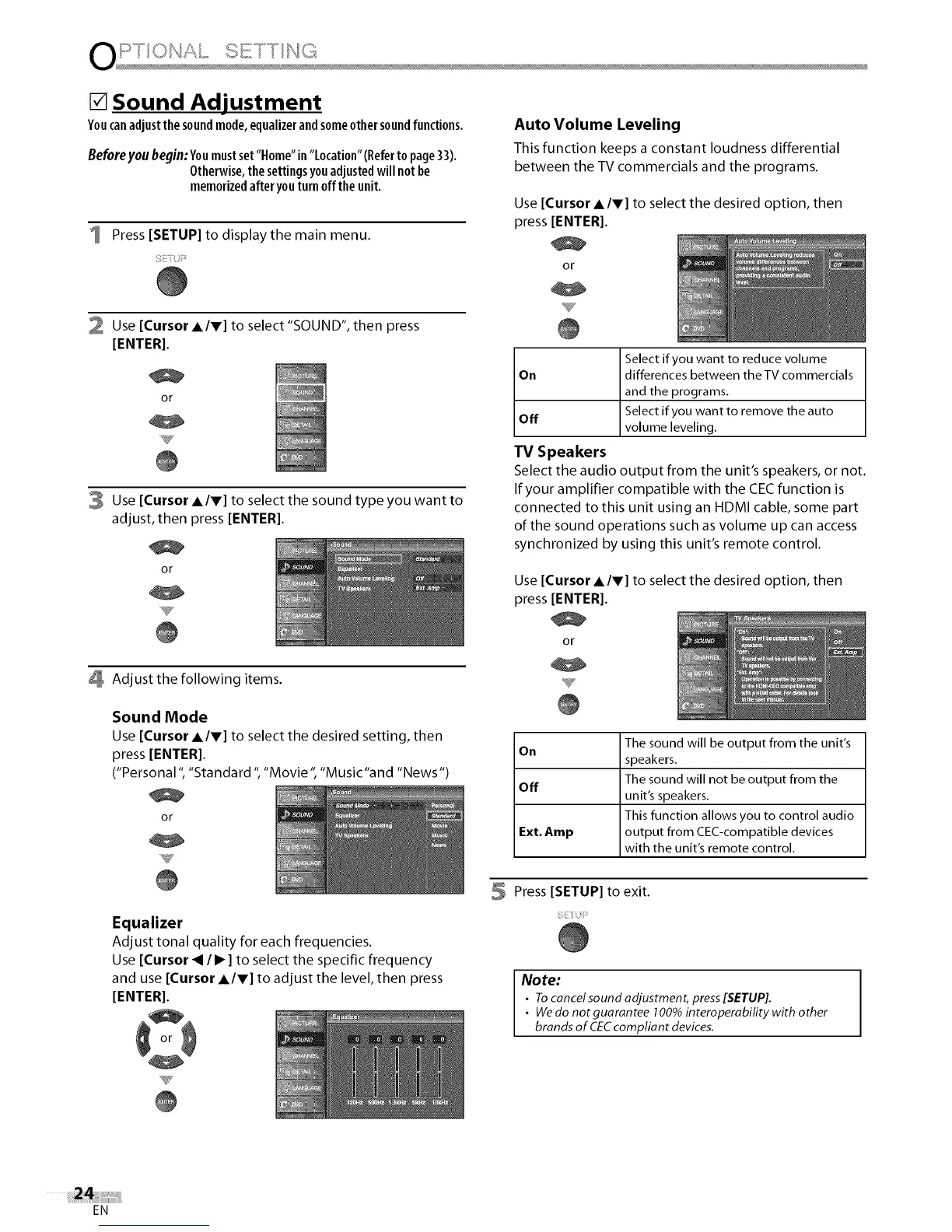
Press [SETUP] to display the main menu.
2 Use [Cursor AIr] to select "SOUND", then press
[ENTER].
or
3 Use [Cursor AIr] to select the sound type you want to
adjust, then press [ENTER[.
or
Adjust the following items.
Sound Mode
Use [Cursor AIr] to select the desired setting, then
press [ENTER[.
("Personal ", "Standard ", "Movie ", "Music"and "News ")
or
Equalizer
Adjust tonal quality for each frequencies.
Use [Cursor _ /I_ ] to select the specific frequency
and use [Cursor A/V] to adjust the level, then press
[ENTER].
Auto Volume Leveling
This function keeps a constant loudness differential
between the TV commercials and the programs.
Use [Cursor AIr] to select the desired option, then
press [ENTER[.
or
Select if you want to reduce volume
On differences between theTV commercials
and the programs.
Select if you want to remove the auto
Off
volume leveling.
TV Speakers
Select the audio output from the unit's speakers, or not.
If your amplifier compatible with the CECfunction is
connected to this unit using an HDMI cable, some part
of the sound operations such as volume up can access
synchronized by using this unit's remote control.
Use [Cursor AIr] to select the desired option, then
press [ENTER[.
or
The sound will be output from the unit's
On
speakers.
The sound will not be output from the
Off
unit's speakers.
This function allows you to control audio
Ext. Amp output from CEC-compatible devices
with the unit's remote control.
5 Press [SETUP] to exit.
Note:
• Tocancel sound adjustment, press[SETUP].
• Wedo not guarantee 100%interoperabifity with other
brands of CECcompliant devices.
EN















 To Next Page