[] Still Mode
Youcanpausethe imageshownontheTVscreen.
Press [PAUSE I I] to pause the image shown on the TV
screen.
i_4iSE
• The sound outputwill not be paused.
• If no signal is detected or protected signal is received
during still mode, the image remains paused and the
sound output will be muted.
• The still function will be released after 5 minutes.
To cancel still mode, press any button except [POWER].
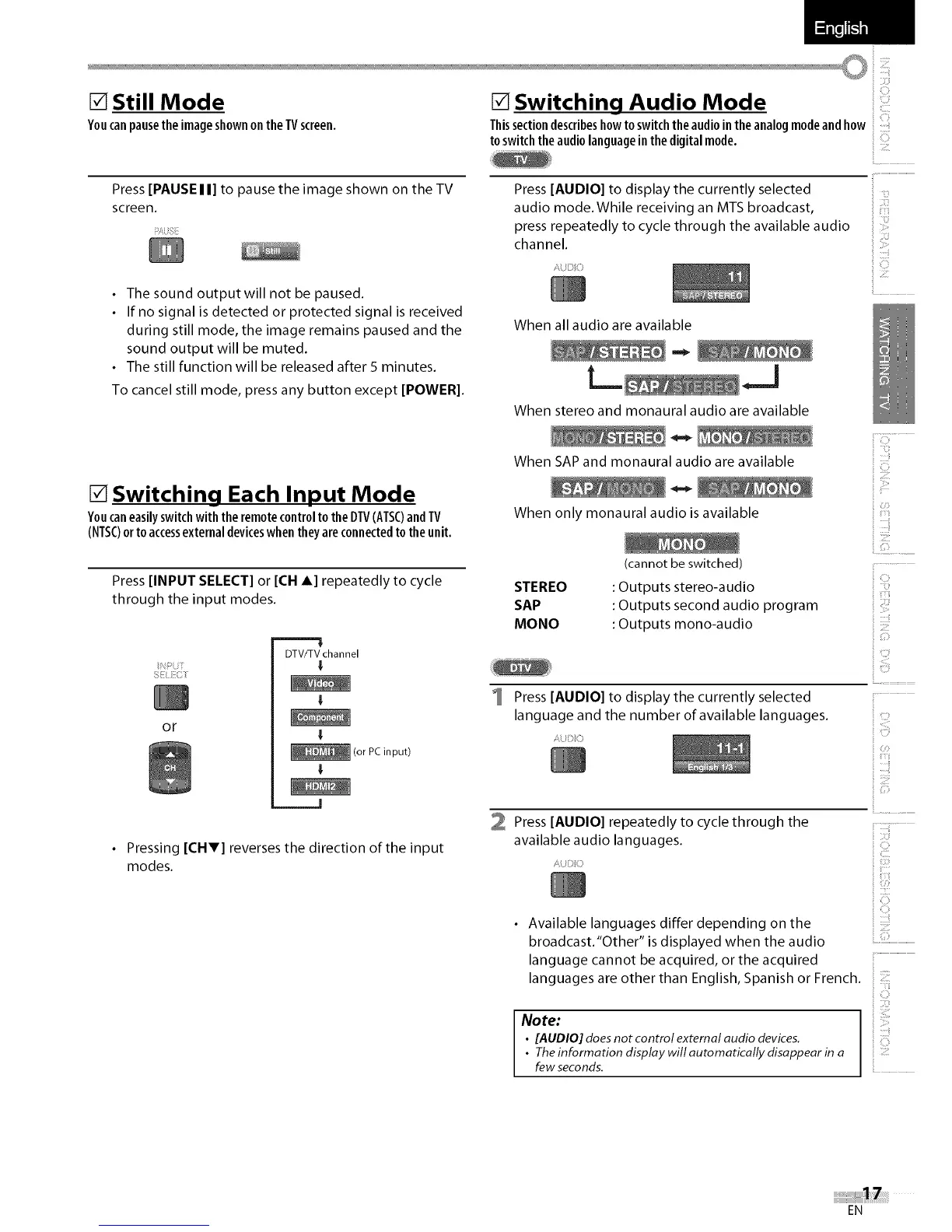
[] Switching Each Input Mode
Youcaneasilyswitchwith theremotecontrolto the DTV(ATSC)andTV
(NTSC)orto accessexternaldeviceswhentheyareconnectedto theunit.
Press [INPUT SELECT] or [CH A] repeatedly to cycle
through the input modes.
C/
or
DTV/TV channel
I
I
(or PC input)
I
• Pressing [CHV] reverses the direction of the input
modes.
[] Switching Audio Mode ::
Thissectiondescribeshowto switchthe audiointheanalogmodeandhow
toswitch the audiolanguageinthe digitalmode. ::
Press [AUDIO] to display the currently selected
audio mode.While receiving an MTS broadcast,
press repeatedly to cycle through the available audio
channel.
AUDIO
i ill
31¸¸¸¸!
iiiii!:!::i
When all audio are available
When stereo and monaural audio are available
When SAP and monaural audio are available
When only monaural audio is available
STEREO
SAP
MONO
(cannot be switched)
: Outputs stereo-audio
: Outputs second audio program
: Outputs mono-audio
ilG:......
i! IIIU!
_i i_ili!!i':i
_ii!!i!ill
s:F
_i!!!ii_!!i:
_i!!i__
i! ::!!
Press [AUDIO] to display the currently selected
language and the number of available languages.
/, :C
il
:iii!{!
C3!
1i)
)
2 Press [AUDIO] repeatedly to cycle through the
available audio languages.
iU}:)
ii"ii{iii.....
i CO!¸
iiii:i_:ii
• Available languages differ depending on the
broadcast.'Other" is displayed when the audio ................................
language cannot be acquired, or the acquired
languages are other than English, Spanish or French. ::
Note:
• [AUDIO] does not control external audio devices.
• Theinformation display will automatically disappear in a
few seconds.
EN















 To Next Page