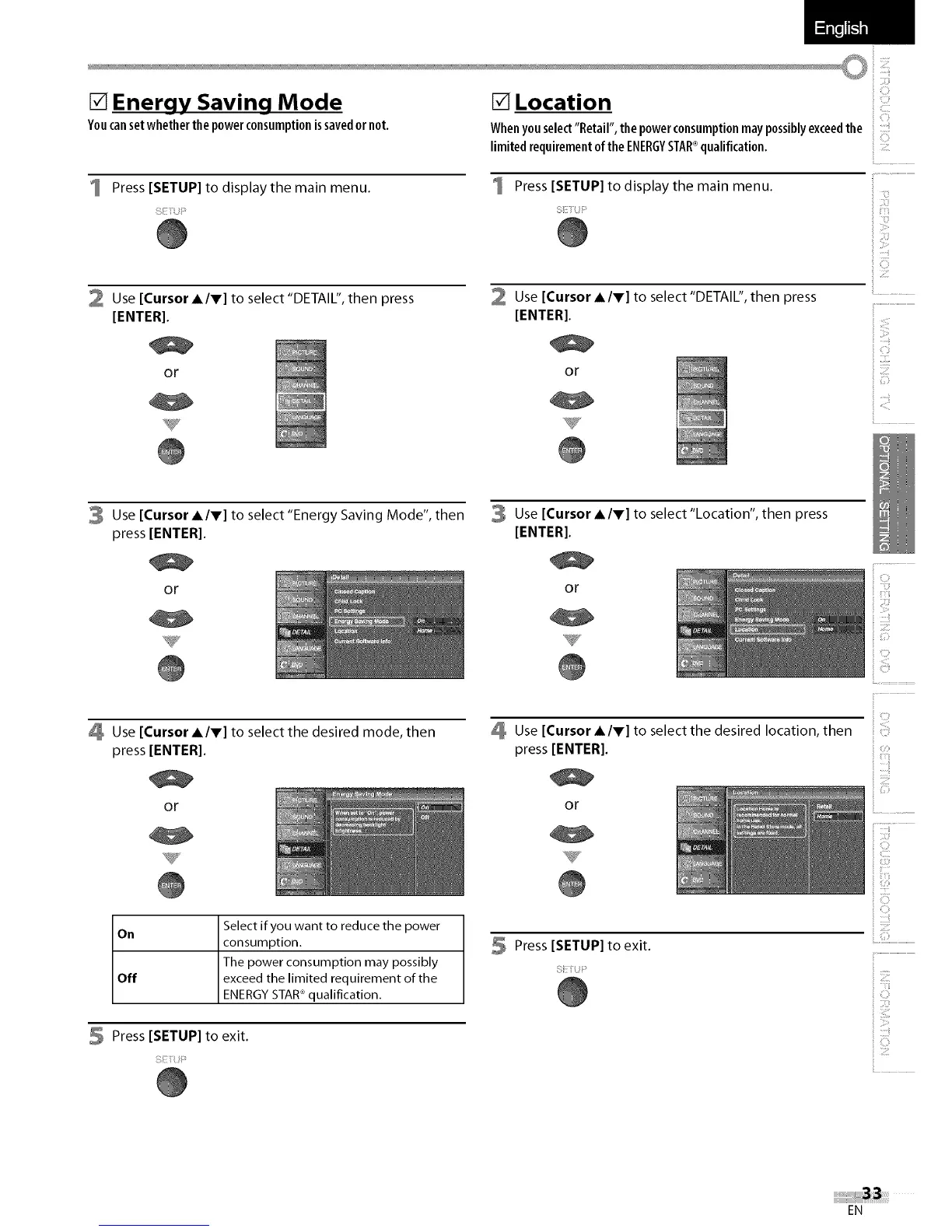
[] Energy Saving Mode
Youcansetwhetherthepowerconsumptionissavedornot.
Press [SETUP] to display the main menu.
2 Use [Cursor A/V] to select "DETAIL", then press
[ENTER].
or
[] Location
Whenyouselect"Retail", thepowerconsumptionmaypossiblyexceedthe
limitedrequirementofthe ENERGYSTAR®qualification.......
Press [SETUP] to display the main menu.
2
Use [Cursor A/V] to select "DETAIL", then press
[ENTER].
or
ii..................................................
ii ii,_i,_,_!
C
iil,i,i,i
......ii
3 Use [Cursor A/V] to select"Energy Saving Mode", then
press [ENTER[.
or
Use [Cursor A/V] to select the desired mode, then
press [ENTER[.
or
3 Use [Cursor A/V] to select "Location", then press
[ENTER].
or
Use [Cursor A/V] to select the desired location, then
press [ENTER[.
or
i,iiiii!
On Select if you want to reduce the power
consumption.
The power consumption may possibly
Off exceed the limited requirement of the
ENERGY STAR®qualification.
5 Press [SETUP] to exit.
Press [SETUP] to exit.
i i_¸¸¸
EN















 To Next Page