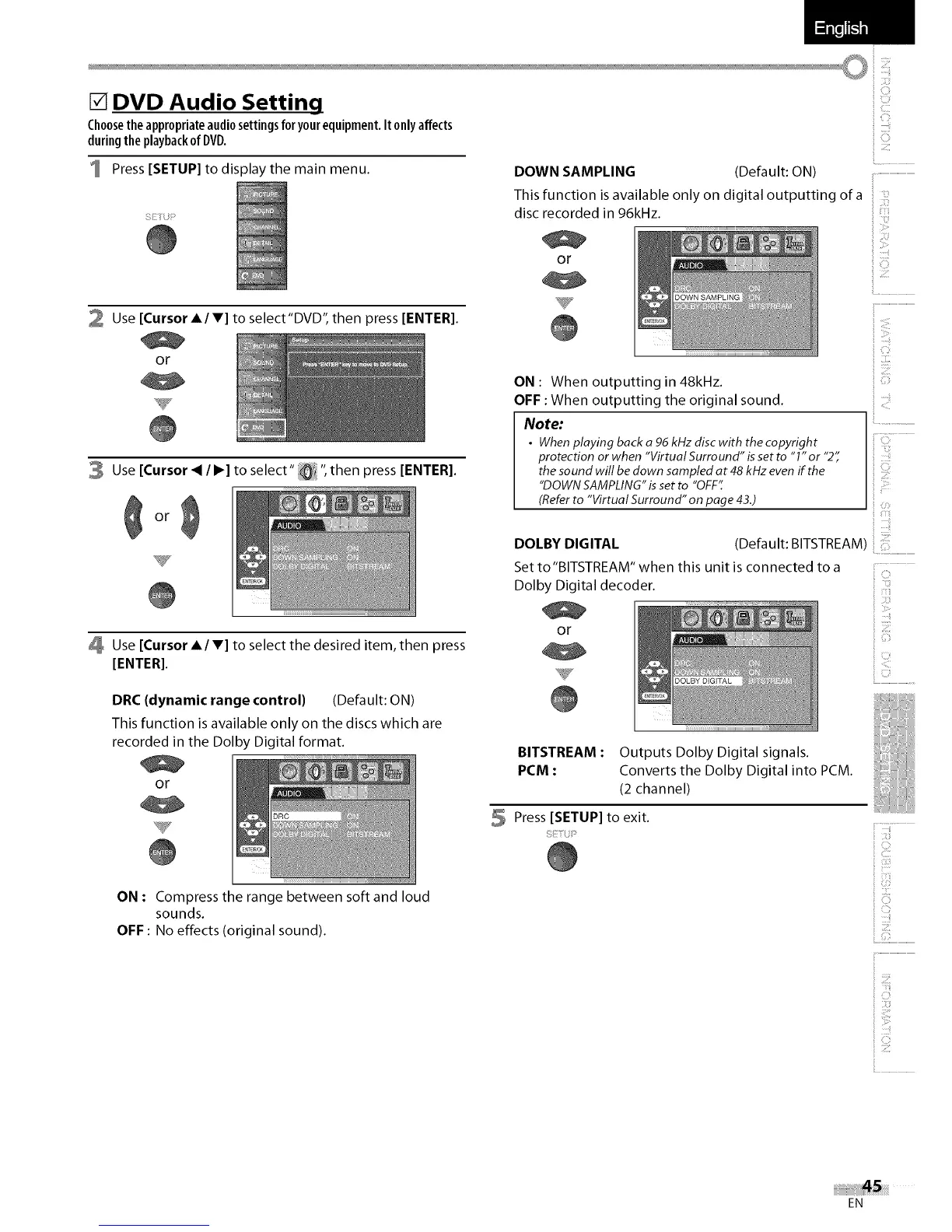
[] DVD Audio Setting
Choosetheappropriateaudiosettingsforyourequipment.Itonlyaffects
duringthe playbackof DVD.
1 Press [SETUP] to display the main menu.
S_TU__
2 Use [Cursor A/V] to select"DVD", then press [ENTER].
or
3 Use [Cursor _ / I_] to select" !_;i ", then press [ENTER].
Use [Cursor A/V] to select the desired item, then press
[ENTER].
DRC (dynamic range control) (Default: ON)
This function is available only on the discs which are
recorded in the Dolby Digital format.
or
DOWN SAMPLING (Default: ON)
This function isavailable only on digital outputting of a
disc recorded in 96kHz.
or
T
ON : When outputting in 48kHz.
OFF : When outputting the original sound.
Note:
• When playing back a 96 kHzdisc with the copyright
protection or when "Virtual Surround" isset to "1" or "2"
the sound will be down sampled at 48 kHzeven if the
"DOWN SAMPLING"isset to "OFF';
(Referto "Virtual Surround" on page 43.)
ON : Compress the range between soft and loud
sounds.
OFF : No effects (original sound).
il.................................................
iiiiii_
,; IIIIC
DOLBY DIGITAL
Set to"BITSTREAM" when this unit is connected to a
Dolby Digital decoder.
or
,ii!!_ii_!!i
i'i'i
iI :,_i
(Defa uIt: BITSTREAM)
i iii
ii C; ¸
BITSTREAM : Outputs Dolby Digital signals.
PCM : Converts the Dolby Digital into PCM.
(2 channel)
5 Press [SETUP] to exit.
iiiii_iii_!!
iiii:ii::i_i
ii iiiiiiii_i_!_!i!
EN















 To Next Page