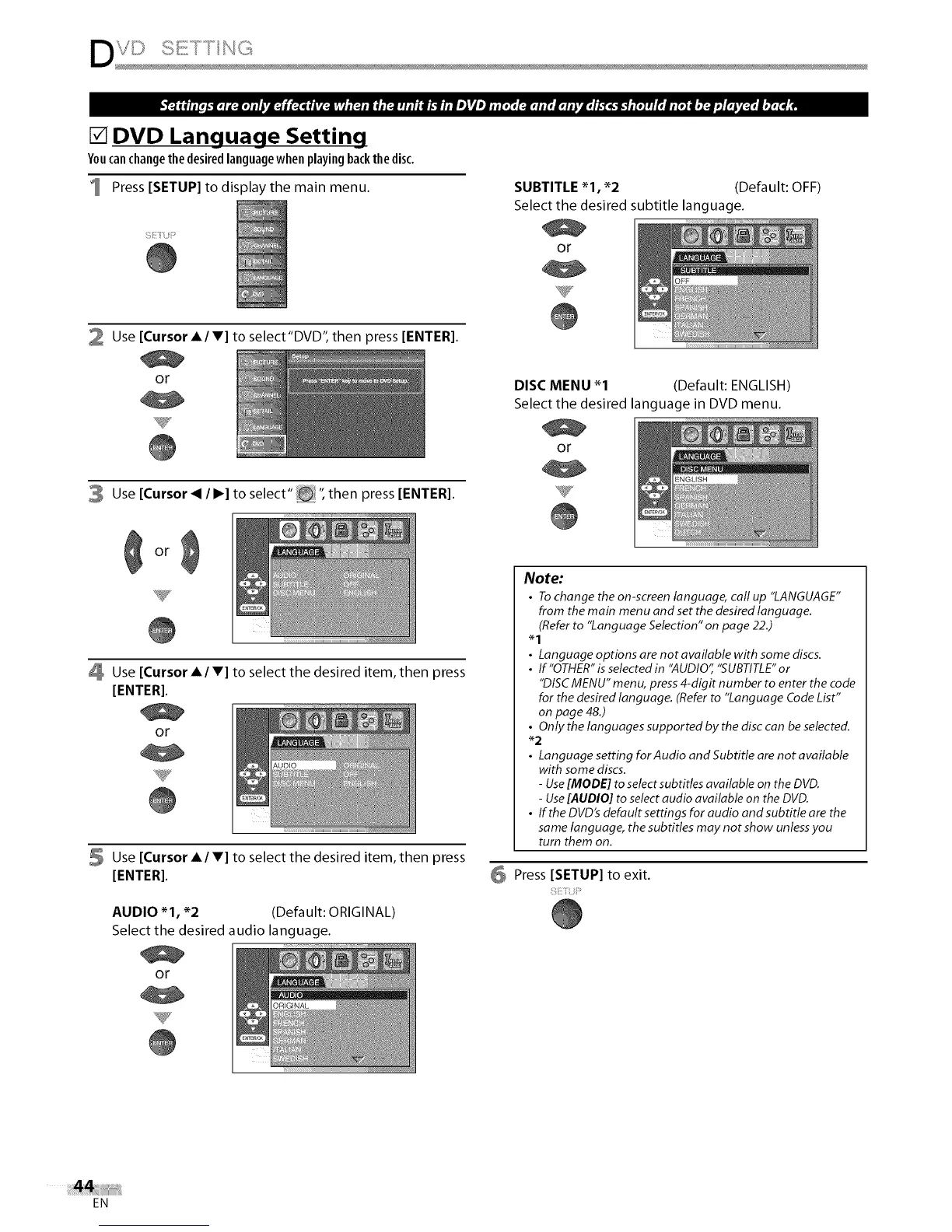
[] DVD Language Setting
Youcan change the desired language when playing back the disc,
Press [SETUP] to display the main menu.
;Ii{ i:'
SUBTITLE _1, _2 (Default: OFF)
Select the desired subtitle language.
or
2 Use [Cursor A/V] to select"DVD", then press [ENTER].
or
3 Use [Cursor _ / I_] to select" _!_ ", then press [ENTER].
Use [Cursor A/V] to select the desired item, then press
[ENTER].
or
Y
5 Use [Cursor A/V] to select the desired item, then press
[ENTER].
AUDIO _1, _2 (Default: ORIGINAL)
Select the desired audio language.
or
DISC MENU _1 (Default: ENGLISH)
Select the desired language in DVD menu.
or
Note:
• To change the on-screen language, call up "LANGUAGE"
from the main menu and set the desired language.
(Refer to "Language Selection" on page 22.)
• Languageoptionsarenotavailablewithsomediscs.
• If"OTHER"is selected in "AUDIO" "SUBTITLE" or
"DISC MENU" menu, press 4-digit number to enter the code
for the desired language. (Refer to "Language Code List"
on page 48.)
• Only the languages supported by the disc can be selected.
_2
• Language setting for Audio and Subtitle are not available
with some discs.
- Use [MODE] to selectsubtitles available on the DVD.
- Use [AUDIO] to select audio available on the DVD.
• If the DVD's default settings for audio and subtitle are the
same language, the subtitles may not show unless you
turn them on.
6 Press [SETUP] to exit.
EN















 To Next Page