[] Parental Setting
Parentalsettingpreventsyourchildrenfromviewinginappropriate
materials,(passwordprotected,)Playbackwillstopifthe ratingsexceed
the levelsyouset.
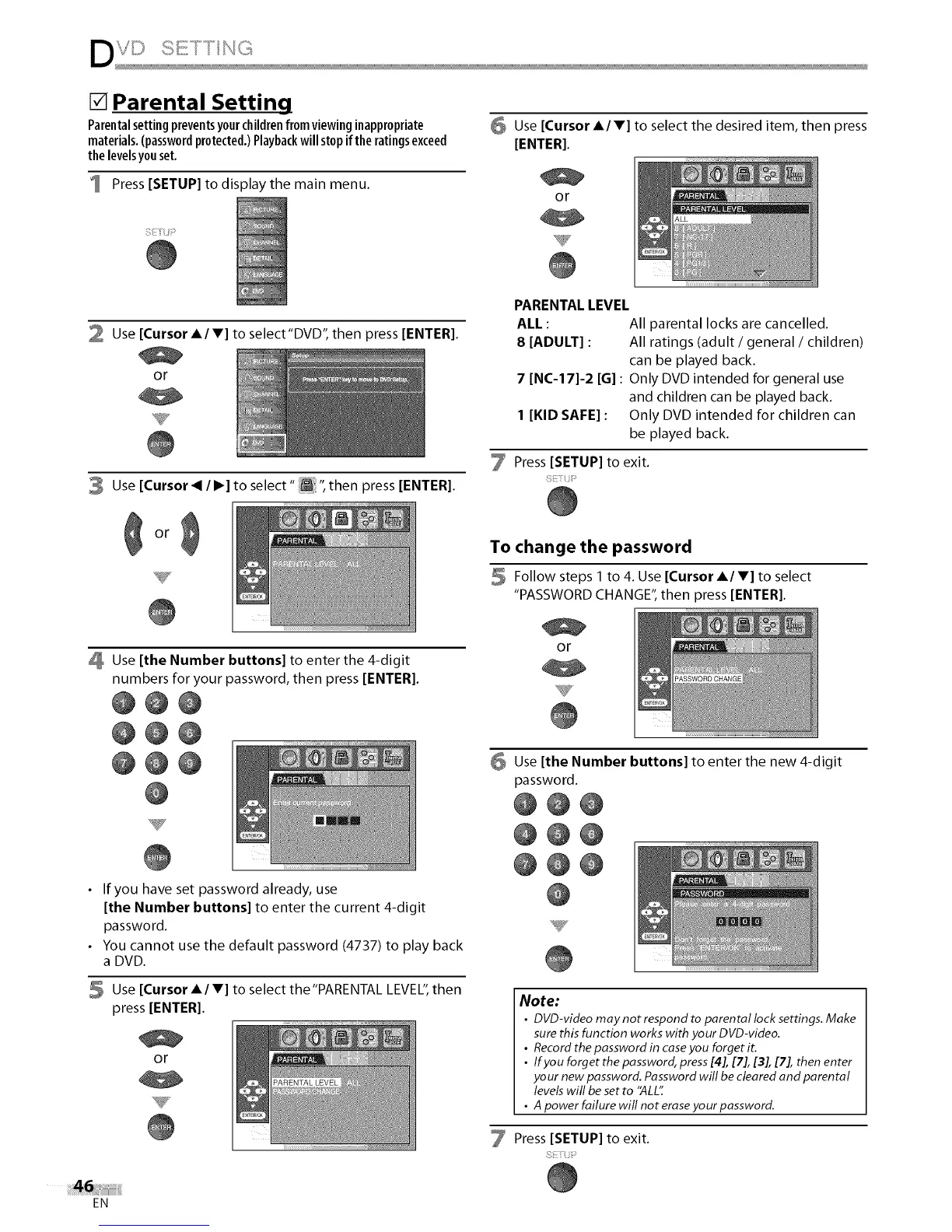
Press [SETUP] to display the main menu.
6 Use [Cursor AI V] to select the desired item, then press
[ENTER].
or
2 Use [Cursor A/V] to select"DVD", then press [ENTER].
or
3 Use [Cursor < / I_] to select" _ ",then press [ENTER].
Use [the Number buttons] to enter the 4-digit
numbers for your password, then press [ENTER].
@@@
@@0
@@@
T
• If you have set password already, use
[the Number buttons] to enter the current 4-digit
password.
• You cannot use the default password (4737) to play back
a DVD.
5 Use [Cursor A/V] to select the"PARENTAL LEVEL",then
press [ENTER].
or
PARENTAL LEVEL
ALL : All parental locks are cancelled.
8 [ADULT] : All ratings (adult / general / children)
can be played back.
7 [NC-17]-2 [G]: Only DVD intended for general use
and children can be played back.
I [KID SAFE] : Only DVD intended for children can
be played back.
Press [SETUP] to exit.
To change the password
Follow steps 1 to 4. Use [Cursor A/V] to select
"PASSWORD CHANGE", then press [ENTER].
or
Use [the Number buttons] to enter the new 4-digit
password.
@@@
@@@
@@@
Y
Note:
• DVD-video may not respond to parental lock settings. Make
sure this function works with your DVD-video.
• Record the password in case you forget it.
• If you forget the password, press[4], [7], [3], [7], then enter
your new password. Password will be cleared and parental
levelswill be set to "ALL':
• A power failure will not eraseyour password.
Press [SETUP] to exit.
EN















 To Next Page