o ii
Others
Youcanchangetheotherfunctions.
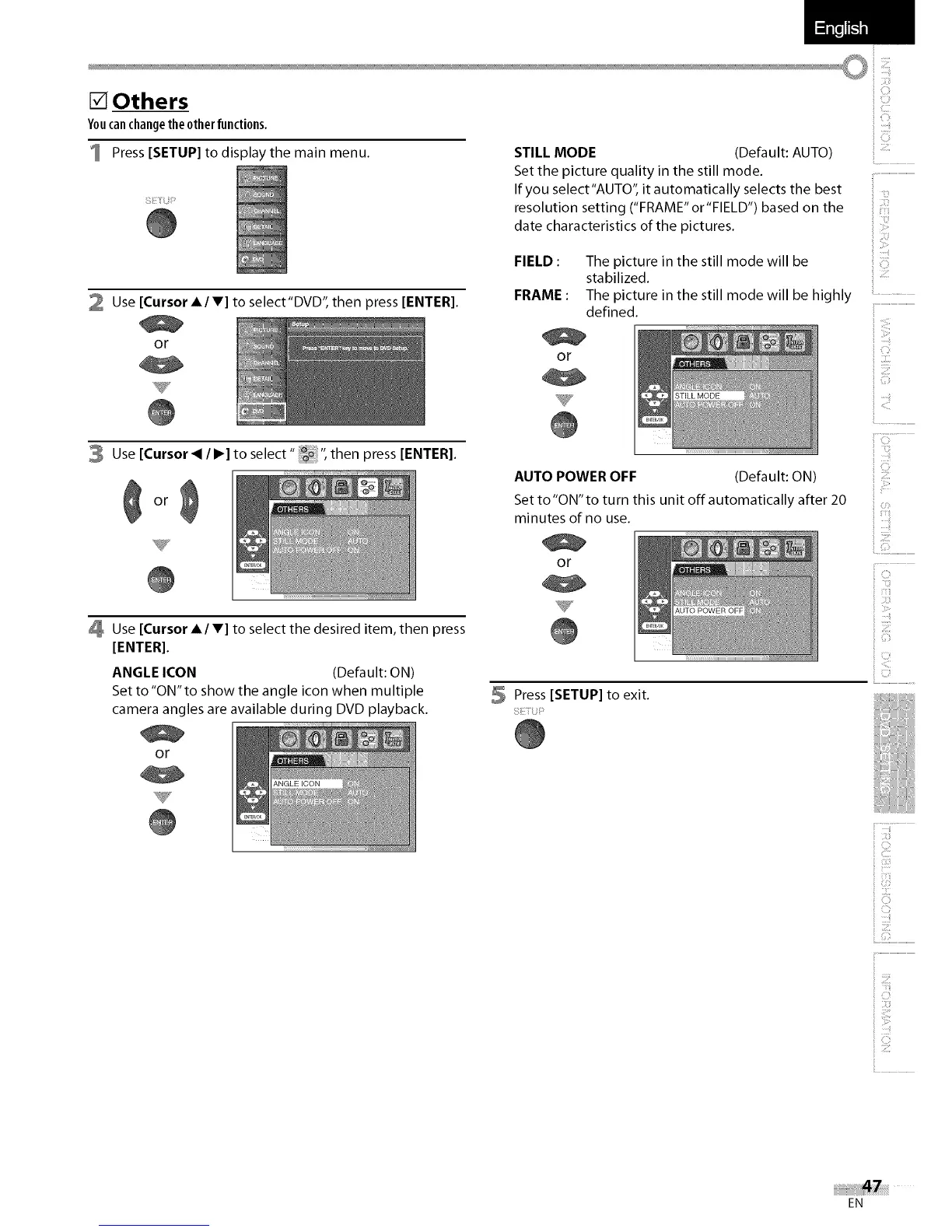
Press [SETUP] to display the main menu.
2 Use [Cursor A/V] to select'DVD', then press [ENTER].
or
3 Use [Cursor < / I_] to select" _ ", then press [ENTER].
or
Use [Cursor A/V] to select the desired item, then press
[ENTER].
ANGLE ICON (Default: ON)
Set to "ON"to show the angle icon when multiple
camera angles are available during DVD playback.
or
%7•
STILL MODE (Default: AUTO)
Set the picture quality in the still mode.
If you select"AUTO", it automatically selects the best
resolution setting ("FRAME"or"FIELD") based on the
date characteristics of the pictures.
ii....................................................
i 2:i
FIELD : The picture in the still mode will be
stabilized.
FRAME : The picture in the still mode will be highly .........
defined. '_..............................................
or
2
)
G_
AUTO POWER OFF (Default: ON)
Set to "ON" to turn this unit off automatically after 20
minutes of no use.
or
V
5 Press [SETUP] to exit.
il!iiii:i!
_3
ii C:¸¸¸
i <::
iiiii_:iii_!!
iiii:i_i:i_i
i G¸¸¸i
ii iiiiiiii_i_!_!i!
:3
}
EN















 To Next Page