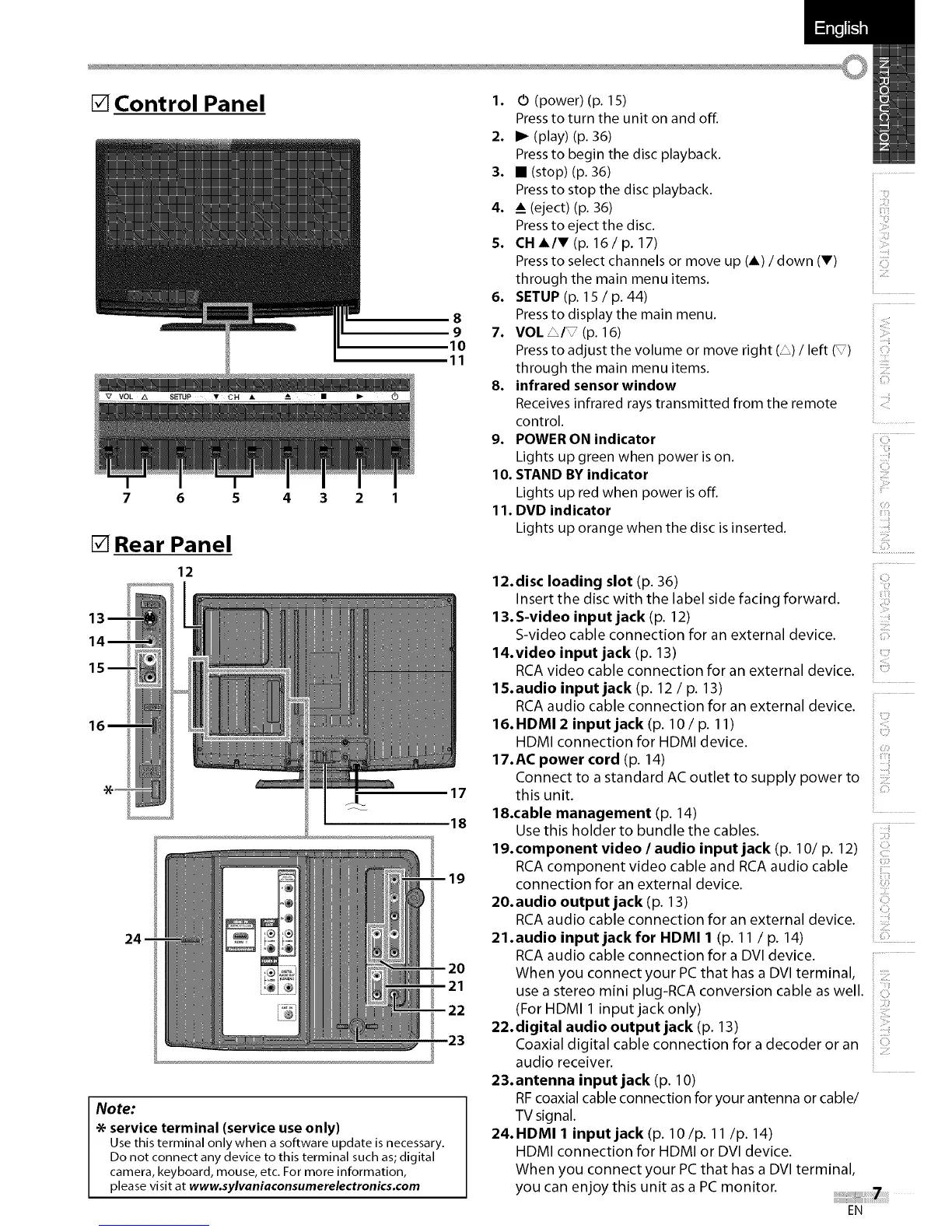
[] Control Panel
8
9
10
11
7 6 5 4 3 2 1
[] Rear Panel
12
17
18
Note:
* service terminal (service useonly)
Use this terminal only when a software update is necessary.
Do not connect any device to this terminal such as; digital
camera, keyboard, mouse, etc. For more information,
please visit at www.sylvaniaconsumerelectronics.com
1. 0 (power) (p. 15)
Press to turn the unit on and off.
2. I_ (play) (p. 36)
Press to begin the disc playback.
3. • (stop) (p. 36)
Press to stop the disc playback.
4. _ (eject) (p. 36)
Press to eject the disc.
5. CH A/V (p. 16 / p. 17)
Press to select channels or move up (A) / down (V)
through the main menu items.
6. SETUP (p. 15 / p. 44)
Press to display the main menu.
7. VOL _/_ (p. 16)
Press to adjust the volume or move right (_) / left (_)
through the main menu items.
8. infrared sensor window
Receives infrared rays transmitted from the remote
control.
9. POWER ON indicator
Lights up green when power is on.
10. STAND BY indicator
Lights up red when power is off.
11. DVD indicator
Lights up orange when the disc is inserted.
)
::ii,!iii!i
! !:!!:i¸¸
<i:i
i iii_iiil
12.disc loading slot (p. 36)
Insert the disc with the label side facing forward.
13. S-video input jack (p. 12)
S-video cable connection for an external device.
14.video input jack (p. 13)
RCAvideo cable connection for an external device.
15.audio input jack (p. 12 / p. 13)
RCAaudio cable connection for an external device.
16. HDMI 2 input jack (p. 10 / p. 11)
HDMI connection for HDMI device.
17.AC power cord (p. 14)
Connect to a standard AC outlet to supply power to
this unit.
18.cable management (p. 14)
Use this holder to bundle the cables.
19. component video / audio input jack (p. 10/p. 12)
RCAcomponent video cable and RCAaudio cable
connection for an external device.
20.audio output jack (p. 13)
RCAaudio cable connection for an external device.
21.audio input jack for HDMI 1 (p. 11 / p. 14)
RCAaudio cable connection for a DVI device.
When you connect your PCthat hasa DVI terminal,
i:_iiiiii
i !iT'_I
i iiii_ii!i!i
i C ¸¸i
i _:_:i¸
i!!iiii!
i Tii
i iiiiii!!
i!i_ii!i.........
use a stereo mini plug-RCA conversion cable as well.
(For HDMI 1 input jack only)
22.digital audio output jack (p. 13)
Coaxial digital cable connection for a decoder or an
audio receiver.
23.antenna input jack (p. 10)
RFcoaxialcable connectionfor your antenna or cable/
TV signal.
24.HDMI 1 input jack (p. lO/p. 11/p. 14)
HDMI connection for HDMI or DVl device.
When you connect your PCthat has a DVl terminal,
you can enjoy this unit as a PCmonitor.
EN















 To Next Page