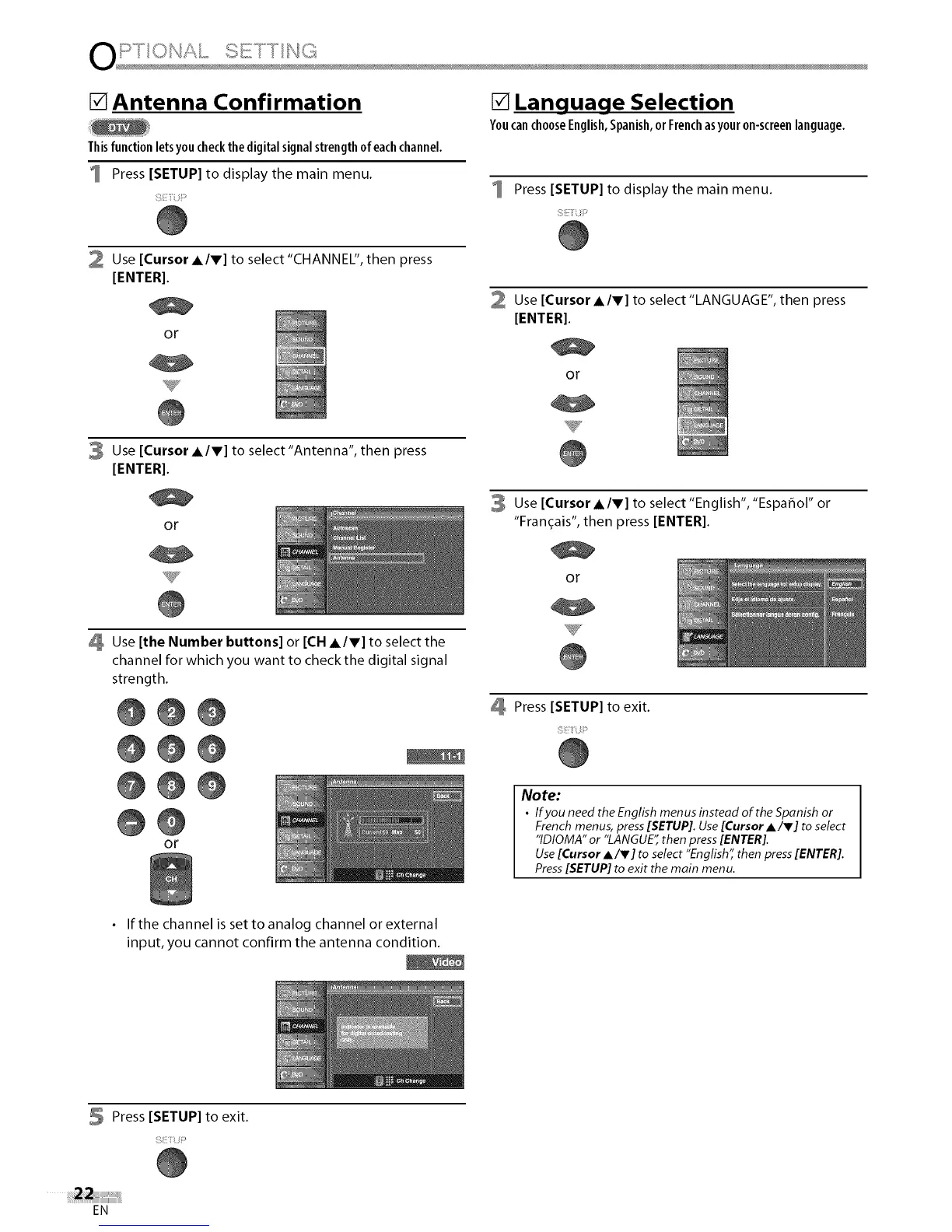
[] Antenna Confirmation
Thisfunctionletsyoucheckthe digitalsignalstrengthofeachchannel.
Press [SETUP] to display the main menu.
[] Language Selection
YoucanchooseEnglish,Spanish,orFrenchasyouron-screenlanguage.
Press [SETUP] to display the main menu.
2 Use [Cursor AIr] to select"CHANNEL", then press
[ENTER].
or
v
3 Use [Cursor AIr] to select"Antenna", then press
[ENTER].
or
Use [Cursor A/V] to select"LANGUAGE", then press
[ENTER].
or
Use [Cursor A/V] to select "English", "Espar_ol" or
"Fran_ais", then press [ENTER].
or
Use [the Number buttons] or [CH AIr] to select the
channel for which you want to check the digital signal
strength.
@@@
@@@
@@@
@@
or
Press [SETUP] to exit.
Note:
• IfyouneedtheEnglish menusinsteadoftheSpanish or
French menus,press[SETUP].Use[CursorA/V] to select
"IDIOMA"or "LANGUE"then press[ENTER].
Use[CursorA/V] to select "English",then press[ENTER].
Press[SETUP] to exit the main menu.
• If the channel is set to analog channel or external
input, you cannot confirm the antenna condition.
Press [SETUP] to exit.
EN















 To Next Page