[] TV Screen Display Mode
4typesofdisplaymodescanbeselectedwhenthe broadcastingstation
issending4:3or16:9videosignal.And3 typesofdisplaymodescanbe
selectedforPCinputsignal.
Press [SCREEN MODE @3] repeatedly to switch the TV
aspect ratio.
MODZ
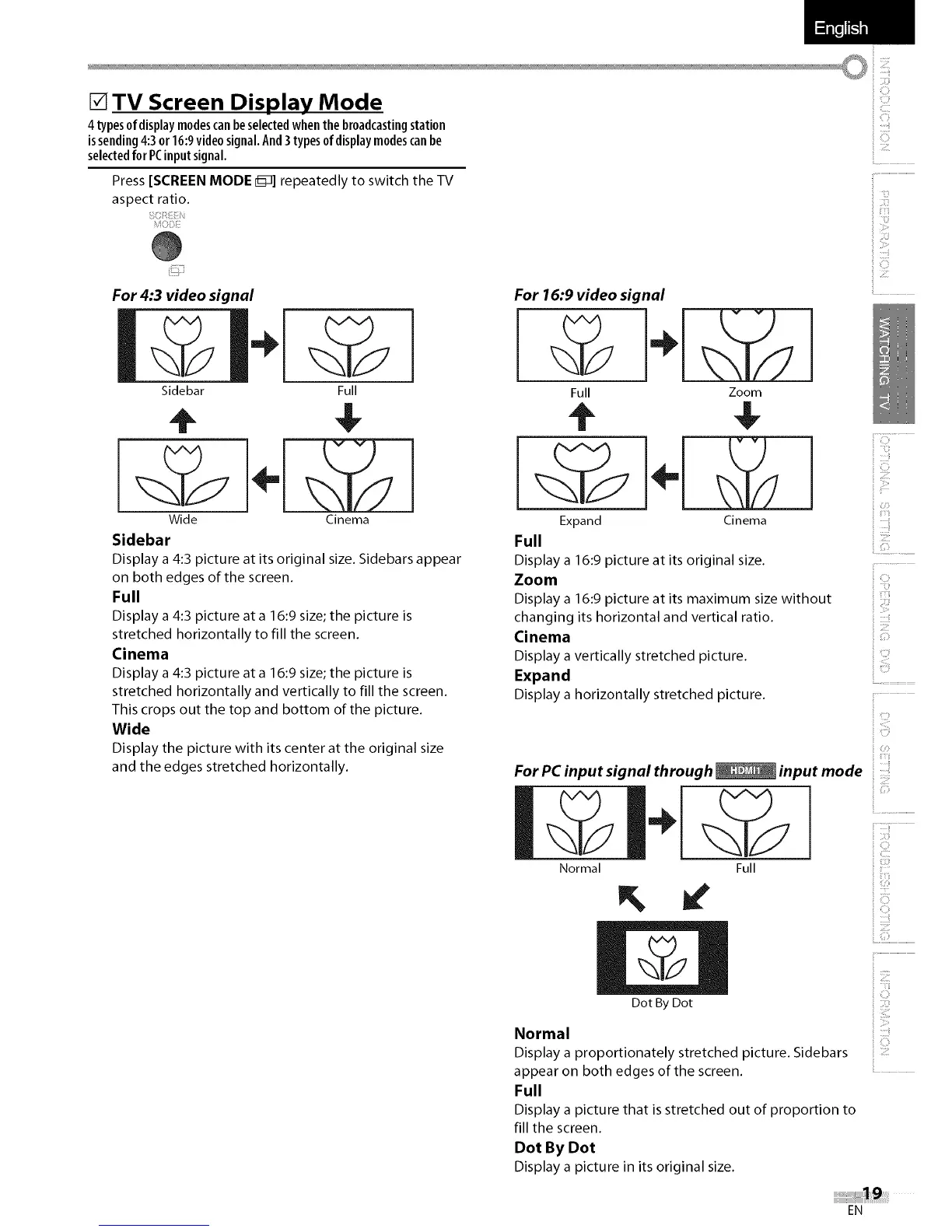
For 4:3 video signal
Sidebar Full
Wide Cinema
Sidebar
Display a 4:3 picture at its original size. Sidebars appear
on both edges of the screen.
Full
Display a 4:3 picture at a 16:9 size; the picture is
stretched horizontally to fill the screen.
Cinema
Display a 4:3 picture at a 16:9 size; the picture is
stretched horizontally and vertically to fill the screen.
This crops out the top and bottom of the picture.
Wide
Display the picture with its center at the original size
and the edges stretched horizontally.
iiS
ii ii:}i
For 16:9 video signal
Full
Expand
Full
Zoom
Cinema
Display a 16:9 picture at its original size.
Zoom
Display a 16:9 picture at its maximum size without
changing its horizontal and vertical ratio.
Cinema
Display a vertically stretched picture.
Expand
Display a horizontally stretched picture.
For PC input signal through _ input mode
Normal Full
il ZII_!
iiiii!_!:i
_ii_i!ii'!!!i
i! ZII_!
_i Z!!I'II
_ii!_ii{ill
s:F
ii C:_
_i!!i__
i! ::_!{
ii ZI!I!I
c?
00
::!i
iiiii_!}}!_
(ii/';_
[' ::::ii'
i U3
ii!!i i iii
ii Ziil
L,Z................................
y,
Dot By Dot
Normal
Display a proportionately stretched picture. Sidebars
appear on both edges of the screen.
Full
Display a picture that isstretched out of proportion to
fill the screen.
Dot By Dot
Display a picture in its original size.
ii i}}Z
i C}
ii Zt!:
EN















 To Next Page