In additionto thebasicclosedcaptiondescribedonpage25, DTVhasits
ownclosedcaptioncalleddigitalcaptionservice.Usethismenuto change
the settingsfordigitalcaptionservice.
Use [Cursor A/V] to select "Digital Caption Service",
then press [ENTER[.
or
Youcanchangethe captionstyle suchasfont,colororsize,etc.
Use [Cursor A/V] to select "Caption Style", then press
[ENTER].
or
Use [Cursor A/V] to select the desired digital caption
service, then press [ENTER].
or
Off Select if you do not want digital caption
service.This is the default.
Select one of these before changing
any other item in "Closed Caption"
service 1-6
menu. Choose"Service] "under normal
circumstances.
Press [SETUP] to exit.
Use [Cursor A/V] to select "User Setting", then press
[ENTER].
or
Use [Cursor &IV] to select "On", then press [ENTER].
or
Note:
• "Digital Caption Service" thatyou can switch differs
depending on the broadcast description.
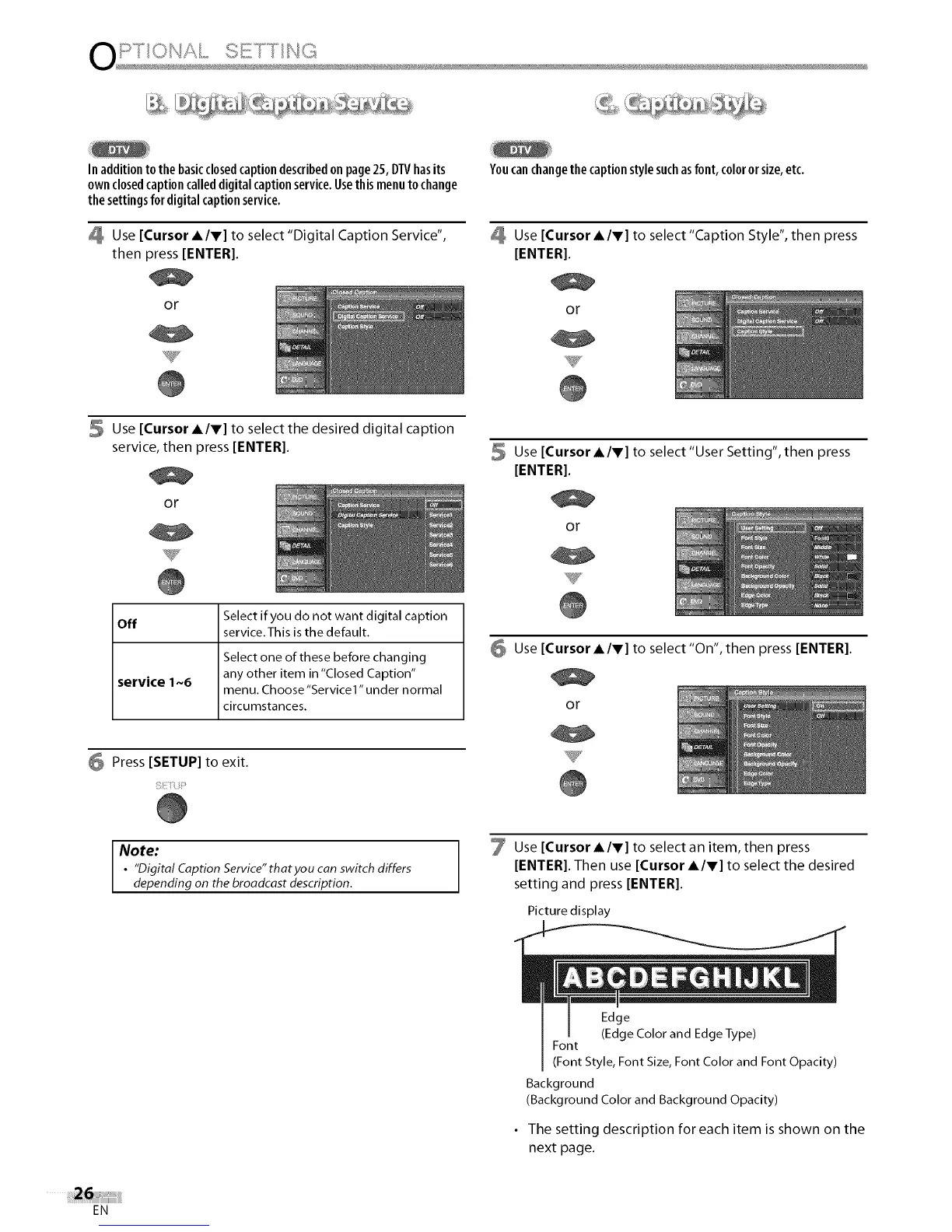
Use [Cursor A/V] to select an item, then press
[ENTER]. Then use [Cursor A/V] to select the desired
setting and press [ENTER].
Picture display
Edge
(Edge Color and Edge Type)
Font
(Font Style, Font Size, Font Color and Font Opacity)
Background
(Background Color and Background Opacity)
• The setting description for each item is shown on the
next page.
EN















 To Next Page