To this chapter contents
2. Maintenance Information
2-21
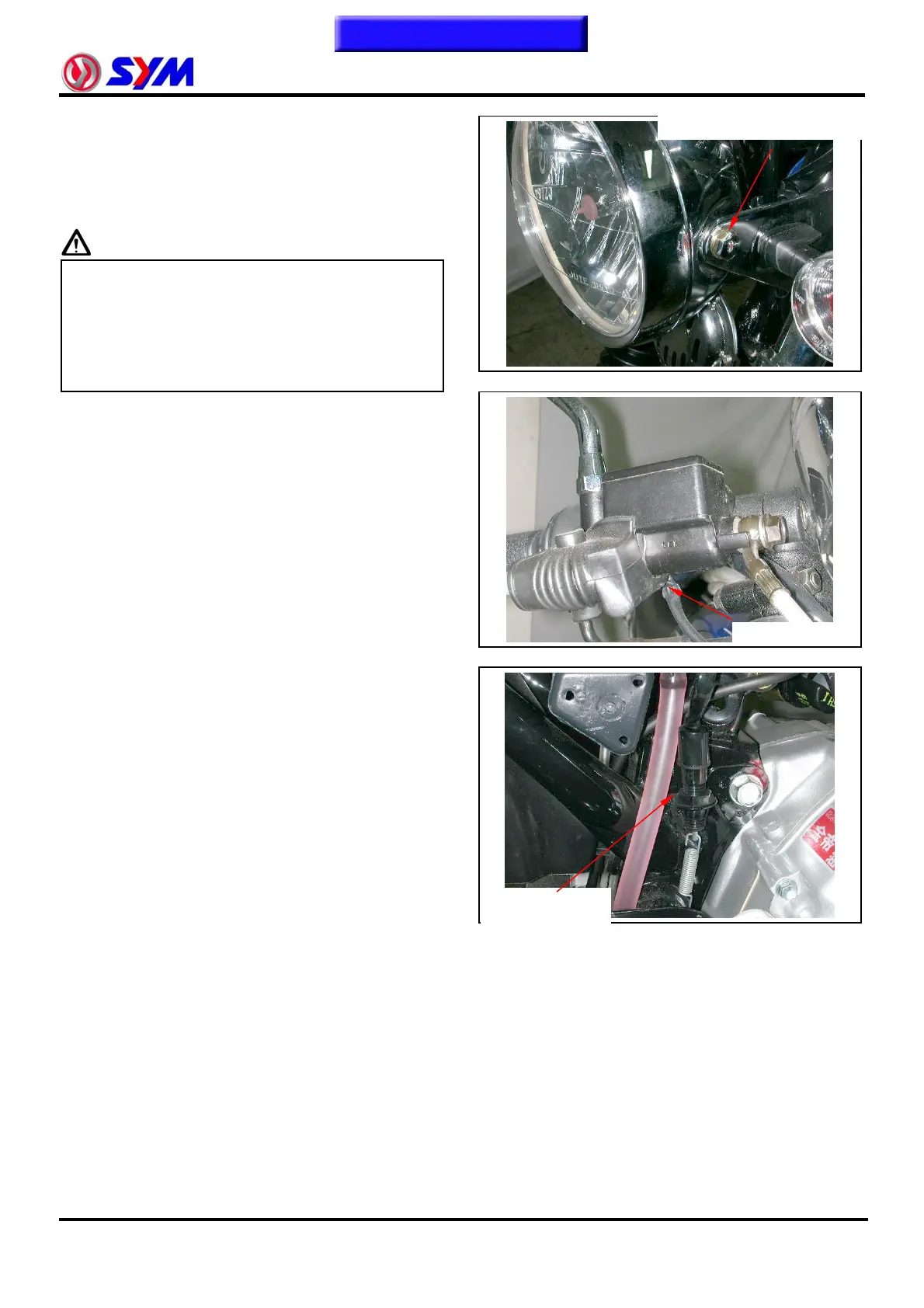
Headlight Adjustment
Turn on main switch. Loosen the headlight
adjustment screw to adjust headlight beam
height.
Caution:
z The factory setting of the beam height is
consistent with government orders.
z Improper headlight beam setting will
make driver in the opposite lane dazzled
and cause danger.
Brake Switch
Inspection on the brake switch
When brake lever is pulled, brake switch will
light up the brake lamp.
Make sure that electrical starter can be
activated only under braking condition.
Adjustment of rear brake switch.
Turn on the main switch.
When the brake pedal is stepped down for
20mm,the brake lamp should be activated.
If the brake lamp is not activated or
activated too early, please adjust through the
rear-brake-switch adjusting nut.
Turning clockwise will decrease the free
play, and counterclockwise to increase the
free play.
Nuts, Bolts Tightness
Apply periodical maintenance in according
with the Periodical Maintenance Schedule.
Check if all the bolts and nuts on the frame
are tightened well.
Check all fixing pins, snap rings, hose (pipe)
lamps, and wire holders for security. c
RR brake switch
adjust nut
headli
ht ad
ust. screw
Brake switch



 To Next Page