Administrative Options
5-9
To conduct a CB3000 firmware update:
1. Save the CB3000 current configuration before updating the firmware. After the update, the
configuration file can be imported to restore the CB3000 to the settings before the update.
See Importing or Exporting the Configuration File for more information.
Warning! Be sure to save a copy of the CB3000’s configuration file before
updating the firmware.
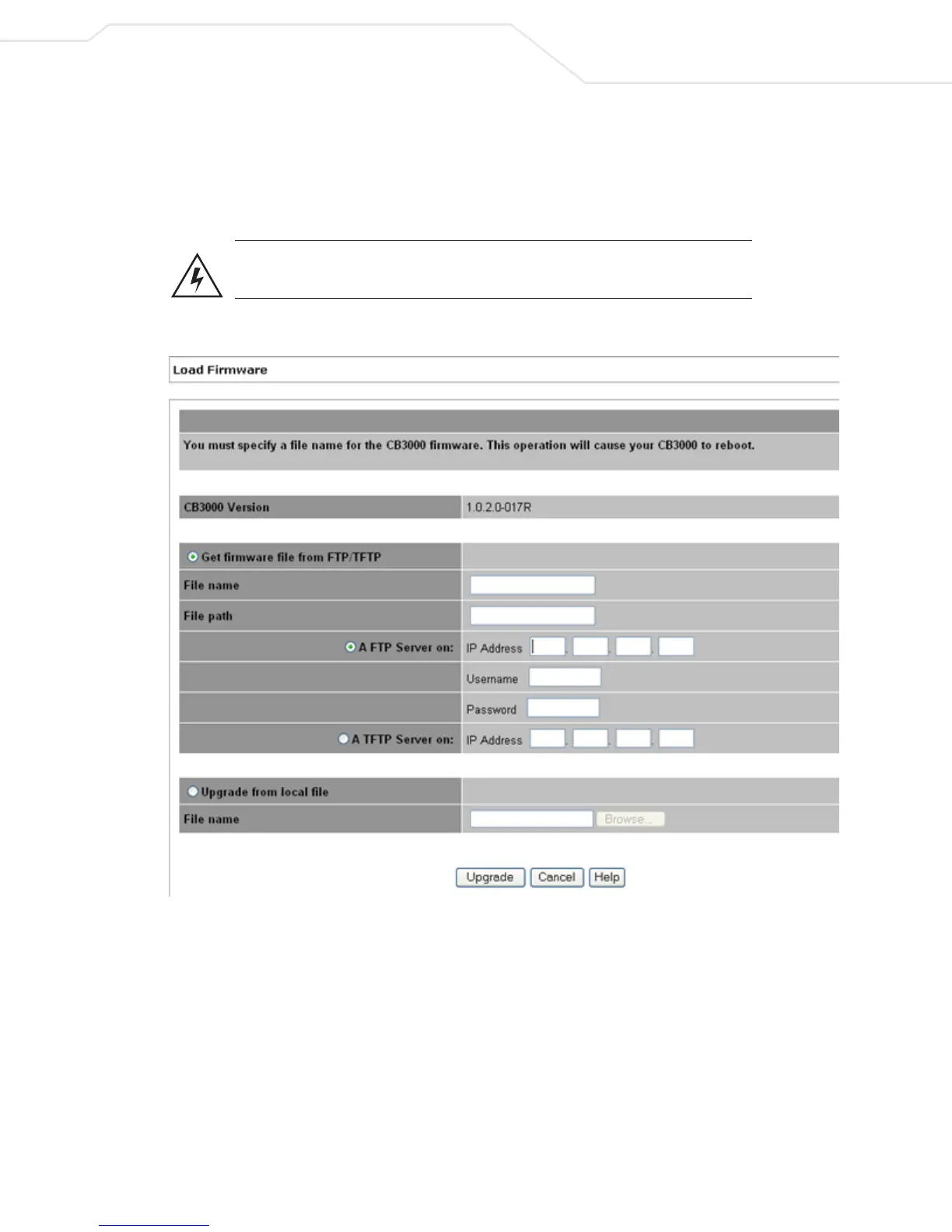
2. Select Tools > Load Firmware from the CB3000 menu tree. The Load Firmware screen displays.
Figure 5.6 Load Firmware Screen
3. Refer to the CB3000 Version displayed at the top of the screen to assess whether a firmware update
is required. Compare the installed version with the version available at:
http://www.symbol.com/services/downloads
If a firmware update is required, proceed to step 4.
4. Select whether to get the firmware file from either an FTP/TFTP server, or locally, via HTTP, by clicking
on the appropriate radio button in the upper and lower panels on the screen.
5. If loading the firmware file from a FTP/TFTP server, follow these steps (skip to step 6 for HTTP loads):
a. Specify the name of the target firmware file within the File name field.



 To Next Page