76
|
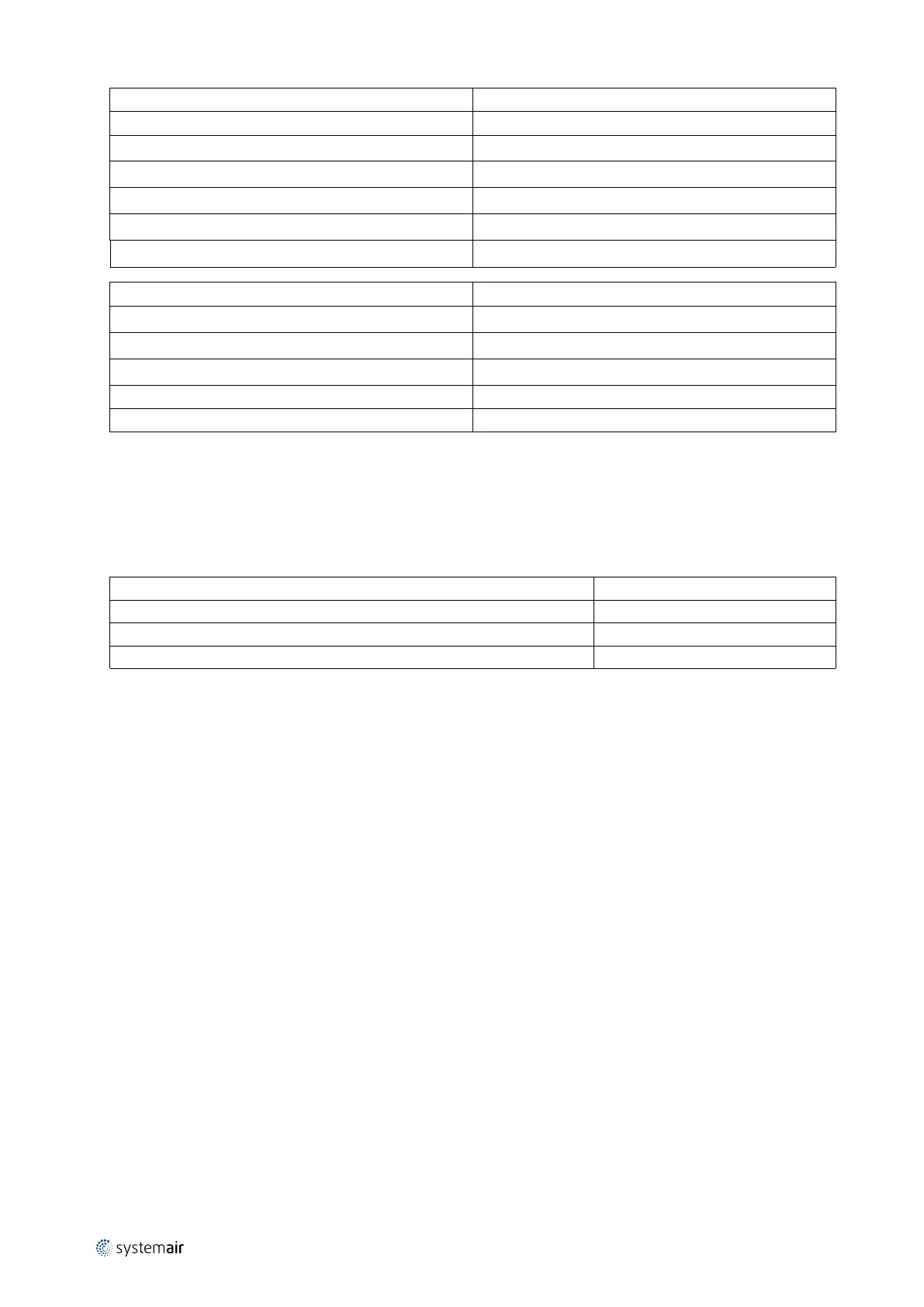
LED indication Value
No indication Power off
Green
Ordinary operation
Green – flashes Ready for operation
Green/Red strobe Rotary guard activated
Red Rotor guard has not been activated
Red strobe in sequence Alarm, rotary guard failure
Number of red flashes in series Value
1
Output current limit
2
Over voltage
3
Under voltage
4
Failure in the controller
5
Communication failure
Restart of rotor:
• Switch off power and switch on power again
or
• Press the test button inside the cabinet
Table 3 Test of motor by checking the resistance in all 3 vindings
Motor sizes
Ohm
90TYD-S214-M 40Ω
120TYD-S214-M 18Ω
120TYD-S214-L 10Ω
Setting of constant speed:
• Set fourth DIP switch lever in position - ON
Test:
• Set fourth DIP switch lever in position – ON
• Press the test button
7.2.3 Copy of the label with information about connection of cables
This self-adhesive label is always placed on the cover of the cabinet. The text is always in English.
211728 | v7.2



 To Next Page