EVERY CALL COUNTS 21
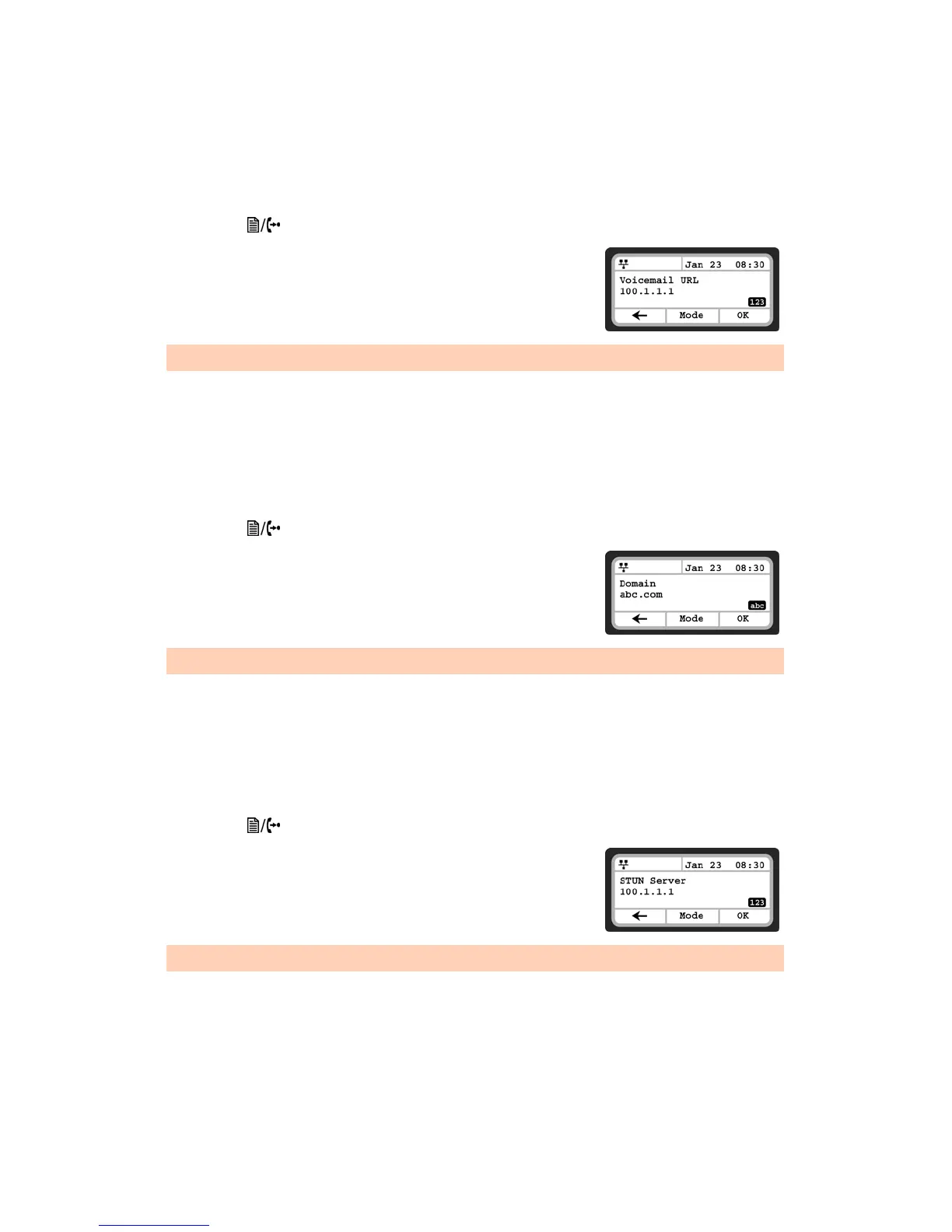
Voicemail URL
The Voicemail URL is used to access the voicemail of a host service or PBX. If not configured by the host
service or PBX, then it should be configured accordingly.
To assign the Voicemail URL:
• Press the button, then select 2. SIP Configuration, then 10. Voicemail URL.
• Input the Voicemail URL using the dial pad and press the OK softkey
to save your entry.
Domain
The Domain specifies the domain for SIP service when the provider desires to use a specific SIP domain for
the phone.
To assign the Domain:
• Press the button, then select 2. SIP Configuration, then 11. Domain.
• Input the Domain name using the dial pad and press the OK softkey
to save your entry.
STUN Server
When the phone is located behind NAT and a STUN server is required, enter a STUN server IP address or
FQDN to enable this feature that helps traverse firewalls in limited conditions.
• To assign a STUN server:
• Press the button, then select 2. SIP Configuration, then 12. Stun Server.
• Input the Stun Server using the dial pad and press the OK softkey to
save your entry.
To enter alphanumeric characters, select the Mode softkey.
To enter alphanumeric characters, select the Mode softkey.
To enter alphanumeric characters, select the Mode softkey.



 To Next Page