EVERY CALL COUNTS 29
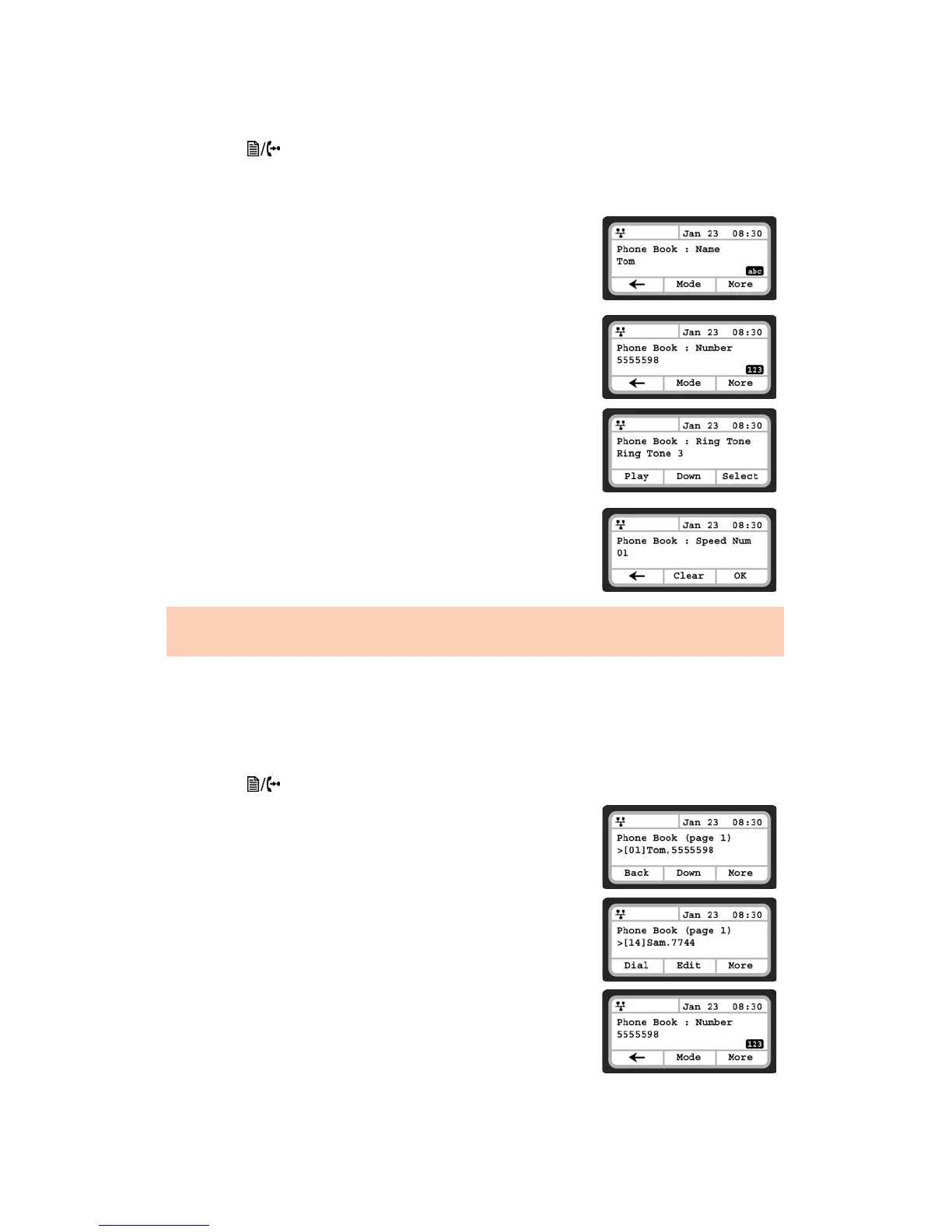
To add entries to the Phone Book using the telephone interface
• Press the button, then select 5. Directory, then 1. Phone Book.
• Press the More softkey twice to scroll to the additional softkey options.
• Press the Add softkey.
• Enter a name for the new contact, press the More softkey, then the
OK softkey.
• Enter a phone number, press the More softkey, then the OK softkey.
• Select the Ring tone to use when receiving a call from this contact,
then press the Select softkey.
• Enter a Speed Number (00–79), then press the OK softkey.
The phone adds the new contact to the Phone Book and returns to
the Phone Book list.
Editing a Contact
If logged in via the web interface, then click the Modify button next to the contact you wish to edit, then
change the information as required and save.
To edit a Phone Book contact from the phone:
• Press the button, then select 5. Directory, then 1 .Phone Book.
• Select a contact to edit using the Up and Down navigation keys.
• Press the More softkey once to scroll to the additional softkey
options.
• Press the Edit softkey.
• If required, edit the name of the contact and press the OK softkey.
• If required, edit the name of the contact, press the More softkey,
then the OK softkey.
To enter alphanumeric characters, select the Mode softkey.
If no ring tone is defined for a Phone Book entry, the default ring tone is used.



 To Next Page