EVERY CALL COUNTS 31
Searching the Phone Book
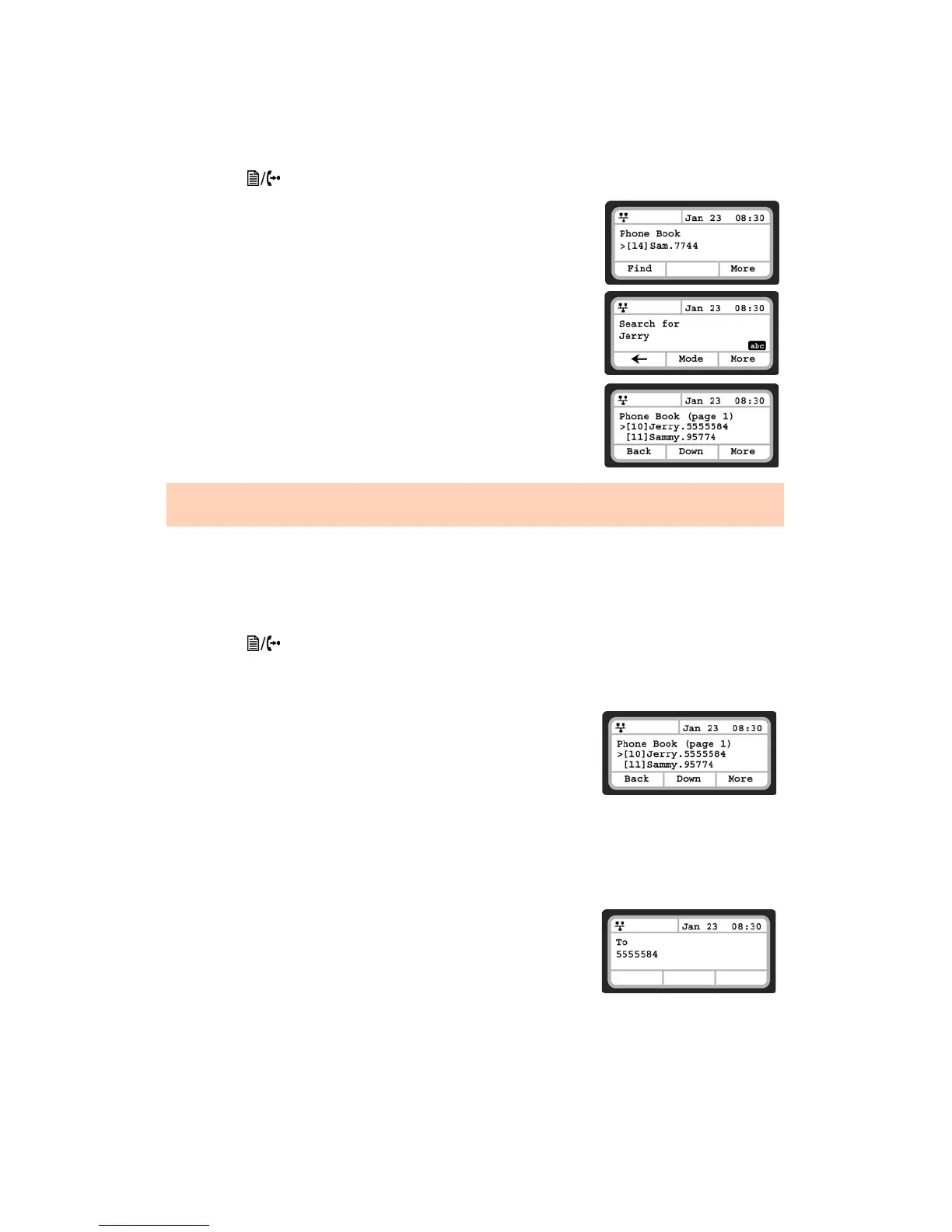
To search for the Phone Book using either Name or Number:
• Press the button, then select 5. Directory then 1. Phone Book.
• Press the More softkey 3 times to scroll to the additional softkey
options.
• Press the Find softkey.
• Input a search keyword, press the More softkey, then press the OK
softkey.
• The search result displays showing the Speed Number Name
and number.
Dialing from the Phone Book
To dial a number from the Phone Book:
• Press the button, then select 5. Directory then 1. Phone Book.
• Select a contact to dial using the Down softkey or search using the Find softkey.
• Press the More softkey to scroll to the additional softkey options.
• Press the Dial softkey to place the call.
To dial a contact using a flexible button programmed for Phone
Book access:
• Press the button while the phone is idle.
• Select a contact to dial using the Down softkey or search using the Find softkey.
• Press the More softkey to scroll to the additional softkey options.
• Press the Dial softkey to place the call.
To enter alphanumeric characters, select the Mode softkey. Refer to Appendix B for the character mapping of dial
pad digits.


 To Next Page