EVERY CALL COUNTS 49
PHONE BOOK
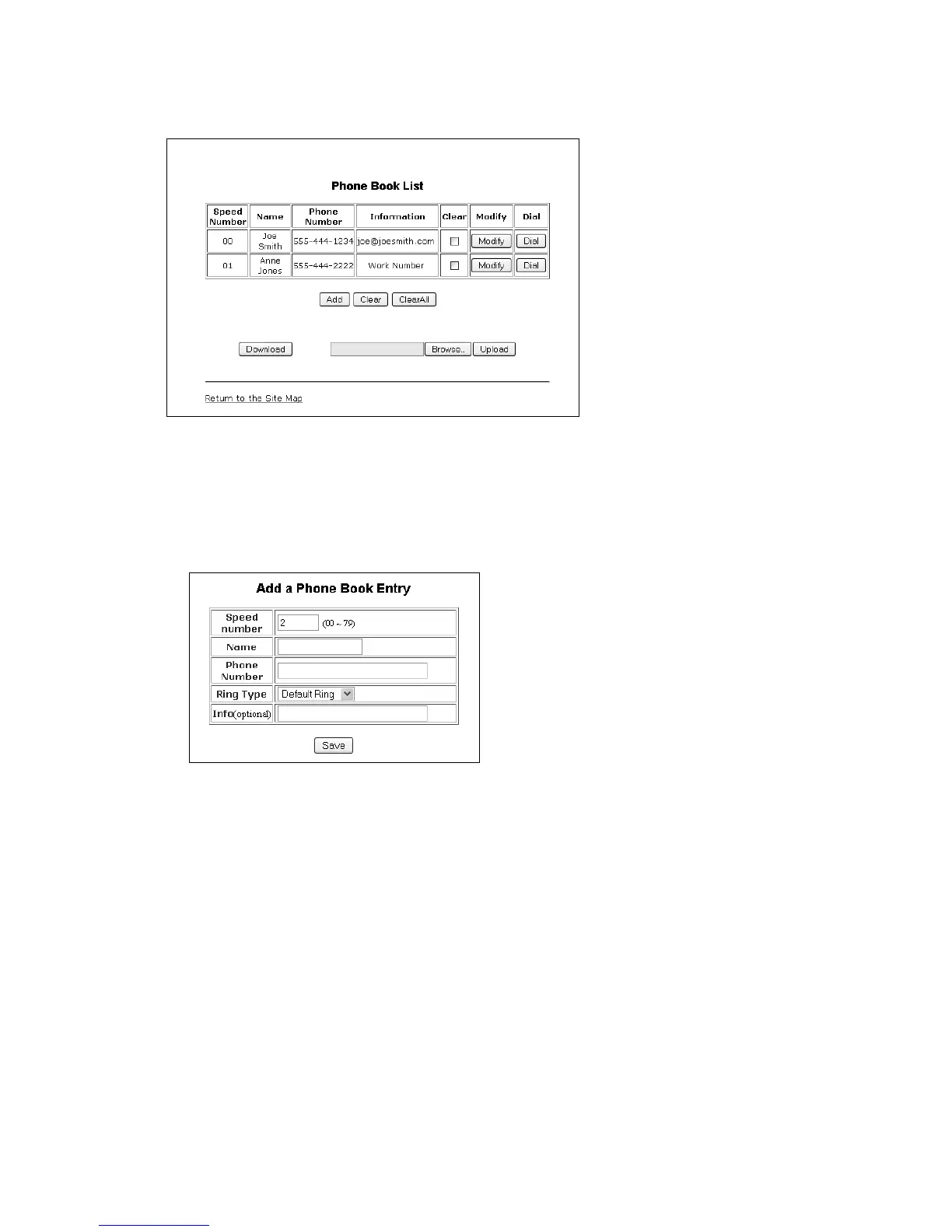
The phone includes an internal Phone Book with 80 contact records. Calls to a contact can be made using
the Speed number (00–79). Records may be added, edited, deleted or searched from the phone interface
via the Phone Book section under the Directory.
To add a Phone Book entry:
• Click the Add button and enter the new values. Information is purely an optional field. For example,
you might enter company names or e-mail addresses if desired.
• When complete, select the Save button to store the record.
To modify an entry:
•Select Modify for the desired record and enter the new values in the Phone Book Entry screen.
• When complete, select Save to store the modified record.
To place a call using the Phone Book:
• Click the Dial button for the desired contact.
To delete specific entries from the Phone Book:
• Click the Clear box for the desired records and select the Clear button to delete checked records.
To delete all entries from Phone Book:
• Select the ClearAll button.


 To Next Page