EasyManua.ls Logo

Tascam 388 Studio 8 - Punch-In Andinsert Editing

Tascam 388 Studio 8
139 pages
Print Icon
To Next Page IconTo Next Page
To Previous Page IconTo Previous Page
Loading...
It
¡s
possible
to
add
new
parts
while
ping-
ponging.
Any
mixer
channel
that
is
not
being
used
¡n
the
Remix
¡nput
mode
can
be
usad
to
add
a
new
part.
1.
Set
up
the
controls
for
the
channel(s)
that
you
want
to
use
for
the
new
material
in
the
same
way
that
you
did
for
recording
basic
tracks.
If
you
followed
our
example
for
ping-
PUNCH-IN
ANDINSERT
EDITING
The
artistic
process
doesn't
end
when
the
recording
begins.
Many
times,
a
way
to
improve
your
program
will
become
apparent
as
it
is
being
recordad.
Punch-in
gives
you
a
way
to
add
those
last
minute
ideas
to
your
recording.
Punch-in
can
aiso
be
used
to
correct
a
mistake
that
made
its
way
onto
the
tape.
Punch-in
erases
oíd
material
and
puts
new
material
in
its
place.
This
changa
is
permanent,
so
it's
wise
to
rabearse
your
Punch-in
until
you
are
confident
that
it
can
be
performed
correctiy.
We
will
give
you
the
rehearsal
procedure
first.
1.
PLAY
the
tape
to
within
several
seconds
of
the
desired
edit/punch-in
point.
2.
Press
the
RESET
button.
3.
Set
the
MON
switch
(PGM/CUE)
to
the
CUE
position
(up).
4.
Your
new
material
will
be
coming
from
one
of
the
Input
channeis
of
your
mixer.
Press
ponging,
you
could
use
channeis
5,
6,
and
7
for
new
material.
Route
the
new
channeis
to
program
buss
8
by
pressing
ASSIGN
7-8
and
rotating
the
PAN
fully
right
in
each
channel.
2.
Rabearse
the
new
parts
while
listening
to
the
previously
recordad
tracks.
Use
this
rehearsal
to
set
leváis
for
the
new
material.
3.
Perform
the
remainder
of
the
Ping-ponging
procedure.
the
appropriate
ASSIGN
switches
and
adjust
Faders
and
PAN
controls.
5.
During
this
rehearsal,
all
REC
FUNC-
TION
switches
should
be
off
(up).
6.
PLAY
your
tape.
The
reference
tracks
should
be
heard
through
your
headphones
via
the
MONITOR
section.
Adjust
the
lavéis
of
the
tracks
using
the
MONITOR
GAIN
controls.
7.
Rewind
the
tape
by
pressing
the
RTZ
button,
and
PLAY
it
again.
8.
When
you
reach
your
edit
point,
press
the
REC
FUNCTION
switch
for
the
track
to
be
editad.
You
will
now
be
able
to
hear
the
new
material
through
your
headphones.
9.
When
the
point
comes
to
punch-out,
end
the
edit,
press
the
REC
FUNCTION
switch
again.
This
will
return
the
MONITOR
to
the
tape
signal.
10.
Repeat
the
process
until
you
are
com-
fortable
with
it.
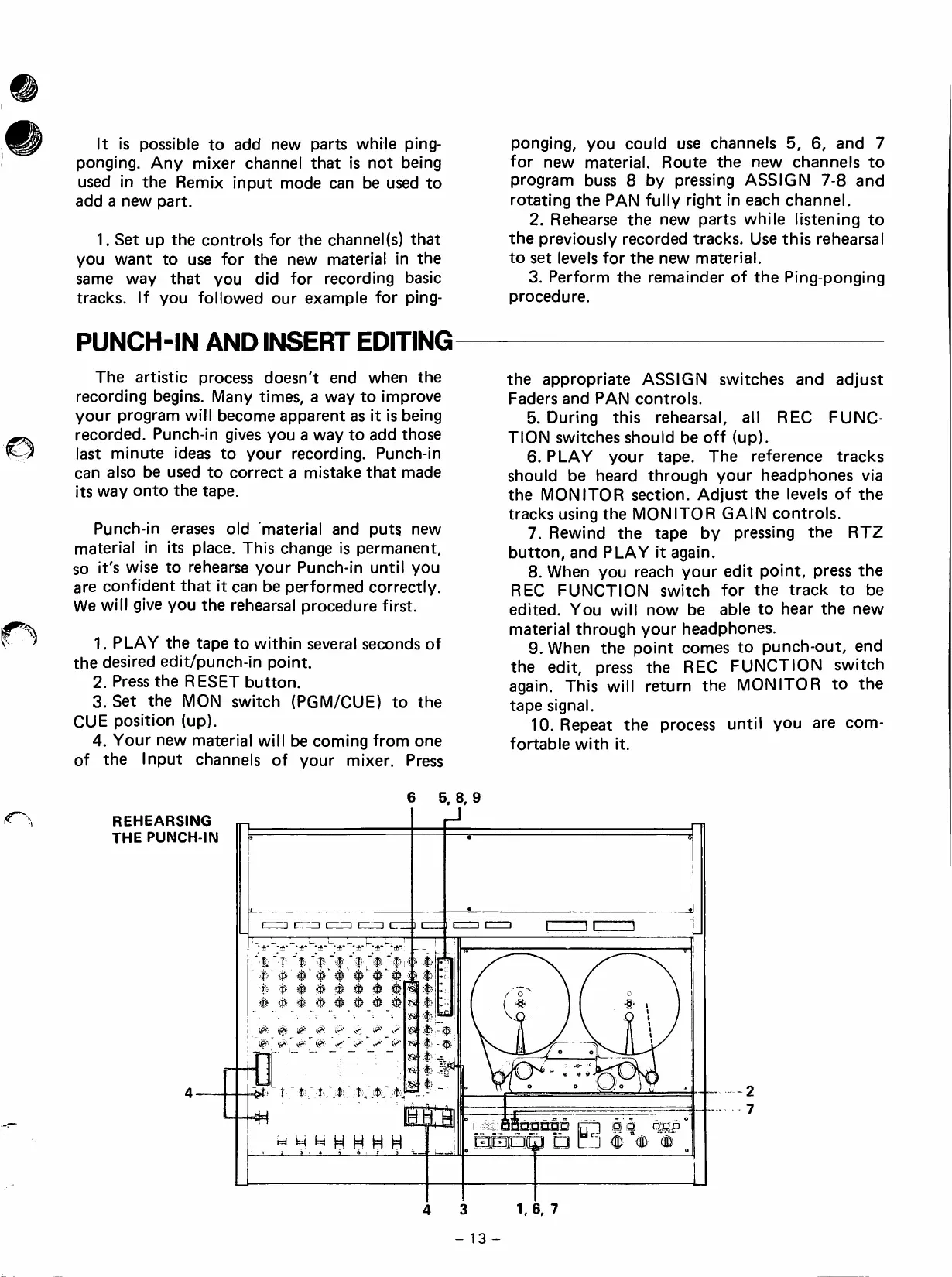
REHEARSING
THE
PUNCH-IN
k..kJ
■E
1
t
'
é'
é é
■fe
'Íí
^
#
ífe
ífe
é-
0
0 0 0
<r''
v'*
íí^'
r"T3
ir
^
M
H H
H H
5,
8,
9
^
-4;
Jí!
nnnna
□
i:
^
p
a
pLop
"
<ffi
1,
6,
7

Table of Contents