EasyManua.ls Logo

Tascam 388 Studio 8 - Tape Speed

Tascam 388 Studio 8
139 pages
Print Icon
To Next Page IconTo Next Page
To Previous Page IconTo Previous Page
Loading...
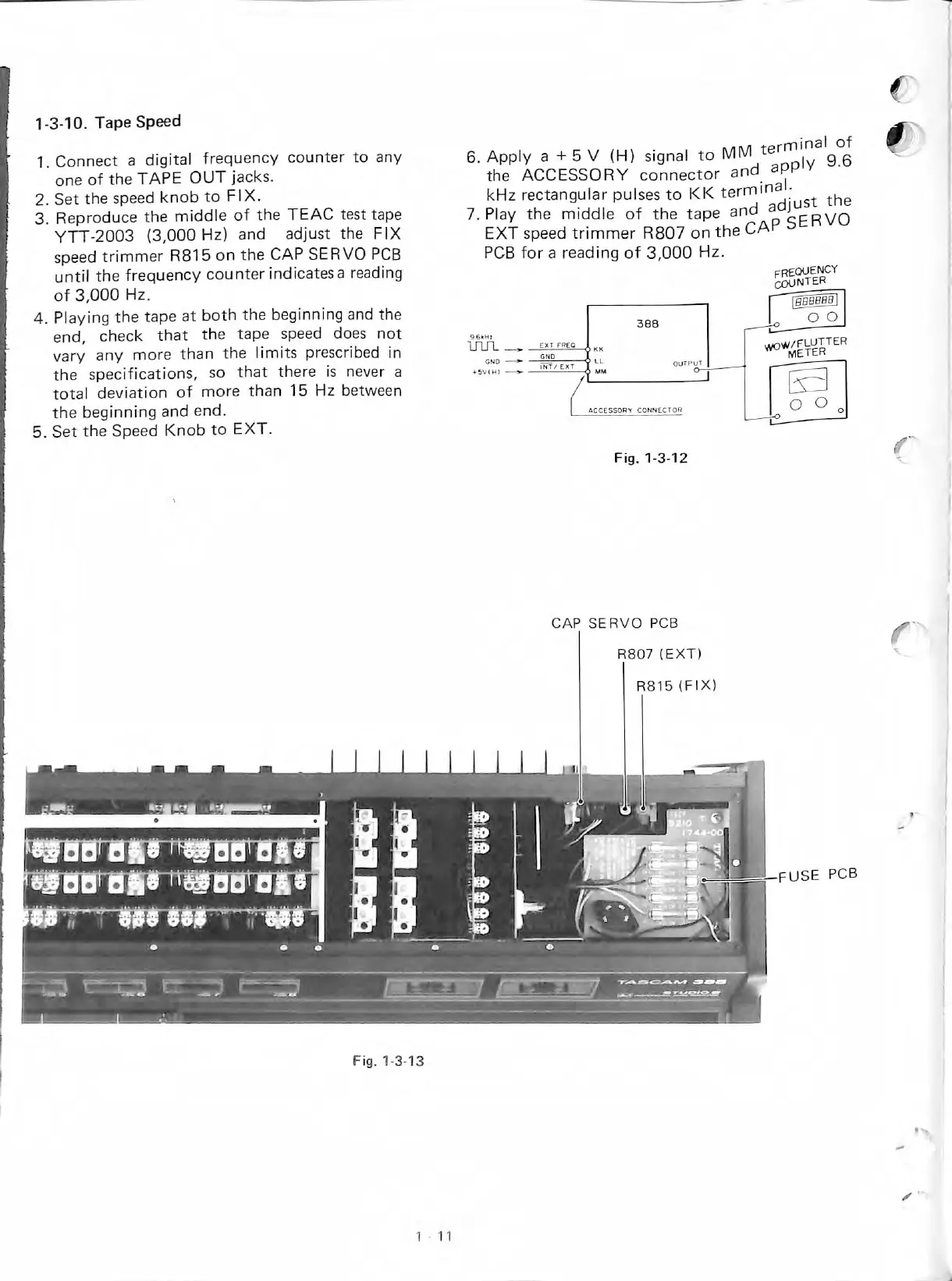
1-3-10.
Tape
Speed
1.Connect
a
digital
frequency
counter
to
any
one
of
the
TAPE
OUT
jacks.
2.
Set
the
speed
knob
to
FIX.
3.
Reproduce
the
middie
of
the
TEAC
test
tape
YTT-2003
(3,000
Hz)
and
adjust
the
FIX
speed
trimmer
R815
on
the
CAP
SERVO
PCB
untíl
the
frequency
counterindicatesa
reading
of
3,000
Hz.
4.
Playing
the
tape
at
both
the
beginning
and
the
end,
check
that
the
tape
speed
does
not
vary
any
more
than
the
limits
prescribed
in
the
specifications,
so
that
there
is
never
a
total
deviation
of
more
than
15
Hz
between
the
beginning
and
end.
5.
Set
the
Speed
Knob
to
EXT.
6.
Apply
a
+
5
V
(H)
signal
to
9.6
the
ACCESSORY
connector
and
app
y
kHz
rectangular
pulses
to
KK
the
7.
Play
the
middie
of
the
tape
and
p^cRVO
EXT
speed
trimmer
R807
on
the
CAP
PCB
for
a
reading
of
3,000
Hz.
aCCESSOPY
CONNECTOR
Fig.
1-3-12
CAP
SERVO
PCB
R807
(EXT)
frequewcy
^NTER
O
O O
„
R815
(FIX)
J'.
Fig.
1-3-13

Table of Contents