EasyManua.ls Logo

Tascam 388 Studio 8 - Wowand Flutter Check

Tascam 388 Studio 8
139 pages
Print Icon
To Next Page IconTo Next Page
To Previous Page IconTo Previous Page
Loading...
1
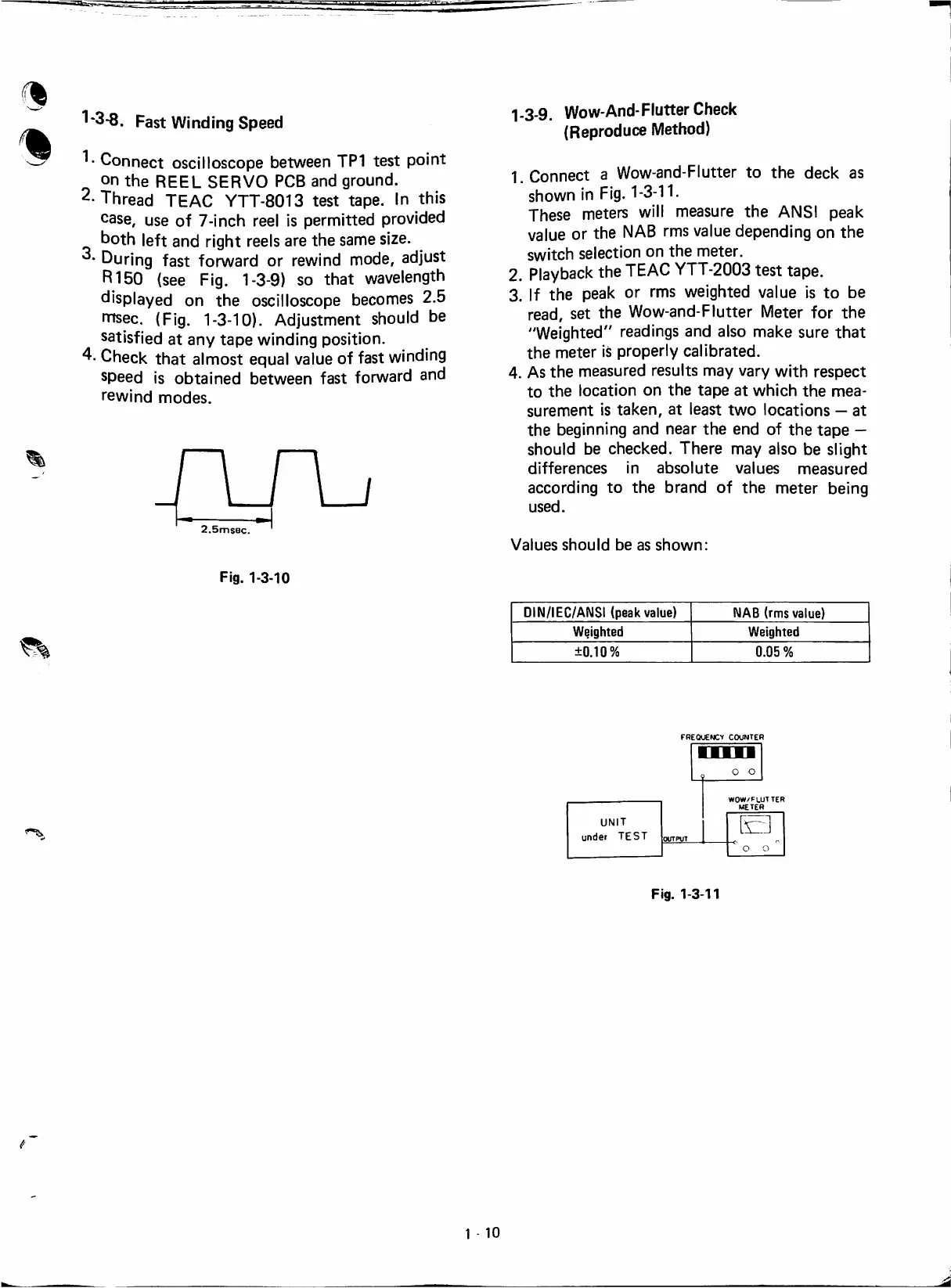
1-3-8.
Fast
Windíng
Speed
1*
Connect
oscílloscope
between
TP1
test
point
on
the
REEL
SERVO
PCB
and
ground.
2.
Thread
TEAC
YTT-8013
test
tape.
In
this
case,
use
of
7-¡nch
reel
¡s
permitted
provided
both
left
and
right
reeis
are
the
same
size.
During
fast
forward
or
rewind
mode,
adjust
R150
(see
Fig.
1-3-9)
so
that
wavelength
displayed
on
the
oscílloscope
becomes
2.5
rnsec.
(Fig.
1-3-10).
Adjustment
shouid
be
satisfied
at
any
tape
windíng
position.
4-
Check
that
almost
equal
valué
of
fast
windíng
speed
is
obtained
between
fast
forward
and
rewind
modes.
2.5msec.
1-3-9.
Wow-And-Flutter
Check
(Reproduce
Method)
1
Connect
a
Wow-and-Flutter
to
the
deck
as
shown
in
Fig.
1-3-11.
These
meters
will
measure
the
ANSI
peak
valué
or
the
NAB
rms
valué
depending
on
the
switch
selection
on
the
meter.
2.
Playback
the
TEAC
YTT-2003
test
tape.
3.
If
the
peak
or
rms
weighted
valué
is
to
be
read,
set
the
Wow-and-Flutter
Meter
for
the
"Weighted"
readings
and
aiso
make
sure
that
the
meter
is
properly
calibrated.
4.
As
the
measured
results
may
vary
with
respect
to
the
location
on
the
tape
at
which
the
mea-
surement
is
taken,
at
least
two
locations
at
the
beginning
and
near
the
end
of
the
tape
shouid
be
checked.
There
may
aiso
be
slight
differences
in
absolute
valúes
measured
according
to
the
brand
of
the
meter
being
used.
Valúes
shouid
be
as
shown:
Fig.
1-3-10
DIN/IEC/ANSi
(peak
valué)
NAB
(rms
valué)
Weighted
Weighted
±0.10%
0.05
%
FREQUENCV
COUNTER
WOW/FLUTTER
METER
UNIT
under
TEST
OUTPUT
o o
Fig.
1-3-11
1
10

Table of Contents