EasyManua.ls Logo

Tascam 388 Studio 8 - Dbx Pcb Adjustment

Tascam 388 Studio 8
139 pages
Print Icon
To Next Page IconTo Next Page
To Previous Page IconTo Previous Page
Loading...
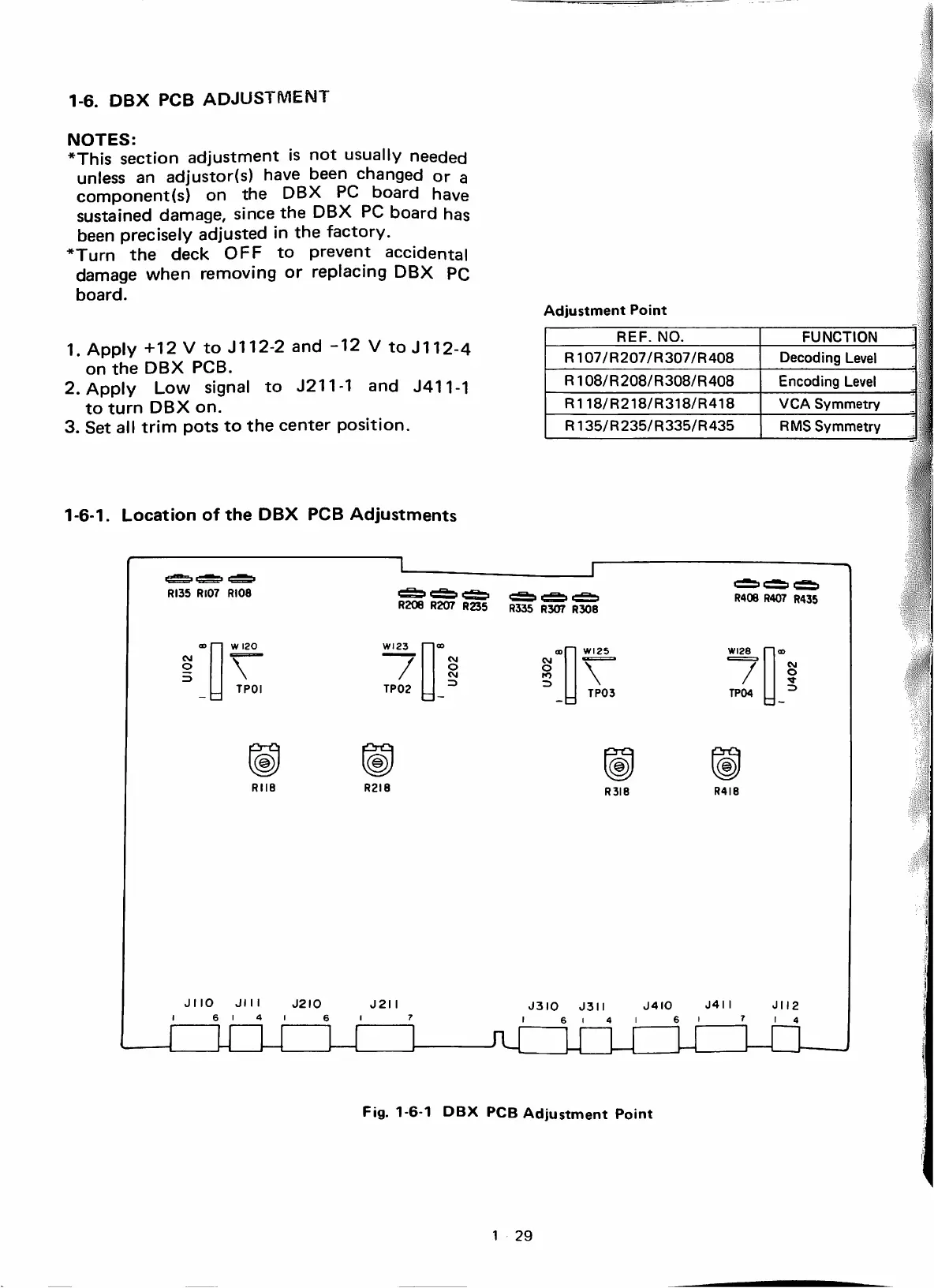
1-6.
DBX
PCB
ADJUSTMENT
NOTES:
*This
sectíon
adjustment
is
not
usually
needed
unless
an
adjustor{s)
have
been
changad
or
a
component(s)
on
the
DBX
PC
board
have
sustained
damage,
sincethe
DBX
PC
board
has
been
precisely
adjusted
¡n
the
factory.
*Turn
the
deck
OFF
to
prevent
accidental
damage
when
removing
or
repiacing
DBX
PC
board.
1.
Apply
+12
V
to
J112-2
and
-12
V
to
J112-4
on
the
DBX
PCB.
2.
Apply
Low
signal
to
J211-1
and
J411-1
to
turn
DBX
on.
3.
Set
all
trim
pots
to
the
center
position.
Adjustment
Point
REF.
NO.
FUNCTION
R107/R207/R307/R408
Decoding
Level
R108/R208/R308/R408
Encoding
Level
R118/R218/R318/R418
VCASymmetry
R135/R235/R335/R435
RMS
Symmetry
1-6-1.
Location
of
the
DBX
PCB
Adjustments
ROS
RI07
RIOS
W
I20
\"
TPOI
(©)
RII8
JI
IO
JIM
J2I0
I
6
1
4
1
6
R20e
R207
R235
R335
R307
R308
/
TP02
cvi
O
CVI
3
(g)
R2I8
J2I
I
\
TP03
(©)
R3I8
R40e
R407
R435
/
TP04
(g)
R4I8
J3I0
J3Í
Í
J4I0
J4I
I
JI
I2
I
6
1
4
1
6
1
f
1
4
Fig.
1-6-1
DBX
PCB
Adjustment
Point
1
29

Table of Contents

Related product manuals