EasyManua.ls Logo

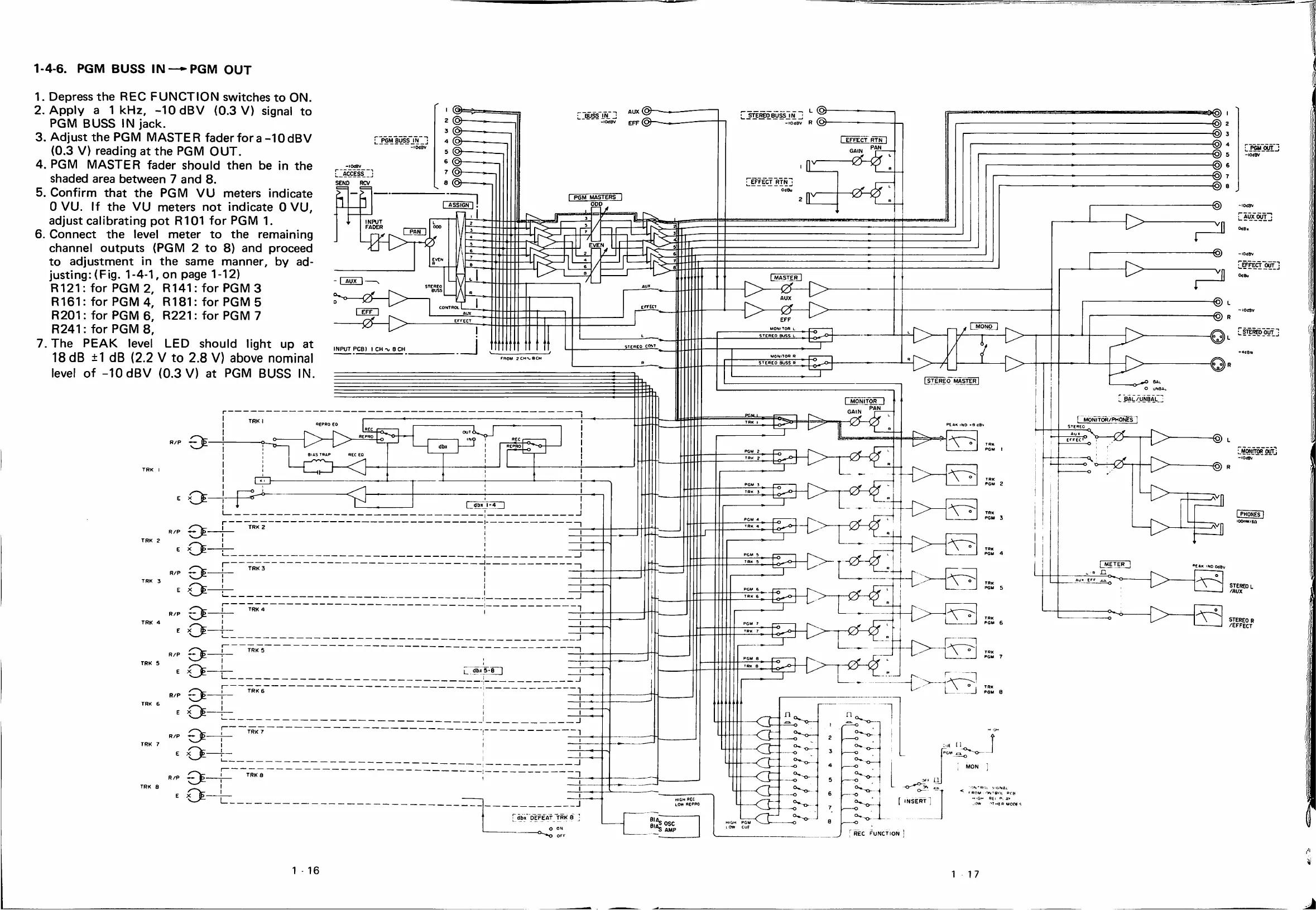
Tascam 388 Studio 8 - Pgm Buss In-Pgm out

Tascam 388 Studio 8
139 pages
Print Icon
To Next Page IconTo Next Page
To Previous Page IconTo Previous Page
Loading...
1-4-6.
PGM
BUSS
IN
—PGM
OUT
1.
Depress
the
REC
FUNCTION
switches
to
ON.
2.
Apply
a
1
kHz,
-lOdBV
{0.3
V)
signal
to
PGM
BUSS
IN
jack.
3.
Adjust
the
PGM
MASTER
fader
fora-lOdBV
(0.3
V)
reading
at
the
PGM
OUT,
4.
PGM
MASTER
fader
should
then
be
¡n
the
shaded
area
between
7
and
8.
5.
Confirm
that
the
PGM
VU
meters
indícate
O
VU.
If
the
VU
meters
not
indícate
O
VU,
adjust
calibrating
pot
R101
for
PGM
1.
6.
Connect
the
leve!
meter
to
the
remaining
channel
outputs
(PGM
2
to
8)
and
proceed
to
adjustment
in
the
same
manner,
by
ad-
jüsting:
(Fig.
1-4-1,
on
page
1-12)
R121:
for
PGM
2,
R141:forPGM3
R181
R221
for
PGM
5
for
PGM
7
R161:
for
PGM
4,
R201:
for
PGM
6,
L-ÁCCESS
_]
SENO
RCV
>
R241:
for
PGM
8,
7.
The
PEAK
leve!
LED
should
light
up
at
18
dB
±1
dB
(2.2
V
to
2.8
V)
above
nominal
level
of
-lOdBV
(0.3
V)
at
PGM
BUSS
IN.
,
L
@
STEREOBUSSIN
rOúBV
ppp
EFFECT
RTN
PGM
BUSS
IN
0«BV
^OUT
-lOdBV
EFFECT
RTN
OdBu
(2^
PGM
MASTERS
ASSiGN]
-lOÍBV
AUX
OUT
INPUT
FADER
EVEN
^ffFECT^
EFFECT
LmonoJ
r—\
1>
STEREO
OUT
steheo
cott
INPUT
PCB)
I
CH-v,
eCH
I
STEREO
MASTER
BAL/UNBAL
MONITOR
r
mónitor/phonEs
STEBEO
r-r>
TRK
I
MONITOR
OUTj
PGM
2
PGM
3
TRK
2
»eAK
1N0
OdBV
TRK
3
STEREO
L
/AUX
TRK
4
TRK
5
L_
db;>
5*8
TRK
PGM
e
TRK
6
TRK
7
TRK
8
I
INSERT
-J
db*
OEFEAT
TRK0
BiS
ose
S
AMP
O
ON
OfF
REC
FUNCTION
STEREO
R
/EFFECT
1
'S'GNAi
POM
ON
Tgoi
PftB
m'Gm
PE<
a>
MH^PMOfífS
1
-
16
1
17

Table of Contents

Related product manuals