EasyManua.ls Logo

Tascam 388 Studio 8 - Crosstalk between Channeis

Tascam 388 Studio 8
139 pages
Print Icon
To Next Page IconTo Next Page
To Previous Page IconTo Previous Page
Loading...
5)
Compare
the
output
leveis
obtained
¡n
the
steps
2
and
4;
the
level
difference
should
be
higher
than
70
dB
for
each
channel.
6)
If
not:
*
Olean
the
tape
transport
path.
*Check
the
tape
transport
mechanism.
OSOLUOSCOPE
OSCILLATOR
AMP
SPKR
AC
VOLTMETER
FlUTER
ATTENUATOR
UNIT
under
TEST
Fig.
1-5-5.
Erase
Ratio
Test
Set-Up
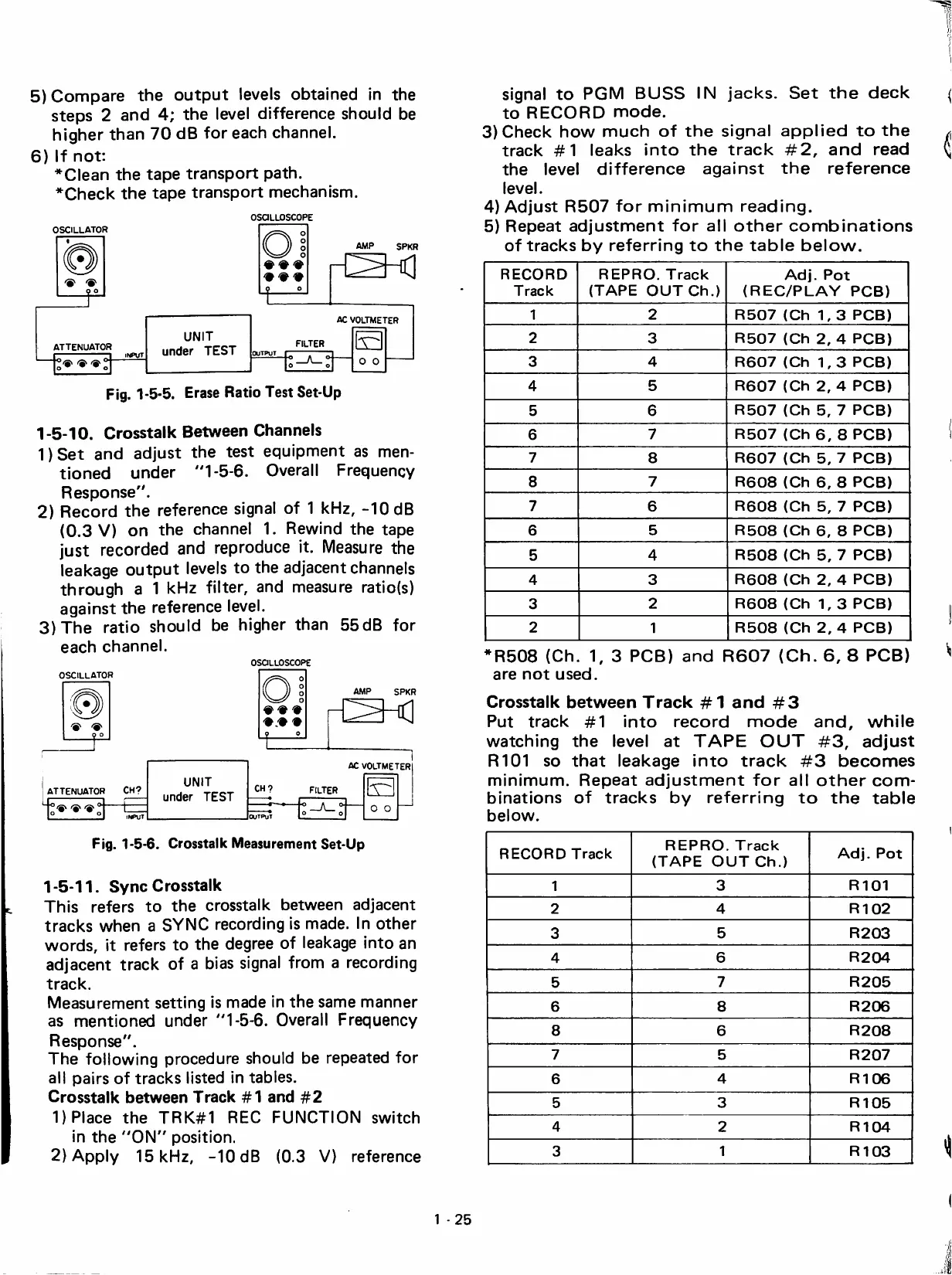
1-5-10.
Crosstalk
Between
Channeis
1)Set
and
adjust
the
test
equipment
as
men-
tioned
under
"1-5-6.
Overa!!
Frequency
Response".
2)
Record
the
reference
signa!
of
1
kHz,
-10
dB
(0.3
V)
on
the
channe!
1.
Rewind
the
tape
just
recordad
and
reproduce
it.
Measure
the
leakage
output
leveis
to
the
adjacent
channeis
through
a
1
kHz
füter,
and
measure
ratio(s)
against
the
reference
leve!.
3)
The
ratio
should
be
higher
than
55dB
for
each
channe!.
OSOLUOSCOPE
AMP
SPKR
AC
VOLTMETER
CH?
ATTENUATOR
CH?
FILTER
UNIT
under
TEST
Fig.
1-5-6.
Crosstalk
Measurement
Set-Up
1-5-11.
Syno
Crosstalk
This
refers
to
the
crosstalk
between
adjacent
tracks
when
a
SYNC
recording
is
made.
!n
other
words,
it
refers
to
the
degree
of
leakage
into
an
adjacent
track
of
a
bias
signa!
from
a
recording
track.
Measurement
setting
is
made
in
the
same
manner
as
mentioned
under
"1-5-6.
Overa!!
Frequency
Response".
The
foüowing
procedure
should
be
repeated
for
al!
pairs
of
tracks
listad
in
tables.
Crosstalk
between
Track
#1
and
#2
1)
Place
the
TRK#1
REO
FUNCTION
switch
in
the
"ON"
position.
2)App!y
15
kHz,
-10
dB
(0.3
V)
reference
signa!
to
PGM
BUSS
IN
jacks.
Set
the
deck
to
RECORD
mode.
3)
Check
how
much
of
the
signa!
applied
to
the
track
#1
leaks
into
the
track
#2,
and
read
the
leve!
difference
against
the
reference
leve!.
4)
Adjust
R507
for
minimum
reading.
5)
Repeat
adjustment
for
al!
other
combinations
of
tracks
by
referring
to
the
table
below.
RECORD
Track
REPRO.
Track
(TAPE
GUTCh.)
Adj.
Pot
(REC/PLAY
PCB)
1
2
R507
(Ch
1,3
PCB)
2
3
R507
(Ch
2,
4
PCB)
3
4
R607
(Ch
1,3
PCB)
4
5
R607
(Ch
2,
4
PCB)
5
6
R507
(Ch
5,
7
PCB)
6
7
R507
(Ch
6,
8
PCB)
7
8
R607
(Ch
5,
7
PCB)
8
7
R608
(Ch
6,
8
PCB)
7
6
R608
(Ch
5,
7
PCB)
6
5
R508
(Ch
6,
8
PCB)
5
4
R508
(Ch
5,
7
PCB)
4
3
R608
(Ch
2,
4
PCB)
3
2
R608
(Ch
1,3
PCB)
2
1
R508
(Ch
2,
4
PCB)
*R508
(Ch.
1,
3
PCB)
and
R607
(Oh.
6,
8
PCB)
are
not
used.
Crosstalk
between
Track
#1
and
#3
Put
track
#1
into
record
mode
and,
while
watching
the
leve!
at
TAPE
OUT
#3,
adjust
R101
so
that
leakage
into
track
#3
becomes
minimum.
Repeat
adjustment
for
al!
other
com
binations
of
tracks
by
referring
to
the
table
below.
RECORD
Track
REPRO.
Track
(TAPE
OUT
Ch.)
Adj.
Pot
1
3
R101
2
4
R102
3
5
R203
4
6
R204
5
7
R205
6
8
R206
8
6
R208
7
5
R207
6
4
R106
5
3
R105
4
2
R104
3
1
R103
1
25

Table of Contents