EasyManua.ls Logo

Tascam 388 Studio 8 - A Word of Mixing Advice

Tascam 388 Studio 8
139 pages
Print Icon
To Next Page IconTo Next Page
To Previous Page IconTo Previous Page
Loading...
n^essary.
Less
is
defínitely
more
when
con-
sidering
EQ.
^
®Qua'izer
¡s
a
three
band
sweep-
frirf
offers
the
ability
to
select
a
precise
15
h'r
or
minus
frnm
ó
c
I
.
.
^°"trol
covers
frequencles
ODPrat
U
mid-range
control
contri?'
I""®®"
5
The
bass
to
1
irú'^
^djustable
for
frequencies
from
50
Hz
in
+K
t
^here
¡s
some
overlap
in
the
frequency
ranges.
T-i
controls
work
in
an
interactive
way.
can
be
timbre
of
the
sound
In
a
channel
brusL
L
®
=hange
SuDnnco
controls.
How
so?
the
'=''^"9®
"balance"
of
you
reach't
^
®®®®"*"®t'"9
the
bass.
Before
start
booct
"'^
the
50Hz
to
1
kHz
control
and
both
of
fh
"sing
either
or
someoftha
controls
to
"roll
off"
ephomiU
th"'
®
tf^^®®
®°"t'-ols
solvina
Ai«
*®®'"work
approach
to
problem
an
EQ
adh
consider
all
three
options
when
adjustment
is
necessary.
neJl^c«"'*'®r:í'^"'.®''
*''®
®'9"al
defínitely
at
tho
adjustment
and
you
have
looked
which
nf
®"''
determinad
voii
nn
three
controls
you
wish
to
use,
within
7h
cletermine
the
precise
frequency
wthm
the
control's
ranga.
To
do
this,
turn
the
knnhc
t
'"PP®"")
of
the
two
concentric
wav
Mn°
r,
®*®9?®''®ted
positlon
almost
all
the
freouenrv/
slowly
sweep
the
port^nn
f™u®®
^
*"''".'"9
"'®
°"tside
(lower)
murn
it
*11
í
®°"®®"*''ic
knob
from
Its
mini-
In
a
oi
J
■
niaxlmum
(fully
right)
un,!
.°®'í'^'®®
motlon.
As
the
control
Is
turnad
Whe,^'l
f
In
the
signal's
content.
the
rÍ,f,
®''
frequency
Is
Isolated,
reset
of
h
control
for
the
necessary
amount
durinn^^^
^^®id
rnaking
these
changes
creato
^
''®po''ding.
The
sweeping
actlon
can
create
undesirable
tonal
effects.
A
WORD
OF
MIXING
ADVICE
All
finished
tapes
must
be
balanced
for
leve!.
Do
all
the
instruments
and
volees
blend
together
In
a
way
that
Is
appealing?
Are
the
bass
and
drums
so
loud
that
the
singer
Is
"lost
¡n
the
mix"?
Your
slgnal
leveis
wlll
affect
the
entire
recording
and
mastering
process,
Incíuding
the
EQ
process.
So
make
sure
that
your
leveis
are
properly
adjusted
when
mixing
for
recording.
You
can't
flx
It
If
you
can't
find
It.
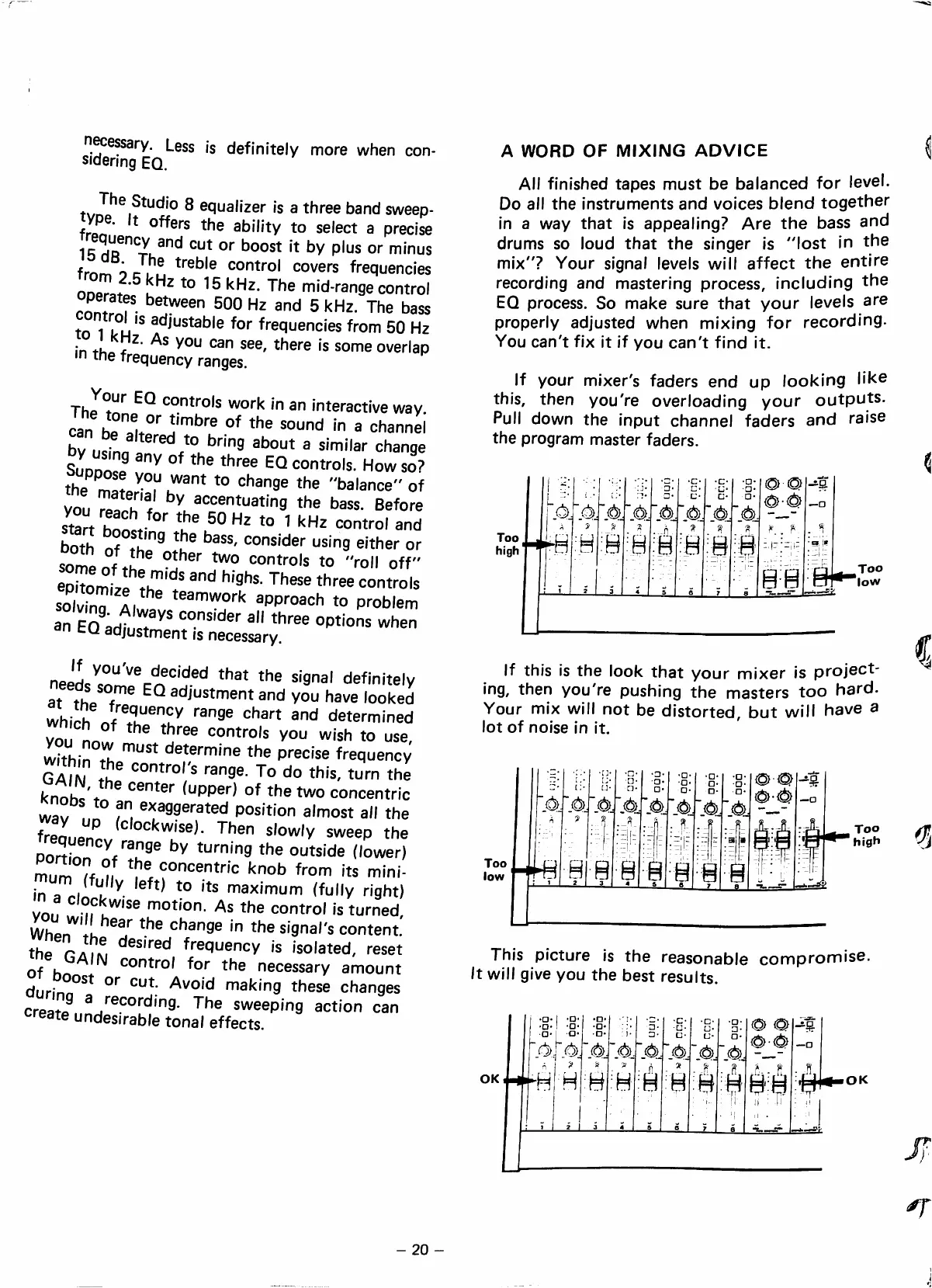
If
your
mixer's
faders
end
up
looking
Ük©
this,
then
you're
overloading
your
outputs.
Pul!
down
the
Input
channel
faders
and
ralse
the
program
master
faders.
Too
high
■s
'.ú
9
'A
á
"A
.-ó
a
'4
■.4
■_4
8
Ú-Ú
88
88-
Too
low
If
this
Is
the
look
that
your
mixer
is
project-
Ing,
then
you're
pushing
the
masters
too
hard.
Your
mIx
wlll
not
be
distorted,
but
wlll
have
a
lot
of
nolse
In
It.
íú>.~é>
'4
j4
j4
.4
'.4
'.4:
4-4
This
picture
Is
the
reasonable
compromise.
It
wlll
glve
you
the
best
results.
OK
'.4j'4
ó
I
^
8
H
A/Aíó
8
8
é
2
I
3
4
4
".4
8
8
A.
é
éá
I
I
■
-i
i
él-
OK
-20-

Table of Contents