EasyManua.ls Logo

Tascam 388 Studio 8 - Recorder;Reproducer Section Adjustment; Recording Blas Adjustment; Reproduce Frequency Response; Reproduce Level

Tascam 388 Studio 8
139 pages
Print Icon
To Next Page IconTo Next Page
To Previous Page IconTo Previous Page
Loading...
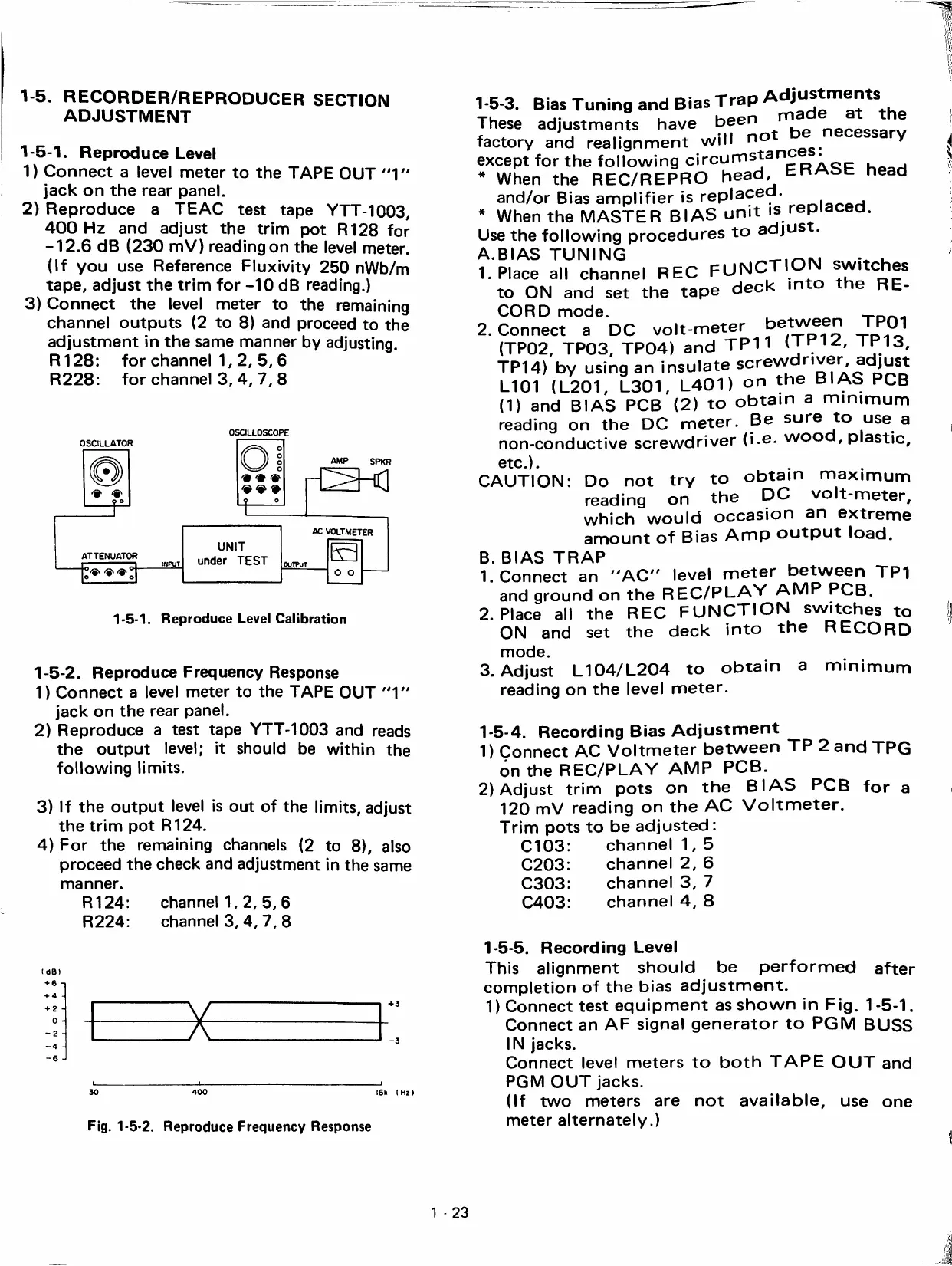
1-5.
RECORDER/REPRODUCER
SECTION
ADJUSTMENT
1-6-1.
Reproduce
Level
1)
Connect
a
level
meter
to
the
TAPE
OUT
"1"
jack
on
the
rear
panel.
2)
Reproduce
a
TEAC
test
tape
YTT-1003,
400
Hz
and
adjust
the
trim
pot
R128
for
-12.6
dB
(230
mV)
readingon
the
level
meter.
(If
you
use
Reference
Fluxivity
250
nWb/m
tape,
adjust
the
trim
for
-10
dB
reading.)
3)
Connect
the
level
meter
to
the
remaining
channel
outputs
(2
to
8)
and
proceed
to
the
adjustment
in
the
same
manner
by
adjusting.
R128:
for
channel
1,
2,
5,
6
R228:
for
channel
3,
4,1,
8
OSCILLOSCOPE
OSCILLATOR
9
o
AMP
SPKR
ATTENUATOR
r
n
iNPuT
UNIT
under
TEST
AC
VOLTMETER
OUTPUT
IvH
o
o
1-5-1.
Reproduce
Level
Caiibration
1-5-2.
Reproduce
Frequency
Response
1)
Connect
a
level
meter
to
the
TAPE
OUT
"1"
jack
on
the
rear
panel.
2)
Reproduce
a
test
tape
YTT-1003
and
reads
the
output
level;
it
should
be
within
the
following
limits.
3)
If
the
output
level
is
out
of
the
limits,
adjust
the
trim
pot
R124.
4)
For
the
remaining
channeis
(2
to
8),
aiso
proceed
the
check
and
adjustment
in
the
same
manner.
R124:
channeM,
2,
5,
6
R224:
channel
3,4,
7,
8
(
OBI
+
6
+
4
+
2
H
o
-2
-
Fig.
1-5-2.
Reproduce
Frequency
Response
1-6-3.
Bias
Tuning
and
Bias
Trap
These
adjustments
have
necessarv
factory
and
realignment
will
^
except
for
the
following
circurnstanc
.
. .
When
the
REC/REPRO
head
ERASE
head
and/or
Bias
amplifier
is
replaced.
,
.
*
When
the
MASTER
BIAS
unit
is
repiacea.
Use
the
following
procedures
to
adjus
A.BIAS
TUNING
u
1.
Place
all
channel
REC
FUNCTION
switches
to
ON
and
set
the
tape
deck
mto
the
RE-
CORD
mode.
-i-oi-.-
2.
Connect
a
DO
volt-meter
between
TPOI
(TP02,
TP03,
TP04)
and
TP11
'^.13.
TP14)
by
using
an
insólate
n®""'
L101
(L201,
L301,
L401)
on
the
BIAS
PCB
(1)
and
BIAS
PCB
(2)
to
obtain
a
mínimum
reading
on
the
DC
meter.
Be
sure
to
use
a
non-conductive
screwdriver
(i.e.
wood,
plástic,
etc.).
CAUTION:
Do
not
try
to
obtain
máximum
reading
on
the
DC
volt-meter,
which
would
occasion
an
extreme
amount
of
Bias
Amp
output
load.
B
BIAS
TRAP
1.
Connect
an
"AC"
level
meter
between
TP1
and
ground
on
the
REC/PLAY
AMP
PCB.
2.
Place
all
the
REC
FUNCTION
switches
to
ON
and
set
the
deck
into
the
RECORD
mode.
3.
Adjust
L104/L204
to
obtain
a
minimum
reading
on
the
level
meter.
1-5-4.
Record
ing
Bias
Adjustment
1)
Connect
AC
Voltmeter
between
TP
2
and
TPG
ón
the
REC/PLAY
AMP
PCB.
2)
Adjust
trim
pots
on
the
BIAS
PCB
for
a
120
mV
reading
on
the
AC
Voltmeter.
Trim
pots
to
be
adjusted:
C103
C203
C303
C403
channel
1,
5
channel
2,
6
channel
3,
7
channel
4,
8
after
1-5-5.
Record
ing
Level
This
alignment
should
be
performed
completion
of
the
bias
adjustment.
1)
Connect
test
equipment
as
shown
in
Fig.
1
-5-1.
Connect
an
AF
signal
generator
to
PGM
BUSS
IN
jacks.
Connect
level
meters
to
both
TAPE
OUT
and
PGM
OUT
jacks.
(If
two
meters
are
not
available,
use
one
meter
alternately.)
1
-
23

Table of Contents