EasyManua.ls Logo

Tascam 388 Studio 8 - Apparent and Absolute Valúes; How to Use Your Equalizer

Tascam 388 Studio 8
139 pages
Print Icon
To Next Page IconTo Next Page
To Previous Page IconTo Previous Page
Loading...
APPARENT
AND
ABSOLUTE
VALUES
HOW
TO
USE
YOUR
EQUALIZER
Your
ear
and
your
Studio
8
perceive
the
same
program
material
¡n
very
different
ways.
The
ear
deals
¡n
apparent,
subjective
valúes,
while
your
mixer
and
recorder
¡n
the
Studio
8
deal
in
absoluta,
objective
valúes.
This
difference
leads
to
the
fundamental
rule:
On
the
way
in,
to
your
recorder
by
way
of
the
mixer,
trust
the
machine's
meters
and
OL
indicators;
On
the
way
out,
to
the
ear
by
way
of
loudspeakers/
headphones,
trust
what
you
hear.
Remember
too,
until
your
ears
reach
the
level
of
perception
achieved
by
experienced
audio
engineers,
trust
your
meters
and
LEDs
whenever
in
doubt.
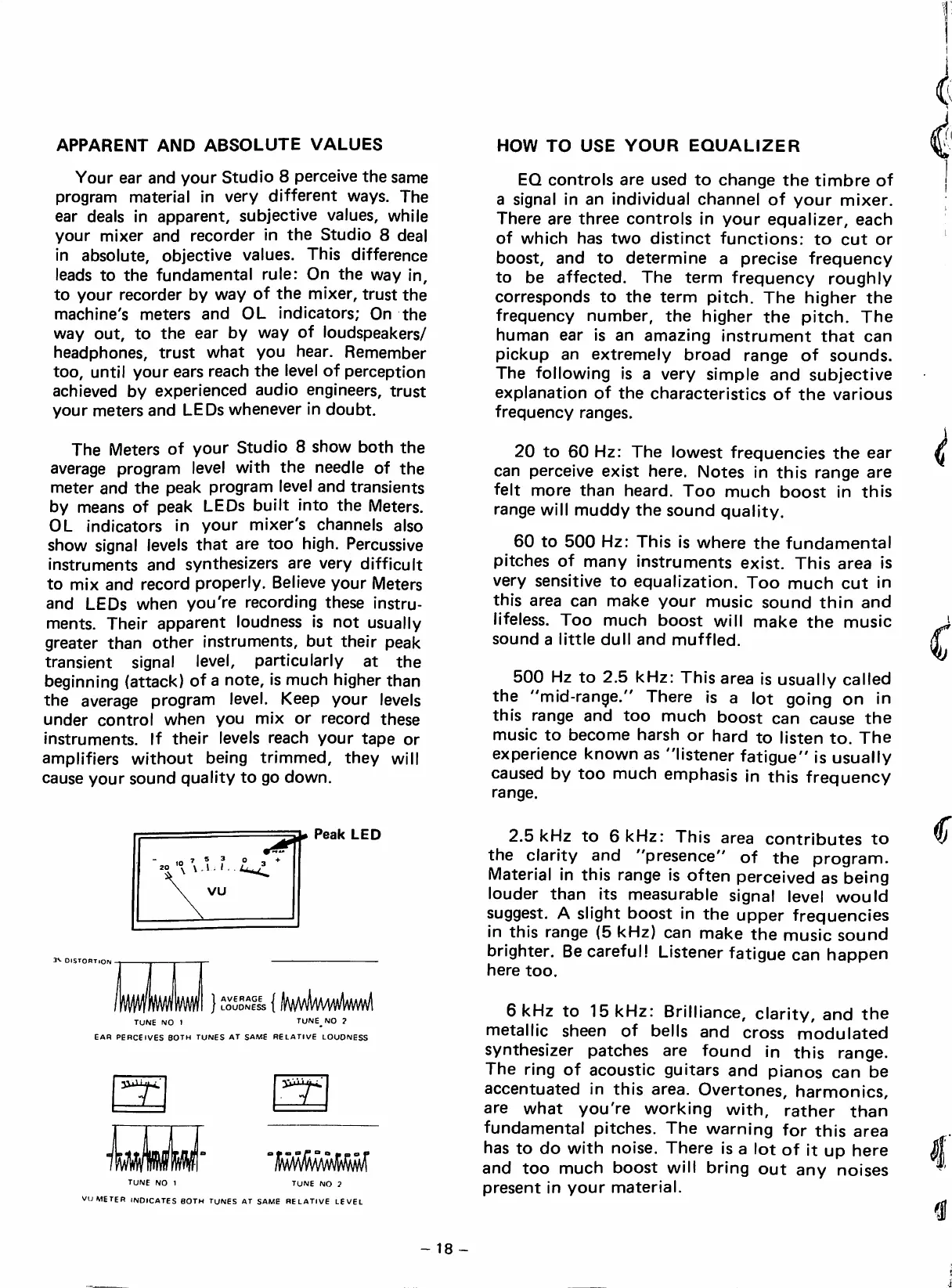
The
Meters
of
your
Studio
8
show
both
the
average
program
level
with
the
needle
of
the
meter
and
the
peak
program
level
and
transients
by
means
of
peak
LEDs
built
into
the
Meters.
OL
indicators
in
your
mixer's
channeis
aiso
show
signal
leveis
that
are
too
high.
Percussive
instruments
and
synthesizers
are
very
difficult
to
mix
and
record
properiy.
Relieve
your
Meters
and
LEDs
when
you're
recording
these
instru
ments.
Their
apparent
loudness
is
not
usually
greater
than
other
instruments,
but
their
peak
transient
signal
level,
particularly
at
the
beginning
(attack)
of
a
note,
is
much
higher
than
the
average
program
level.
Keep
your
leveis
under
control
when
you
mix
or
record
these
instruments.
If
their
leveis
reach
your
tape
or
amplifiers
without
being
trimmed,
they
will
cause
your
sound
quality
to
go
down.
EQ
controls
are
used
to
changa
the
timbre
of
a
signal
in
an
individual
channel
of
your
mixer.
There
are
three
controls
in
your
equalizer,
each
of
which
has
two
distinct
functions:
to
cut
or
boost,
and
to
determine
a
precise
frequency
to
be
affected.
The
term
frequency
roughiy
corresponds
to
the
term
pitch.
The
higher
the
frequency
number,
the
higher
the
pitch.
The
human
ear
is
an
amazing
instrument
that
can
pickup
an
extremely
broad
ranga
of
sounds.
The
following
is
a
very
simple
and
subjective
explanation
of
the
characteristics
of
the
various
frequency
rangas.
20
to
60
Hz:
The
lowest
frequencies
the
ear
can
perceive
exist
here.
Notes
in
this
ranga
are
feit
more
than
heard.
Too
much
boost
in
this
ranga
will
muddy
the
sound
quality.
60
to
500
Hz:
This
is
where
the
fundamental
pitches
of
many
instruments
exist.
This
area
is
very
sensitiva
to
equalization.
Too
much
cut
in
this
area
can
make
your
music
sound
thin
and
lifeless.
Too
much
boost
will
make
the
music
sound
a
littie
dull
and
muffied.
500
Hz
to
2.5
kHz:
This
area
is
usually
callad
the
"mid-range."
There
is
a
lot
going
on
in
this
ranga
and
too
much
boost
can
cause
the
music
to
become
harsh
or
hard
to
listen
to.
The
experience
known
as
"listener
fatigue"
is
usually
causad
by
too
much
emphasis
in
this
frequency
ranga.
Peak
LED
IV
DISTORTION
AVERAGE
LOUDNESS
{y4/mkml\
TUNE
NO
1
TUNE^NO
2
EAR
PERCElVES
BOTH
TUNES
AT
SAME
RELATIVE
LOUDNESS
wmm
TUNE
NO
1
TUNE
NO
2
VU
METER
INDICATES
BOTH
TUNES
AT
SAME
RELATIVE
LEVEL
2.5
kHz
to
6
kHz:
This
area
contributes
to
the
clarity
and
"presence"
of
the
program.
Material
in
this
ranga
is
often
perceived
as
being
louder
than
its
measurable
signal
level
would
suggest.
A
slight
boost
in
the
upper
frequencies
in
this
ranga
(5
kHz)
can
make
the
music
sound
brighter.
Be
carefull
Listener
fatigue
can
happen
here
too.
6
kHz
to
15
kHz:
Brilliance,
clarity,
and
the
metallic
sheen
of
bells
and
cross
modulated
synthesizer
patches
are
found
in
this
range.
The
ring
of
acoustic
guitars
and
pianos
can
be
accentuated
in
this
area.
Overtones,
harmonics,
are
what
you're
working
with,
rather
than
fundamental
pitches.
The
warning
for
this
area
has
to
do
with
noise.
There
is
a
lot
of
it
up
here
and
too
much
boost
will
bring
out
any
noises
present
in
your
material.
-
18
-

Table of Contents