EasyManua.ls Logo

Tascam 388 Studio 8 - Line In-Pgm out

Tascam 388 Studio 8
139 pages
Print Icon
To Next Page IconTo Next Page
To Previous Page IconTo Previous Page
Loading...
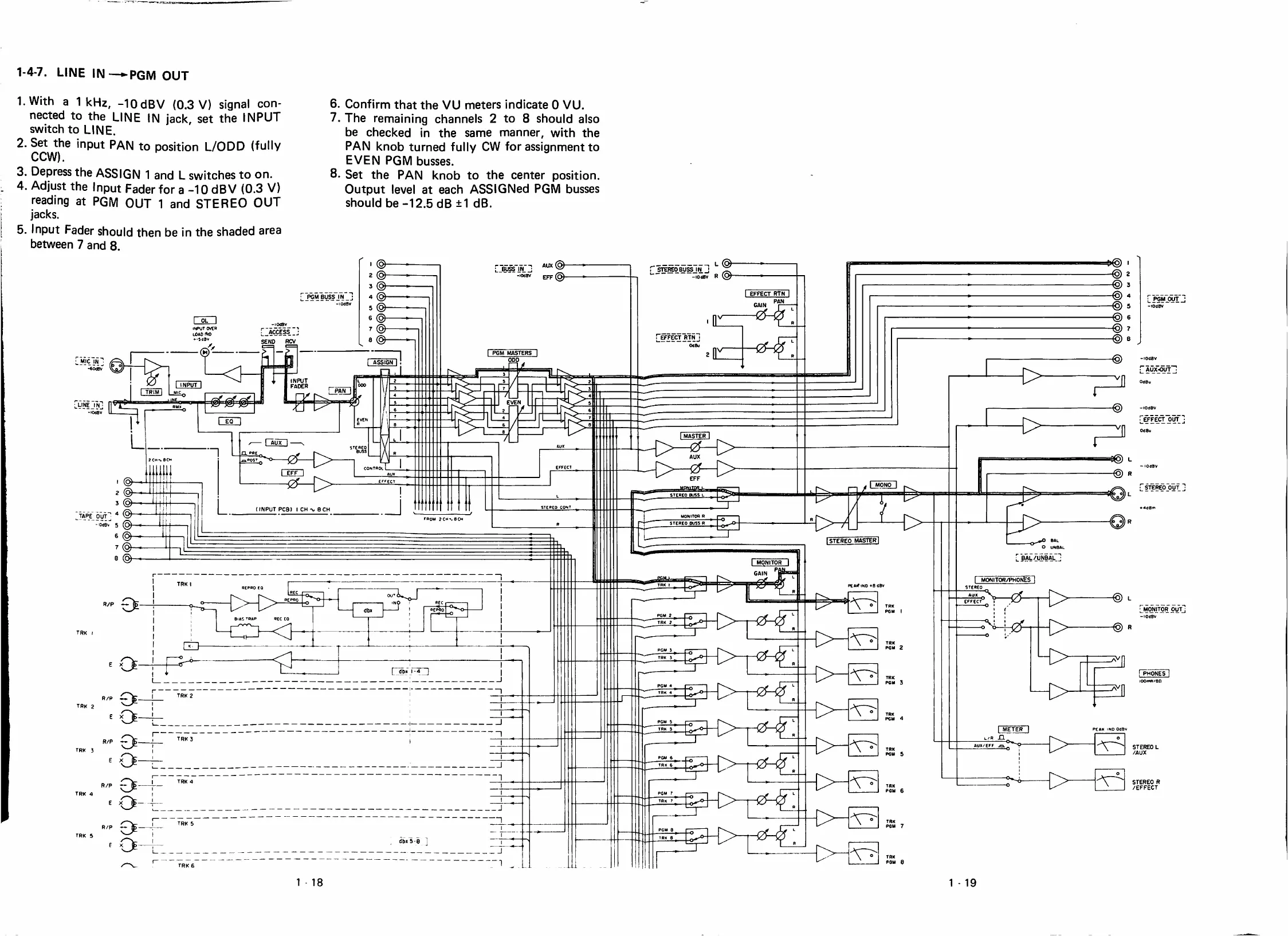
1-4-7.
LINE
IN—•►PGM
OUT
1.With
a
1kHz,
-lOdBV
(0.3
V)
signal
con-
nected
to
the
LINE
IN
jack,
set
the
INPUT
switch
to
LINE.
2.
Set
the
¡nput
PAN
to
position
L/ODD
(fully
CCW).
3.
Depress
the
ASSIGN
1
and
L
switches
to
on.
4.
Adjust
the
Input
Fader
for
a
-10
dBV
(0.3
V)
reading
at
PGM
OUT
1
and
STEREO
OUT
jacks.
5.
Input
Fader
should
then
be
in
the
shaded
area
between
7
and
8.
6.
Confirm
that
the
VU
meters
indícate
O
VU.
7.
The
remaining
channeis
2
to
8
should
aiso
be
checked
in
the
same
manner,
with
the
PAN
knob
turned
fully
CW
for
assignment
to
EVEN
PGM
busses.
8.
Set
the
PAN
knob
to
the
center
position.
Output
level
at
each
ASSIGNed
PGM
busses
should
be
-12.5
dB
±1
dB.
L
PGM-Pyl.
-lOíBV
L
@
jraEOBU^JN
J
-10^
R
EFFECT
RTN
PGM
BUSS
IN
odsv
I
OL
I
-lOd^
wSíss
SENO
HCV
EFFECT
RTN
MBu
I
PGM
MASTERS
@
-lOíav
-
ÁUX-OUT
MIC
¿N
éóisv
ASSIGN
INPUT
FADER
INPUT
TRlffl
LINEJNj
lOdSV
EFFECT
OUT
I
MASTER
I
STEREO
OUT
f
rNPUT
PCB)
I
CH
eCH
TAPE
OUT
0(jBv
5
ISTEREO
MASTER
L
0AL/UNBAL_j
MONITOR/PHONES
PEAriND
*6
<BV
MONjTOR
OUT
-lOtfBv
PGM
I
TRK
I
TRK
PGM
2
[PHQNES
OOnM/Gfl
TRK
PGM
3
TRK
2
TRK
2
TRK
PGM
4
€>
TRK
3
STEREO
L
TRK
PGM
5
TRK
3
I
TRK
4
STEREO
R
TRK
PGM
6
/EFFECT
TRK
4
TRK
PGM
7
TRK
5
dbxS-a
TRK
6
1
18
1
-
19

Table of Contents

Related product manuals