EasyManua.ls Logo

Tascam 388 Studio 8 - Electronic Music Studio

Tascam 388 Studio 8
139 pages
Print Icon
To Next Page IconTo Next Page
To Previous Page IconTo Previous Page
Loading...
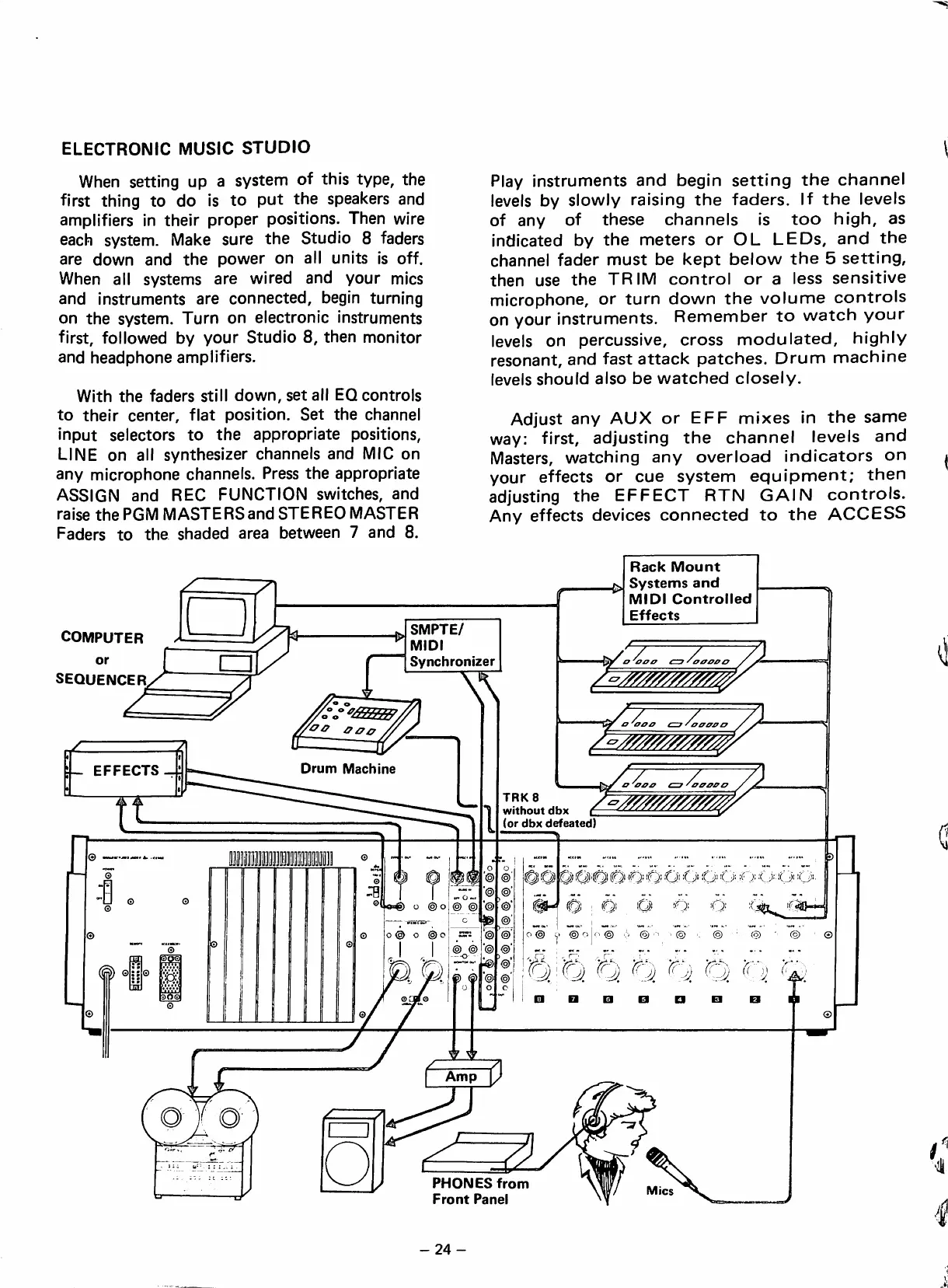
ELECTRONIC
MUSIC
STUDIO
When
setting
up
a
system
of
this
type,
the
first
thing
to
do
¡s
to
put
the
speakers
and
amplifiers
¡n
their
proper
positíons.
Then
wire
each system.
Make
sure
the
Studio
8
faders
are
down
and
the
power
en
all
units
¡s
off.
When
all
systems
are
wired
and
your
mies
and
instruments
are
connected,
begin
turning
on
the
system.
Turn
on
electronic
Instruments
first,
followed
by
your
Studio
8,
then
monitor
and
headphone
amplifiers.
With
the
faders
still
down,
set
all
EQcontrols
to
their
center,
fíat
position.
Set
the
channel
input
selectors
to
the
appropriate
positions,
LINE
on
all
synthesizer
channeis
and
MIC
on
any
microphone
channels.
Press
the
appropriate
ASSIGN
and
REC
FUNCTION
switches,
and
raise
the
PGM
MASTERSand
STEREO
MASTER
Faders
to
the
shaded
area
between
7
and
8.
Play
instruments
and
begin
setting
the
channel
leveis
by
slowly
raising
the
faders.
If
the
leveis
of
any
of
these
channels
is
too
high,
as
indicated
by
the
meters
or
OL
LEDs,
and
the
channel
fader
must
be
kept
below
the
5
setting,
then
use
the
TRIM
control
or
a
less
sensitiva
microphone,
or
turn
down
the
volume
controls
on
your
instruments.
Remember
to
watch
your
leveis
on
percussive,
cross
modulated,
highiy
resonant,
and
fast
attack
patches.
Drunn
machine
leveis
should
aiso
be
watched
closely.
Adjust
any
AUX
or
EFF
mixes
in
the
same
way:
first,
adjusting
the
channel
leveis
and
Masters,
watching
any
overload
indicators
on
your
effects
or
cue
system
equipment;
then
adjusting
the
EFFECT
RTN
GAIN
controls.
Any
effects
devices
connected
to
the
ACCESS
Rack
Mount
Systems
and
COMPUTER
or
SEQUENCER
SMPTE/
MIDI
Synchronizer
z
Drum
Machine
z
TRK8
without
dbx
(or
dbx
defeated)
l
o
O'fO
G'fj'
Ó Ó
OO
O'.'O
O-Xj
O'
I
i'Qi
O)
'Q'
'O'
@
®
O
I
'
'
©
PHONESfrom
Front
Panel
-24-

Table of Contents