EasyManua.ls Logo

Tascam 388 Studio 8 - Page 5

Tascam 388 Studio 8
139 pages
Print Icon
To Next Page IconTo Next Page
To Previous Page IconTo Previous Page
Loading...
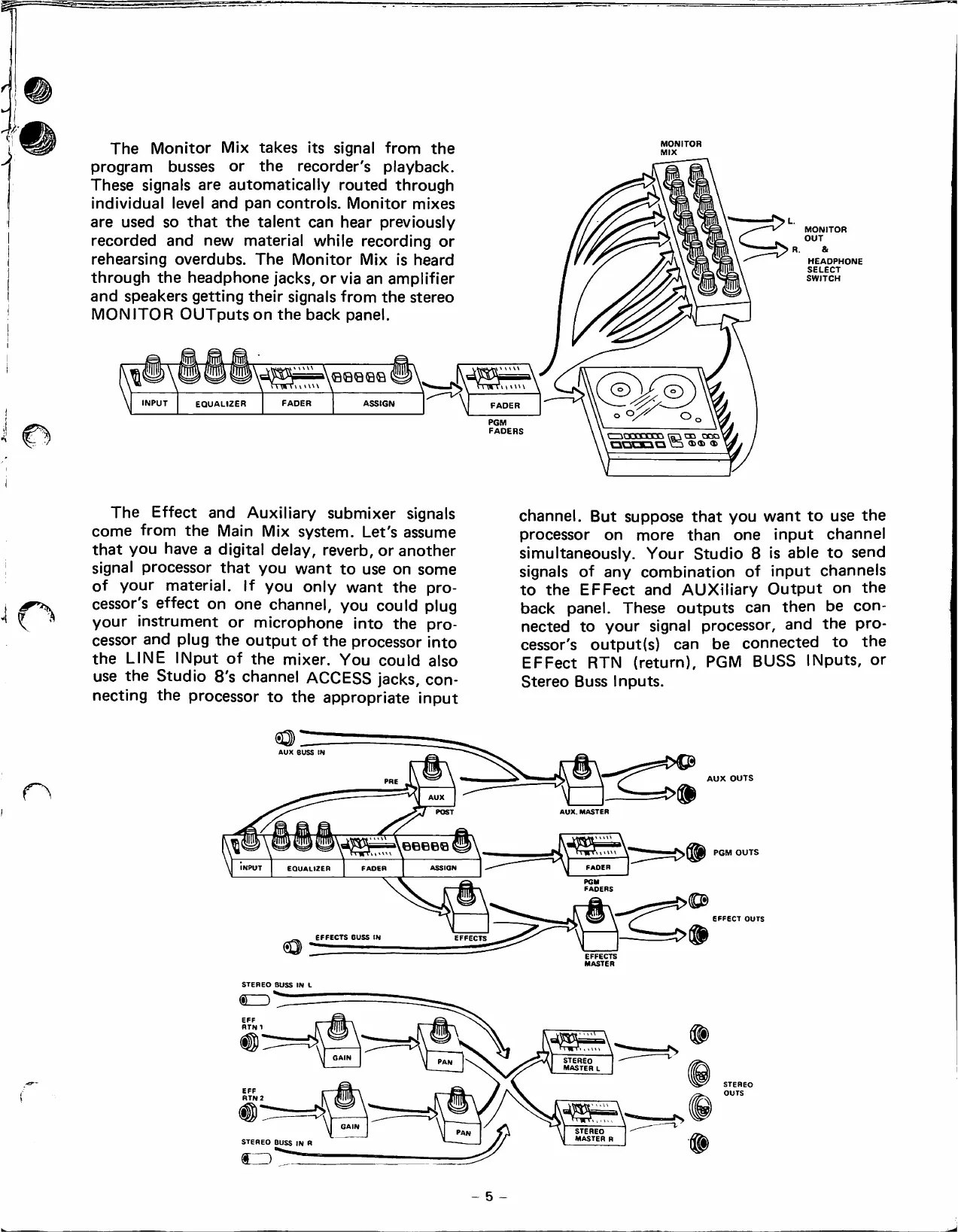
The
Monitor
Mix
takes
its
signa!
from
the
program
busses
or
the
recorder's
playback.
These
signáis
are
automatically
routed
through
individual
leve!
and
pan
controis.
Monitor
mixes
are
used
so
that
the
talent
can
hear
previously
recordad
and
new
materia!
whüe
recording
or
rehearsing
overdubs.
The
Monitor
Mix
is
heard
through
the
headphone
jacks,
or
via
an
ampüfier
and
speakers
getting
their
signáis
from
the
stereo
MONITOR
OUTputson
the
back
pane!.
INPUT
EQUALIZER
FADER
ASSIGN
MONITOR
PGM
FADERS
MONITOR
OUT
R.
&
HEADPHONE
SELECT
SWITCH
The
Effect
and
Auxiüary
submixer
signáis
come
from
the
Main
Mix
system.
Let's
assume
that
you
have
a
digital
deiay,
reverb,
or
another
signa!
processor
that
you
want
to
use
on
some
of
your
materia!.
!f
you
oniy
want
the
pro-
cessor's
effect
on
one
channe!,
you
couid
piug
your
instrument
or
microphone
into
the
pro
cessor
and
piug
the
output
of
the
processor
into
the
LINE
INput
of
the
mixer.
You
couid
aiso
use
the
Studio
8's
channe!
ACCESS
jacks,
con-
necting
the
processor
to
the
appropriate
input
channe!.
But
suppose
that
you
want
to
use
the
processor
on
more
than
one
input
channe!
simuitaneousiy.
Your
Studio
8
is
abie
to
send
signáis
of
any
combination
of
input
channeis
to
the
EFFect
and
AUXiiiary
Output
on
the
back
pane!.
These
outputs
can
then
be
con-
nected
to
your
signa!
processor,
and
the
pro-
cessor's
output(s)
can
be
connected
to
the
EFFect
RTN
(return),
PGM
BUSS
INputs,
or
Stereo
Buss
inputs.
o
AUX.
MASTER
INPUT
EQUALIZER
EFFECTS BUSS
tN
MASTER
STEREO
BUSS
IN
L
®ZD
RTN
1
GAIN
STEREO
MASTER
L
STEREO
MASTER
R
EFFECT
OUTS
STEREO
OUTS
STEREO
BUSS
IN
R
5
-

Table of Contents

Related product manuals