EasyManua.ls Logo

Technics SC-S2350 - Page 47

Technics SC-S2350
60 pages
Print Icon
To Next Page IconTo Next Page
To Previous Page IconTo Previous Page
Loading...
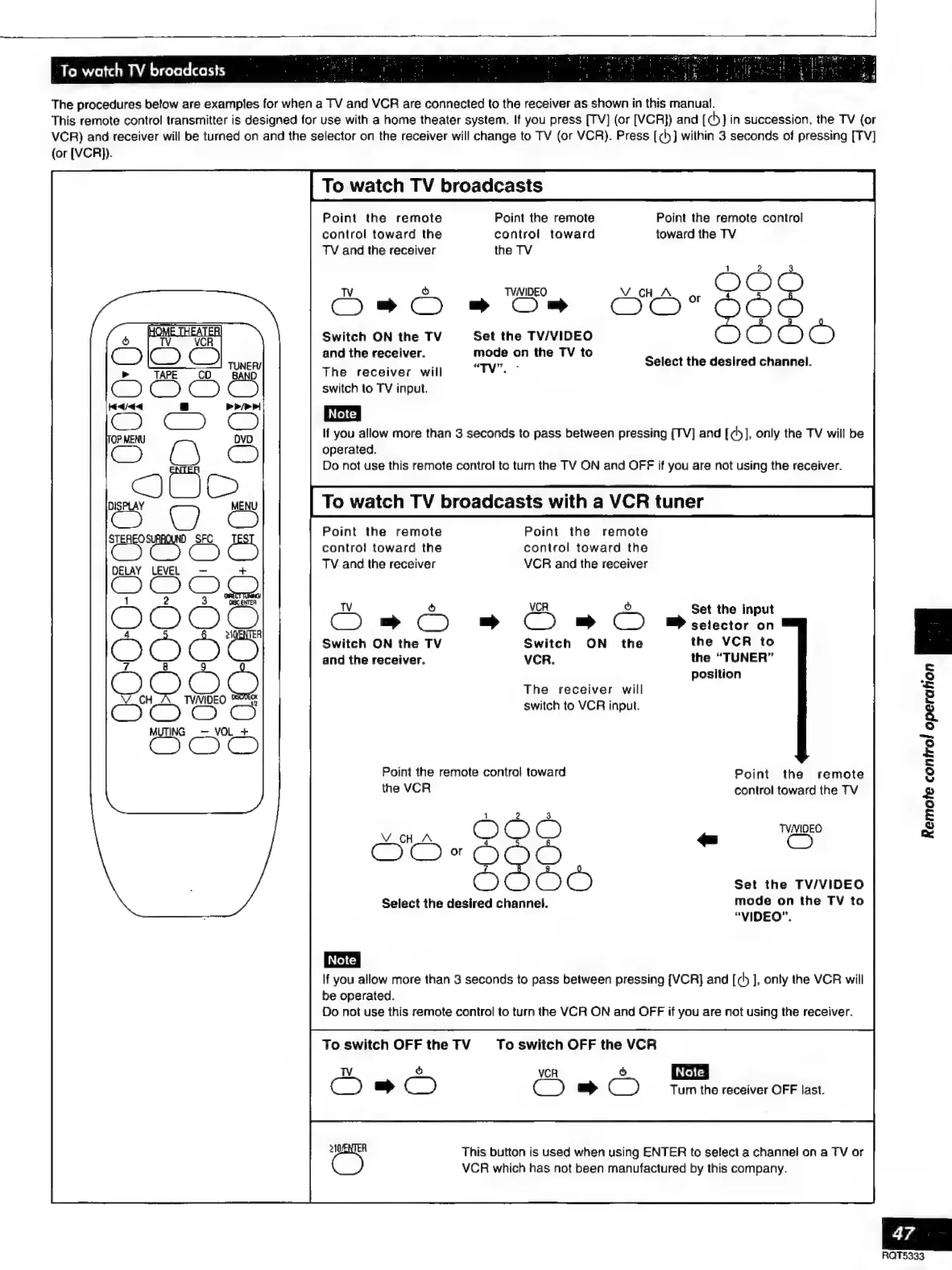
To
watch
TV
broadcasts
The
procedures
below
are
examples
for
when
a
TV
and
VCR
are
connected
to
the
receiver
as
shown
in
this
manual.
This
remote
control
transmitter
is
designed
for
use
with
a
home
theater
system.
If
you
press
[TV]
(or
[VCR])
and
[dy]
in
succession,
the
TV
(or
VCR)
and
receiver
will
be
turned
on
and
the
selector
on
the
receiver
will
change
to
TV
(or
VCR).
Press
[cy]
within
3
seconds
of
pressing
[TV]
(or
[VCR)).
To
watch
TV
broadcasts
Point
the
remote
control
toward
the
TV
and
the
receiver
TV
ò
©
Switch
ON
the
TV
and
the
receiver.
The
receiver
will
Point
the
remote
control
toward
the
TV
TVNIDEO
Set
the
TV/VIDEO
mode
on
the
TV
to
“TY”.
«
Point
the
remote
control
toward
the
TV
Select
the
desired
channel.
switch
to
TV
input.
If
you
allow
more
than
3
seconds
to
pass
between
pressing
[TV]
and
[cy],
only
the
TV
will
be
operated.
Do
not
use
this
remote
control
to
turn
the
TV
ON
and
OFF
if
you
are
not
using
the
receiver.
To
watch
TV
broadcasts
with
a
VCR
tuner
Point
the
remote
control
toward
the
VCR
and
the
receiver
STEREO
D
SFC
Point
the
remote
(E
CO)
Cc
contro!
toward
the
TV
and
the
receiver
DELAY
LEVEL
+
3
OOOO
OO
©
TV
ó
VCR
Ò
CO»
©
OBBO
Switch
ON
the
TV
Switch
ON
the
and
the
receiver.
VCR.
Set
the
input
selector
on
the
VCR
to
the
“TUNER”
position
The
receiver
will
switch
to
VCR
input.
O
S086
JQ
Point
the
remote
control
toward
Point
the
remote
control
toward
the
TV
Remote
control
operation
¡NN
TVNIDEO
Set
the
TV/VIDEO
mode
on
the
TV
to
“VIDEO”.
Select
the
desired
channel.
If
you
allow
more
than
3
seconds
to
pass
between
pressing
[VCR]
and
[ch
],
onty
the
VCR
will
be
operated.
Do
not
use
this
remote
control
to
turn
the
VCR
ON
and
OFF
if
you
are
not
using
the
receiver.
To
switch
OFF
the
TV
Ds
To
switch
OFF
the
VCR
|
Note
|
Turn
the
receiver
OFF
last.
YCR
AO
This
button
is
used
when
using
ENTER
to
select
a
channel
on
a
TV
or
VCR
which
has
not
been
manufactured
by
this
company.
47
RQT5333

Related product manuals